 LibreChat
MCP 服务器对象结构
示例
# Example MCP Servers Object Structure
mcpServers:
  everything:
    # type: sse # type can optionally be omitted
    url: http://localhost:3001/sse
  googlesheets:
    type: sse
    url: https://mcp.composio.dev/googlesheets/some-endpoint
    requiresOAuth: true
    headers:
      X-User-ID: '{{LIBRECHAT_USER_ID}}'
      X-API-Key: '${SOME_API_KEY}'
    serverInstructions: true # Use server-provided instructions
  puppeteer:
    type: stdio
    command: npx
    args:
      - -y
      - '@modelcontextprotocol/server-puppeteer'
    serverInstructions: 'Do not access any local files or local/internal IP addresses'
  filesystem:
    # type: stdio
    command: npx
    args:
      - -y
      - '@modelcontextprotocol/server-filesystem'
      - /home/user/LibreChat/
    iconPath: /home/user/LibreChat/client/public/assets/logo.svg
    # The “wrench” icon shows up if no icon is provided as it is the default rendering.
  mcp-obsidian:
    command: npx
    args:
      - -y
      - 'mcp-obsidian'
      - /path/to/obsidian/vault
  streamable-http-server:
    type: streamable-http
    url: https://example.com/api/
    proxy: '${MCP_PROXY_URL}'
  per-user-credentials-example:
    type: streamable-http
    url: 'https://example.com/api/'
    headers:
      X-Auth-Token: '{{MY_SERVICE_API_KEY}}'
    customUserVars:
      MY_SERVICE_API_KEY:
        title: 'My Service API Key'
        description: "Enter your personal API key for the service. You can generate one at <a href='https://myservice.example.com/developer/keys' target='_blank'>Service Developer Portal</a>."
        sensitive: true
      MY_SERVICE_PROJECT:
        title: 'Project ID'
        description: 'Enter the project ID used by this service.'
        sensitive: false
  oauth-example:
    type: streamable-http
    url: https://api.example.com/mcp/
    oauth:
      authorization_url: https://example.com/oauth/authorize
      token_url: https://example.com/oauth/token
      client_id: your_client_id
      client_secret: your_client_secret
      redirect_uri: http://localhost:3080/api/mcp/oauth-example/oauth/callback
      scope: 'read execute'
  obo-example:
    type: streamable-http
    url: https://api.example.com/mcp/
    obo:
      scopes: 'api://mcp-server-id/Mcp.Tools.ReadWrite'
<serverName>
密钥:
| Key | Type | Description | Example |
|---|---|---|---|
| <serverName> | Object | `mcpServers` 下的每个键都代表一个独立的 MCP 服务器配置,并由一个唯一的名称标识。该名称用于在应用程序中引用此服务器配置。 |
子键
| Key | Type | Description | Example |
|---|---|---|---|
| title | String | (可选)UI 中 MCP 服务器的自定义显示名称。如果未指定,则使用服务器键名。 | title: "My Custom Server" |
| description | String | (可选)MCP 服务器的描述,显示在 UI 中以帮助用户了解其用途。 | description: "Provides file system access" |
| type | String | 指定连接到 MCP 服务器的类型。有效选项为 `"stdio"`、`"websocket"`、`"streamable-http"` 或 `"sse"`。如果省略,将根据 `url` 或 `command` 的存在与否及格式进行默认设置。 | type: "stdio" |
| command | String | (针对 `stdio` 类型)用于启动 MCP server 的命令或可执行文件。 | command: "npx" |
| args | Array of Strings | (针对 `stdio` 类型)传递给 `command` 的命令行参数。 | args: ["-y", "@modelcontextprotocol/server-puppeteer"] |
| url | String | (针对 `websocket`、`streamable-http` 或 `sse` 类型)连接到 MCP server 的 URL。 | url: "http://localhost:3001/sse" |
| proxy | String | (可选,适用于 `sse` 和 `streamable-http` 类型)此远程 MCP 服务器的出站代理 URL。支持 `http://`、`https://`、`socks://` 和 `socks5://` URL。 | proxy: "${MCP_PROXY_URL}" |
| headers | Object | (可选,适用于 `sse` 和 `streamable-http` 类型)随请求发送的自定义标头。支持使用 `{{LIBRECHAT_USER_*}}` 占位符进行动态用户字段替换,以及使用 `${ENV_VAR}` 引用环境变量。 | headers: X-User-ID: "{{LIBRECHAT_USER_ID}}" X-API-Key: "${SOME_API_KEY}" |
| apiKey | Object | (可选,适用于 `sse` 和 `streamable-http` 类型)用于 MCP 服务器的 API 密钥身份验证配置。 | See apiKey section below |
| iconPath | String | (可选)定义工具选择对话框中显示的工具图标。 | iconPath: "/path/to/icon.svg" |
| chatMenu | Boolean | (可选)当设置为 `false` 时,将从聊天区域下拉菜单 (MCPSelect) 中排除 MCP 服务器,以便快速轻松地访问。默认为 `true`。 | chatMenu: false |
| serverInstructions | Boolean or String | (可选)控制如何将 MCP 服务器指令注入到智能体上下文中。服务器指令为整个 MCP 服务器提供高级使用指南,以补充各个工具的描述。 | serverInstructions: true # or serverInstructions: "Custom instructions" |
| timeout | Integer | (可选)MCP 服务器请求的超时时间(以毫秒为单位)。必须是非负整数。 | timeout: 30000 |
| initTimeout | Integer | (可选)MCP 服务器初始化的超时时间(以毫秒为单位)。必须为非负整数。 | initTimeout: 10000 |
| env | Object | (可选,仅限 `stdio` 类型)启动进程时使用的环境变量。 | env: NODE_ENV: "production" |
| requiresOAuth | Boolean | (可选,远程传输方式:`sse`、`streamable-http`、`websocket`)此服务器是否需要 OAuth 身份验证。如果未指定,将在服务器启动期间自动检测。尽管是可选的,但如果您明确知道服务器是否需要 OAuth,最好显式设置此值。设置 `requiresOAuth: false` 对于受静态 `Authorization` 标头保护的服务器非常有用,可以跳过可能将其错误分类为 OAuth 保护的自动检测过程。 | requiresOAuth: false |
| stderr | String or Integer | (可选,仅限 `stdio` 类型)如何处理子进程的 `stderr`。选项包括:`"pipe"`、`"ignore"`、`"inherit"` 或非负整数(文件描述符)。默认为 `"inherit"`。 | stderr: "inherit" |
| customUserVars | Object | (可选)定义用户可为此 MCP 服务器设置的自定义变量,从而允许针对每个用户进行凭据或配置(例如 API 密钥)。这些变量随后可在 `headers` 或 `env` 字段中引用。 | customUserVars: API_KEY: title: "API Key" description: "Your personal API key." |
| oauth | Object | (可选)用于通过 MCP 服务器进行身份验证的 OAuth2 配置。配置后,系统将提示用户通过 OAuth 流程进行身份验证。 | oauth: authorization_url: "https://example.com/oauth/authorize" token_url: "https://example.com/oauth/token" |
| oauth_headers | Object | (可选)仅用于 OAuth 流程请求(例如动态客户端注册或令牌交换)的标头名称和值映射。 | oauth_headers: Authorization: "Bearer ${DCR_API_KEY}" X-Custom-Header: "custom_value" |
| obo | Object | (可选,适用于 `sse` 和 `streamable-http` 类型)On-Behalf-Of 令牌交换配置。将当前用户的 OpenID 访问令牌交换为委托的下游令牌,并将其作为 Bearer 令牌转发。 | obo: scopes: "api://mcp-server-id/Mcp.Tools.ReadWrite" |
| startup | Boolean | (可选)当设置为 false 时,此 MCP 服务器将不会在应用程序启动时连接。 | startup: false |
title
- 类型: 字符串(可选)
- 描述: MCP 服务器在 UI 中的自定义显示名称。如果未指定,则使用服务器键名。
- 示例:
my-server:
  title: 'File System Access'
  command: npx
  args: ['-y', '@modelcontextprotocol/server-filesystem']
description
- 类型: 字符串(可选)
- Description: MCP 服务器的描述,显示在 UI 中以帮助用户了解其用途和功能。
- 示例:
my-server:
  title: 'File System Access'
  description: 'Provides read/write access to local files and directories'
  command: npx
  args: ['-y', '@modelcontextprotocol/server-filesystem']
type
- 类型: String
- 描述: 指定连接到 MCP 服务器的类型。有效选项为
"stdio"、"websocket"、"streamable-http"或"sse"。 - 默认值: 根据
url或command的存在与否及其格式确定。
command
- 类型: String
- Description: (对于
stdio类型) 用于启动 MCP 服务器的命令或可执行文件。
args
- 类型: 字符串数组
- 描述:(针对
stdio类型)传递给command的命令行参数。
url
- 类型: String
- 描述:(适用于
websocket、streamable-http或sse类型)连接到 MCP 服务器的 URL。支持动态用户字段占位符 ({{LIBRECHAT_USER_*}}) 和环境变量替换 (${ENV_VAR})。 - 注意:
- 对于
sse类型,URL 必须以http://或https://开头。 - 对于
streamable-http类型,URL 必须以http://或https://开头。 - 对于
websocket类型,URL 必须以ws://或wss://开头。
- 对于
proxy
- 类型: 字符串(可选,适用于
sse和streamable-http类型) - 描述: 此远程 MCP 服务器的出站代理 URL。该值可以使用
${ENV_VAR}引用环境变量。 - 支持的协议:
http://,https://,socks://和socks5:// - 安全说明:
proxy由管理员控制。它会解析环境变量,但不会解析用户控制的占位符,例如{{LIBRECHAT_USER_ID}}或customUserVars。 - 示例:
mcpServers:
  remote-api:
    type: streamable-http
    url: https://api.example.com/mcp
    proxy: '${MCP_PROXY_URL}'
headers
- 类型: 对象(可选,适用于
sse和streamable-http类型) - 描述: 随请求发送的自定义标头。支持多种占位符类型,用于动态值替换。
- 占位符支持:
{{LIBRECHAT_USER_ID}}:将被替换为当前用户的 ID,从而实现多用户支持。{{LIBRECHAT_USER_*}}:动态用户字段占位符。将*替换为任何允许字段的大写版本。{{LIBRECHAT_OPENID_*}}:用于 YAML 定义服务器的 OpenID 令牌/会话占位符。{{LIBRECHAT_GRAPH_*}}:用于 YAML 定义服务器的 Microsoft Graph 令牌占位符。{{LIBRECHAT_BODY_*}}:用于 YAML 定义服务器的请求体占位符,例如当前的conversationId、parentMessageId或messageId。{{CUSTOM_VARIABLE_NAME}}:替换为用户为customUserVars中定义的变量所提供的值(例如{{MY_API_KEY}})。${ENV_VAR}:将被替换为环境变量{{ENV_VAR}}的值。
可用的用户字段占位符:
| 占位符 | 用户字段 | 类型 | 描述 |
|---|---|---|---|
{{LIBRECHAT_USER_NAME}} | name | String | 用户的显示名称 |
{{LIBRECHAT_USER_USERNAME}} | username | String | 用户的用户名 |
{{LIBRECHAT_USER_EMAIL}} | email | String | 用户的电子邮件地址 |
{{LIBRECHAT_USER_PROVIDER}} | provider | String | 身份验证提供商(例如:"email", "google", "github") |
{{LIBRECHAT_USER_ROLE}} | role | String | 用户的角色(例如:"user", "admin") |
{{LIBRECHAT_USER_GOOGLEID}} | googleId | String | Google 账户 ID |
{{LIBRECHAT_USER_FACEBOOKID}} | facebookId | String | Facebook 账户 ID |
{{LIBRECHAT_USER_OPENIDID}} | openidId | String | OpenID 账户 ID |
{{LIBRECHAT_USER_SAMLID}} | samlId | String | SAML 账户 ID |
{{LIBRECHAT_USER_LDAPID}} | ldapId | String | LDAP 账户 ID |
{{LIBRECHAT_USER_GITHUBID}} | githubId | String | GitHub 账户 ID |
{{LIBRECHAT_USER_DISCORDID}} | discordId | String | Discord 账户 ID |
{{LIBRECHAT_USER_APPLEID}} | appleId | String | Apple 账户 ID |
{{LIBRECHAT_USER_EMAILVERIFIED}} | emailVerified | Boolean → String | 电子邮件验证状态("true" 或 "false") |
{{LIBRECHAT_USER_TWOFACTORENABLED}} | twoFactorEnabled | Boolean → String | 双重身份验证 (2FA) 状态("true" 或 "false") |
{{LIBRECHAT_USER_TERMSACCEPTED}} | termsAccepted | Boolean → String | 条款接受状态("true" 或 "false") |
注意: 缺失的字段将被替换为空字符串。
{{LIBRECHAT_BODY_*}} 占位符是请求作用域的。LibreChat 会为当前运行创建 MCP 连接,在本次运行的工具调用中复用该连接,并在请求结束时将其清理。请求作用域的服务器会被排除在持久化工具缓存之外,因此请求特定的标头和 URL 不会在当前运行之外被复用。{{LIBRECHAT_USER_*}}、{{LIBRECHAT_OPENID_*}} 和 {{LIBRECHAT_GRAPH_*}} 占位符仍然使服务器处于用户作用域,但 HTTP 传输会在每次工具调用前刷新已解析的标头,而不会强制自行重新连接。
- 示例:
headers:
  X-User-ID: '{{LIBRECHAT_USER_ID}}'
  X-User-Email: '{{LIBRECHAT_USER_EMAIL}}'
  X-User-Role: '{{LIBRECHAT_USER_ROLE}}'
  X-API-Key: '${SOME_API_KEY}'
  Authorization: 'Bearer ${SOME_AUTH_TOKEN}'
apiKey
-
类型: 对象(可选,适用于
sse和streamable-http类型) -
描述: MCP 服务器的 API 密钥身份验证配置。提供了一种结构化的方式来配置基于 API 密钥的身份验证。
-
子键:
source: String - API 密钥的来源。选项:"admin":API 密钥由管理员配置(在环境变量或配置文件中)"user": API key 由用户通过 UI 提供
authorization_type: String - API 密钥在请求中的发送方式。选项:"bearer": 以Authorization: Bearer <key>形式发送"basic": 以Authorization: Basic <key>形式发送"custom":在自定义标头中发送(需要custom_header)
custom_header: String - (当authorization_type为"custom"时必需) 用于 API 密钥的请求头名称
-
示例:
# Admin-provided API key with Bearer auth
my-server:
  type: streamable-http
  url: https://api.example.com/mcp
  apiKey:
    source: 'admin'
    authorization_type: 'bearer'

# User-provided API key with custom header
another-server:
  type: sse
  url: https://api.example.com/sse
  apiKey:
    source: 'user'
    authorization_type: 'custom'
    custom_header: 'X-API-Key'
iconPath
- 类型: 字符串(可选)
- 描述: 定义工具选择对话框中显示的工具图标。
chatMenu
- 类型: 布尔值(可选)
- 描述: 当设置为
false时,将从聊天区域下拉菜单 (MCPSelect) 中排除 MCP 服务器,以便快速轻松地访问。 - 默认值:
true(MCP 服务器将包含在聊天区域的下拉菜单中)
serverInstructions
-
类型: 布尔值或字符串(可选)
-
描述: 控制如何将 MCP 服务器指令注入到智能体上下文中。服务器指令为整个 MCP 服务器提供高级使用指南,作为对单个工具描述的补充。
-
选项:
undefined(默认):不包含任何指令true:使用服务器提供的指令(如果可用)——适用于文档完善且具有全面指导的服务器false: 显式禁用指令 - 在节省上下文 token 或工具本身已足够明确时非常有用string: 使用自定义指令(覆盖服务器提供的指令)——最适用于特定于应用程序的工作流,或当服务器指令不足时使用
-
默认值:
undefined(不包含任何指令) -
注意:
- 当配置了
serverInstructions且服务器的工具可供智能体使用时,指令会自动注入。 - 多个服务器可以各自向代理上下文贡献指令
- 当配置了
-
示例:
# Use server-provided instructions
serverInstructions: true

# Use custom instructions
serverInstructions: |
  When using this filesystem server:
  1. Always use absolute paths for file operations
  2. Check file permissions before attempting write operations

# Explicitly disable instructions
serverInstructions: false
env
- 类型: 对象(可选,仅限
stdio类型) - 描述: 启动进程时使用的环境变量。
- 占位符支持:
{{LIBRECHAT_USER_ID}}:替换为当前用户的 ID。{{LIBRECHAT_USER_*}}:动态用户字段占位符(例如{{LIBRECHAT_USER_EMAIL}})。{{CUSTOM_VARIABLE_NAME}}:替换为用户为customUserVars中定义的变量所提供的值(例如{{MY_API_KEY}})。${ENV_VAR}:替换为服务器端环境变量{{ENV_VAR}}的值。
timeout
- 类型: 整数(可选)
- 描述: MCP 服务器请求的超时时间(以毫秒为单位)。必须是非负整数。
- 默认值:
30000(30 秒)
initTimeout
- 类型: 整数(可选)
- 描述: MCP 服务器初始化的超时时间(以毫秒为单位)。必须是非负整数。
- 默认值:
10000(10 秒)
requiresOAuth
- 类型: 布尔值(可选,仅限远程传输:
sse、streamable-http、websocket) - 描述: 此服务器是否需要 OAuth 身份验证。如果未指定,将在服务器启动期间自动检测。虽然是可选的,但如果您明确知道服务器是否需要 OAuth,最好显式设置此值。
- 默认值: 若未指定,则自动检测
- 注意:
- 适用于远程(基于 URL)传输:
sse、streamable-http和websocket。它对stdio服务器无效,因为这些服务器没有可用于身份验证的 URL。 - 自动检测会在服务器启动期间进行,这可能会增加初始化时间
- 显式配置通过跳过检测来提高启动性能
- 对于仅受静态
Authorization请求头(例如 Bearer API 密钥)保护的服务器,请设置requiresOAuth: false。自动检测功能会在不使用您配置的请求头的情况下探测服务器,因此返回401并带有WWW-Authenticate: Bearer质询的服务器可能会被错误地归类为 OAuth 保护;此标志可绕过该探测,并允许您的静态请求头正常验证连接。 - 配合 MCP OAuth 环境变量(
MCP_OAUTH_ON_AUTH_ERROR、MCP_OAUTH_DETECTION_TIMEOUT、MCP_OAUTH_HANDLING_TIMEOUT、MCP_OAUTH_FLOW_TTL)使用,以增强连接管理。
- 适用于远程(基于 URL)传输:
stderr
- 类型: 字符串或整数(可选,仅限
stdio类型) - 描述: 如何处理子进程的
stderr。这与 Node 的child_process.spawn语义一致。有效的字符串值为:"pipe"、"ignore"、"inherit"。或者,也可以使用非负整数作为文件描述符。 - 默认值:
"inherit"(发送至stderr的消息将打印到父进程的stderr)。
customUserVars
- 类型: 对象(可选)
- 描述: 定义用户可以为此 MCP 服务器设置的自定义变量。这允许管理员指定每个用户必须单独配置的变量(例如 API 密钥、URL)。这些用户提供的值随后可在
headers或env配置中使用。具有customUserVars的服务器会自动从应用级连接中排除,从而确保基于每个用户的凭据始终在运行时解析。 - 结构:
customUserVars对象包含多个键,其中每个键代表一个变量名(例如MY_API_KEY)。此名称将用于类似{{MY_API_KEY}}的占位符中。- 每个变量名都是一个包含以下子键的对象:
title: String (Required) - 变量的用户友好标题,显示在配置 UI 中。description: String (可选) - 变量的描述或说明,也会在 UI 中显示以引导用户。此字段可以使用 HTML(例如,创建链接:<a href="https://example.com" target="_blank">More info</a>)。sensitive: Boolean (可选) - 控制该值是否被视为机密并在 UI 中进行掩码处理。省略时默认为掩码/机密行为;对于非机密字段(如项目 ID 或基础 URL),请设置为false。
- 在
headers和env中的用法:- 一旦在
customUserVars下定义,这些变量就可以使用{{VARIABLE_NAME}}语法在headers(适用于sse和streamable-http类型)或env(适用于stdio类型)部分中进行引用。 - 用户通过 UI 提供这些值。可以通过两种方式访问这些设置:
- 来自助手聊天输入:在为助手选择 MCP 工具时,工具选择下拉菜单中可配置的 MCP 服务器旁边会出现一个设置图标。点击此图标将打开一个对话框,用于管理该服务器的凭据。
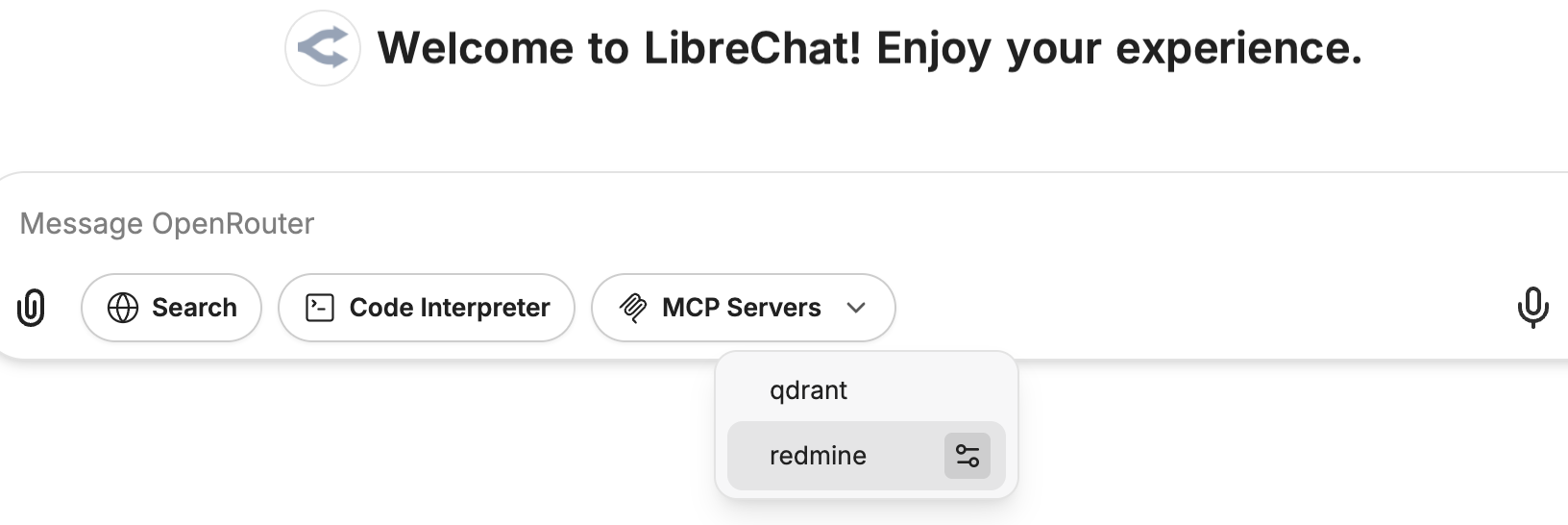
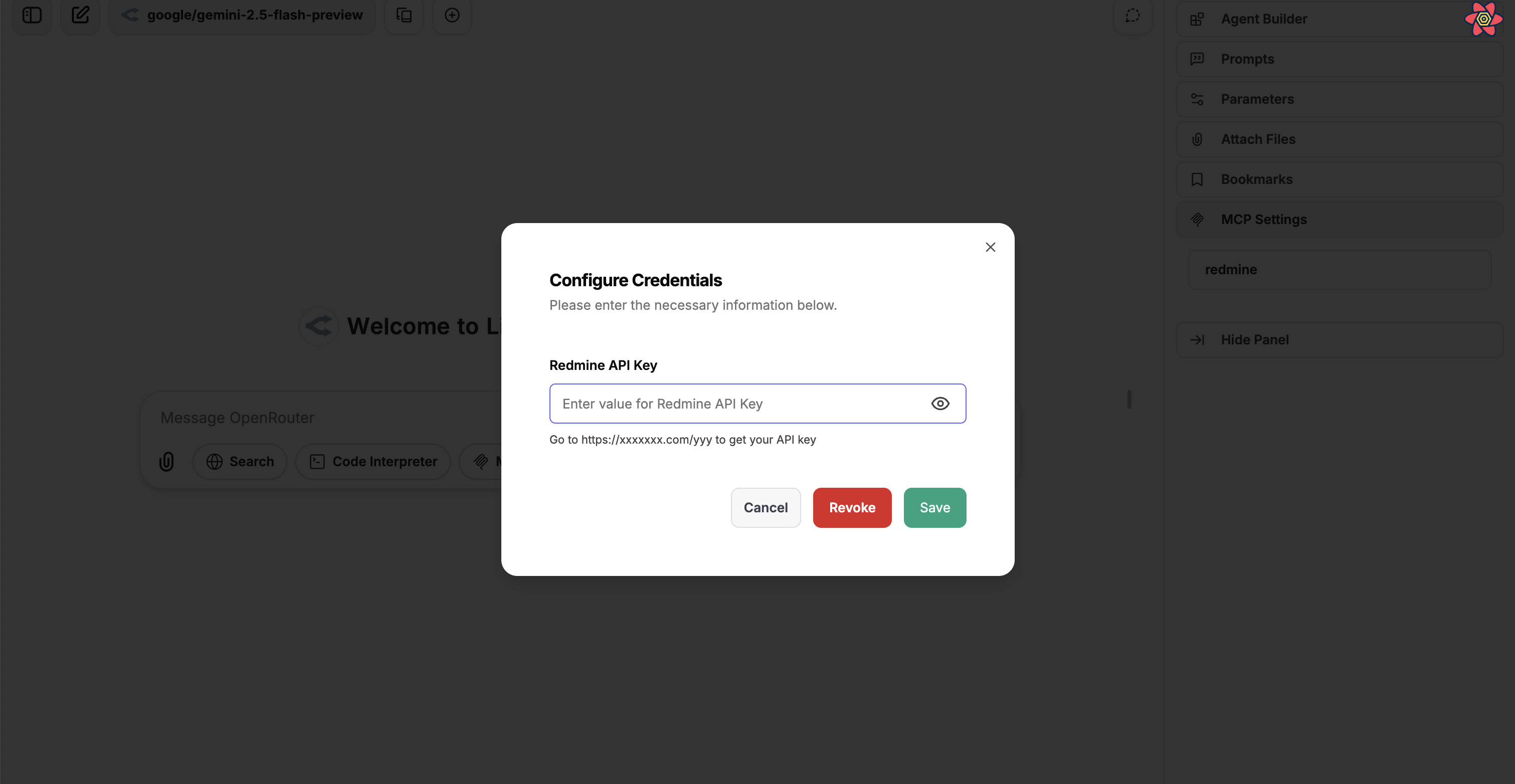
- 从设置面板:右侧面板中一个专门的“MCP Settings”部分列出了所有可定义自定义变量的 MCP 服务器。用户可以点击某个服务器以打开配置对话框,从而为该特定 MCP 服务器设置或更新其凭据。
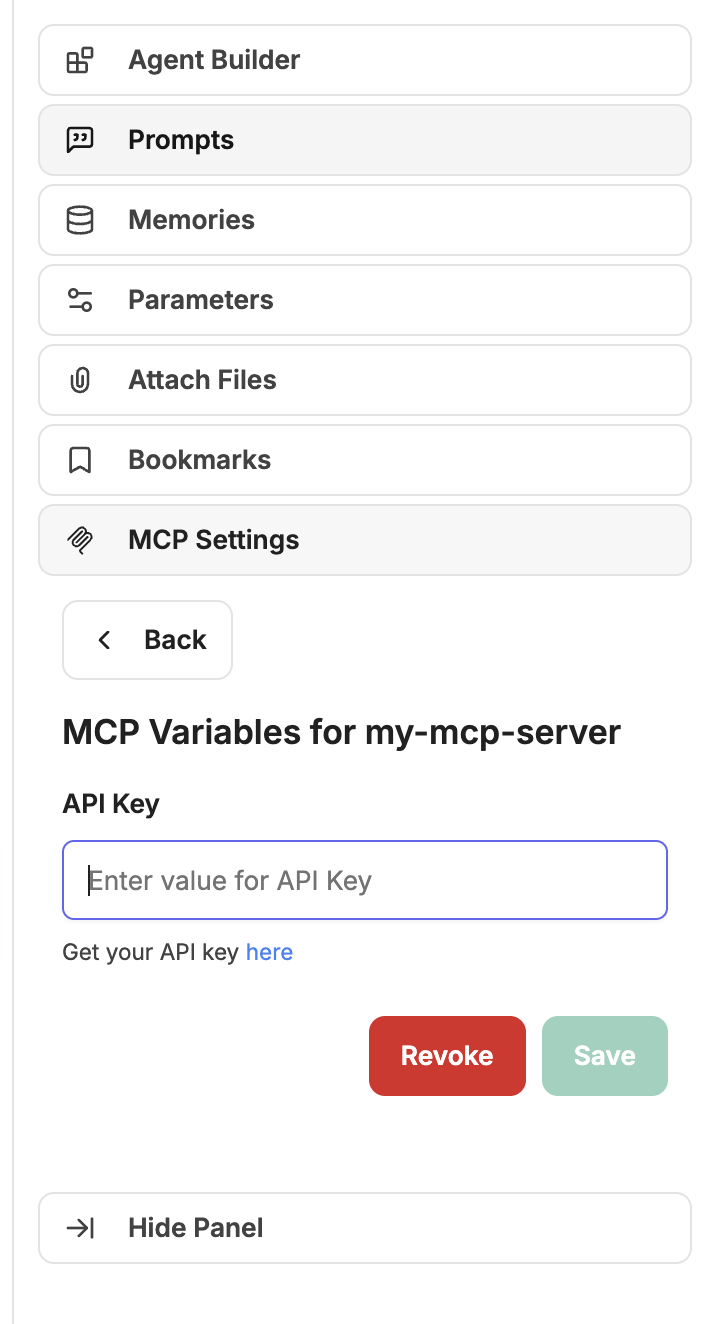
- 来自助手聊天输入:在为助手选择 MCP 工具时,工具选择下拉菜单中可配置的 MCP 服务器旁边会出现一个设置图标。点击此图标将打开一个对话框,用于管理该服务器的凭据。
- 这些用户提供的值会被安全地存储,并与特定用户及特定的 MCP 服务器关联,在运行时进行替换。
- 一旦在
- 示例:
customUserVars: MY_SERVICE_API_KEY: title: 'My Service API Key' description: "Your personal API access key for My Service. Find it at <a href='https://myservice.example.com/settings/api' target='_blank'>My Service API Settings</a>." sensitive: true SOME_OTHER_VAR: title: 'Some Other Variable' description: 'The specific value for some other configuration (e.g., a specific path or identifier).' sensitive: falseheaders中的用法:headers: X-Auth-Token: '{{MY_SERVICE_API_KEY}}' X-Some-Other-Config: '{{SOME_OTHER_VAR}}'env中的用法(适用于stdio类型):env: API_KEY: '{{MY_SERVICE_API_KEY}}'
obo
- 类型: 对象(可选,仅适用于
sse和streamable-http类型) - 描述: 为 MCP 服务器配置 OAuth 2.0 On-Behalf-Of 令牌交换。LibreChat 将已登录用户的 OpenID 访问令牌与配置的作用域进行委托下游令牌交换,然后将该令牌作为
Authorization: Bearer ...请求头转发给 MCP 服务器。 - 必需子键:
scopes: String - 为下游令牌交换所请求的非空作用域 (scopes)。
- 验证:
obo仅对sse和streamable-httpMCP 服务器有效。obo对于stdio和websocket服务器是被拒绝的。- 用户需要
MCP_SERVERS.CONFIGURE_OBO角色权限才能配置此字段。可以通过interface.mcpServers.configureObo进行初始化,或在管理面板中进行管理。
- 先决条件:
- OpenID 身份验证必须配置为使用可重用的访问令牌。
- 您的身份提供商和下游应用程序必须允许所请求的委托范围。
- 示例:
mcpServers:
  enterprise-tools:
    type: streamable-http
    url: https://api.example.com/mcp/
    obo:
      scopes: 'api://mcp-server-id/Mcp.Tools.ReadWrite'
请参阅 OpenID Connect Token Reuse 和 SharePoint Integration 以了解相关的令牌重用和委托令牌设置。
oauth
- 类型: 对象(可选)
- 描述: 用于通过 MCP 服务器进行身份验证的 OAuth2 配置。配置后,用户在使用 MCP 服务器之前将被提示通过 OAuth 流程进行身份验证。如果未提供 client id 和 client secret,则将使用动态客户端注册 (DCR)。
- 必需子键:
authorization_url: String - OAuth 授权端点 URLtoken_url: String - OAuth 令牌端点 URLclient_id: String - OAuth 客户端标识符client_secret: String - OAuth 客户端密钥redirect_uri: String - OAuth 重定向 URI (例如http://localhost:3080/api/mcp/${serverName}/oauth/callback)scope: String - OAuth 作用域(以空格分隔)
- 可选子键:
grant_types_supported: 字符串数组 - 支持的授权类型(默认为["authorization_code", "refresh_token"])token_endpoint_auth_methods_supported: 字符串数组 - 支持的令牌端点身份验证方法(默认为["client_secret_basic", "client_secret_post"])token_exchange_method: String - 令牌交换请求方法。对于期望在 POST 正文中包含 OAuth 客户端凭据的提供商,请使用default_post。response_types_supported: 字符串数组 - 支持的响应类型(默认为["code"])code_challenge_methods_supported: 字符串数组 - 支持的 PKCE 代码质询方法(默认为["S256", "plain"])skip_code_challenge_check: Boolean - 跳过检查 OAuth 提供商是否声明支持 PKCE。对于像 AWS Cognito 这样支持 S256 但未在其元数据中声明的提供商非常有用。(默认为false)
- 环境变量: YAML 定义的 OAuth URL 字段(包括
authorization_url、token_url、redirect_uri和revocation_endpoint)可以使用${ENV_VAR}引用。LibreChat 会在 URL 验证前解析环境变量的值。通过 UI 提交的用户自定义 OAuth 端点 URL 必须是字面量 URL,且会拒绝${ENV_VAR}占位符。 - 示例:
oauth-api-server:
  authorization_url: https://api.example.com/oauth/authorize
  token_url: https://api.example.com/oauth/token
  client_id: your_client_id
  client_secret: your_client_secret
  redirect_uri: http://localhost:3080/api/mcp/oauth-api-server/oauth/callback
  scope: 'read execute'
  grant_types_supported: ['authorization_code', 'refresh_token']
  token_endpoint_auth_methods_supported: ['client_secret_post']
  token_exchange_method: default_post
  response_types_supported: ['code']
  code_challenge_methods_supported: ['S256', 'plain']
oauth_headers
- 类型: 对象(可选)
- 描述: 专门用于 OAuth 流程请求的标头。这些标头在 OAuth 身份验证期间(例如动态客户端注册和令牌交换)使用,不会在常规 MCP 服务器通信期间发送。
- 常见用例:
- 为动态客户端注册 endpoint 添加身份验证,例如
Authorization: Bearer ${DCR_API_KEY} - 包括 OAuth 流程所需的自定义提供商特定标头
- 设置 OAuth 令牌端点所需的标头
- 为动态客户端注册 endpoint 添加身份验证,例如
- 与
headers的主要区别:headers: 在身份验证完成后,随常规 MCP 服务器请求一起发送oauth_headers: 仅在 OAuth 认证流程中发送
- 示例:
oauth_headers:
  Authorization: "Bearer ${DCR_API_KEY}"
  X-Custom-Header: "custom_value"
startup
- 类型: 布尔值(可选)
- 描述: 当设置为
false时,此 MCP 服务器将不会在应用程序启动时连接。这对于需要在连接前进行用户输入或配置的服务器,或者当你希望控制服务器初始化时间的情况非常有用。 - 默认值:
true - 示例:
mcpServers:
  my-mcp-server:
    type: streamable-http
    url: 'https://api.example.com/mcp/'
    startup: false
注意事项
- 类型推断:
- 如果省略
type:- 如果指定了
url且以http://或https://开头,则type默认为sse。 - 如果指定了
url且以ws://或wss://开头,则type默认为websocket。 - 如果指定了
command,type将默认为stdio。
- 如果指定了
- 如果省略
- 连接类型:
stdio:将 MCP 服务器作为子进程启动,并通过标准输入/输出进行通信。websocket: 通过 WebSocket 连接到外部 MCP 服务器。sse: 通过服务器发送事件 (SSE) 连接到外部 MCP 服务器。streamable-http: 通过 HTTP 连接到外部 MCP 服务器,并支持流式响应。
- 内部/本地地址:
- 重要提示:使用内部 IP 地址(例如
172.24.1.165、192.168.1.100)或本地域名(例如mcp-server、host.docker.internal)的 MCP 服务器必须被显式允许。当您希望公共目标保持可访问状态时,请使用mcpSettings.allowedAddresses来指定精确的私有 host:port 服务;当您需要严格的白名单时,请使用mcpSettings.allowedDomains。 - 有关配置详情,请参阅 MCP Settings。
- 重要提示:使用内部 IP 地址(例如
示例
使用内部地址进行配置
当使用内部/本地 MCP 服务器且不需要严格的域名白名单时,请使用确切的主机和端口配置 mcpSettings.allowedAddresses:
# MCP Settings - Required for internal/local addresses
mcpSettings:
  allowedAddresses:
    - '172.24.1.165:8000' # Internal IP and port
    - 'mcp-prod:8001' # Docker container and port
    - 'host.docker.internal:8080' # Docker host and port

# MCP Servers - Individual configurations
mcpServers:
  prod-mcp:
    type: streamable-http
    url: http://172.24.1.165:8000/mcp
    timeout: 120000

  test-mcp:
    type: streamable-http
    url: http://mcp-prod:8001/mcp
    timeout: 120000
stdio MCP Server
puppeteer:
  type: stdio
  command: npx
  args:
    - -y
    - '@modelcontextprotocol/server-puppeteer'
  timeout: 30000
  initTimeout: 10000
  env:
    NODE_ENV: 'production'
    USER_EMAIL: '{{LIBRECHAT_USER_EMAIL}}'
    USER_ROLE: '{{LIBRECHAT_USER_ROLE}}'
  stderr: inherit
sse MCP Server
everything:
  url: http://localhost:3001/sse
  headers:
    X-User-ID: '{{LIBRECHAT_USER_ID}}'
    X-API-Key: '${SOME_API_KEY}'
websocket MCP Server
myWebSocketServer:
  url: ws://localhost:8080
streamable-http MCP Server
streamable-http-server:
  type: streamable-http
  url: https://example.com/api/
  headers:
    X-User-ID: '{{LIBRECHAT_USER_ID}}'
    X-API-Key: '${SOME_API_KEY}'
带有动态用户字段的 MCP Server
user-aware-server:
  type: sse
  url: https://api.example.com/users/{{LIBRECHAT_USER_USERNAME}}/stream
  headers:
    X-User-ID: '{{LIBRECHAT_USER_ID}}'
    X-User-Email: '{{LIBRECHAT_USER_EMAIL}}'
    X-User-Role: '{{LIBRECHAT_USER_ROLE}}'
    X-Email-Verified: '{{LIBRECHAT_USER_EMAILVERIFIED}}'
    Authorization: 'Bearer ${API_TOKEN}'
通过 customUserVars 实现具有用户凭据的 MCP Server
my-mcp-server:
  type: streamable-http
  url: 'https://api.example-service.com/api/' # Example URL
  headers:
    X-Auth-Token: '{{API_KEY}}' # Uses the API_KEY defined below
  customUserVars:
    API_KEY: # This key will be used as {{API_KEY}} in headers/url
      title: 'API Key' # This is the label shown above the input field
      description: "Get your API key <a href='https://example.com/api-keys' target='_blank'>here</a>." # This description appears below the input
注意 有关基于 UI 的服务器初始化的更多信息,请参阅 MCP Server Initialization。
带有自定义图标的 MCP Server
filesystem:
  command: npx
  args:
    - -y
    - '@modelcontextprotocol/server-filesystem'
    - /home/user/LibreChat/
  iconPath: /home/user/LibreChat/client/public/assets/logo.svg
  chatMenu: false # Exclude from chatarea dropdown
带有 OAuth 身份验证的 MCP Server
oauth-api-server:
  type: streamable-http
  url: https://api.example.com/mcp/
  oauth:
    authorization_url: https://api.example.com/oauth/authorize
    token_url: https://api.example.com/oauth/token
    client_id: your_client_id
    client_secret: your_client_secret
    redirect_uri: http://localhost:3080/api/mcp/oauth-api-server/oauth/callback
    scope: 'read execute'
  oauth_headers:
    X-Custom-Header: 'custom_value'
带有服务器指令的 MCP Server
# Server that uses its own provided instructions
web-search:
  type: streamable-http
  url: https://example.com/mcp/search
  serverInstructions: true

# Server with instructions explicitly disabled
filesystem:
  command: npx
  args:
    - -y
    - '@modelcontextprotocol/server-filesystem'
    - /home/user/documents/
  serverInstructions: false

# Server with custom instructions
puppeteer:
  type: stdio
  command: npx
  args:
    - -y
    - '@modelcontextprotocol/server-puppeteer'
  serverInstructions: |
    Browser automation security and best practices:
    1. Be cautious with local file access and internal IP addresses
    2. Take screenshots to verify successful page interactions
    3. Wait for page elements to load before interacting with them
    4. Use specific CSS selectors for reliable element targeting
    5. Check console logs for JavaScript errors when troubleshooting
启用 OAuth 的 MCP 服务器 (旧版 requiresOAuth)
composio-googlesheets:
  type: sse
  url: https://mcp.composio.dev/googlesheets/sse-endpoint
  requiresOAuth: true
  headers:
    X-User-ID: '{{LIBRECHAT_USER_ID}}'
    X-API-Key: '${COMPOSIO_API_KEY}'
  timeout: 45000
  initTimeout: 15000
相关环境变量(可选):
# OAuth configuration for MCP servers
MCP_OAUTH_ON_AUTH_ERROR=true
MCP_OAUTH_DETECTION_TIMEOUT=10000
MCP_OAUTH_HANDLING_TIMEOUT=600000
MCP_OAUTH_FLOW_TTL=900000

# API key for the service
COMPOSIO_API_KEY=your_composio_api_key_here
导入 MCP 服务器配置
mcpServers 配置允许 LibreChat 与各种 MCP 服务器进行动态交互,这些服务器可以在应用程序内执行专门的任务或提供特定的功能。这种模块化方法只需添加或修改服务器配置,即可轻松扩展应用程序的功能。
附加信息
- 默认行为:
- 初始化在启动时进行,必须重启应用才能使更改生效。
- 如果同时指定了
url和command,则必须显式定义type以避免歧义。
- 多用户支持:
- MCPManager 现在支持区分用户级和应用级连接,从而实现针对每个用户的有效连接管理。
- 用户连接会被单独跟踪和管理,并进行适当的建立和清理。
- 在标头、URL 和环境变量中使用动态用户字段占位符:
{{LIBRECHAT_USER_ID}}- 用户的唯一标识符{{LIBRECHAT_USER_EMAIL}}- 用户的电子邮件地址{{LIBRECHAT_USER_USERNAME}}- 用户的用户名{{LIBRECHAT_USER_ROLE}}- 用户的角色(例如:"user", "admin")- 以及更多字段(完整列表请参阅 headers 部分)
- 用户空闲管理:
- 用户连接会受到活动监控,并在 15 分钟不活动后断开连接。
- 环境变量:
- 在
env中(针对stdio类型): 用于设置 MCP 服务器进程所需的特定运行时环境或配置。 - 在
headers中(适用于sse和streamable-http类型): 使用${ENV_VAR}语法在标头值中引用环境变量。
- 在
- 动态用户字段:
- 用户字段占位符会在运行时被替换为已认证用户的信息。
- 仅提供非敏感字段(密码和其他敏感数据已被排除)
- 缺失的字段默认为空字符串
- 布尔字段会被转换为字符串表示形式("true" 或 "false")
- 错误处理 (
stderr):- 配置
stderr允许您管理如何处理来自 MCP 服务器进程的错误消息。默认的"inherit"表示错误将被打印到父进程的stderr中。
- 配置
- 服务器指令:
- 当使用 MCP 服务器工具时,指令会自动注入到代理的系统消息中。
- 自定义指令(字符串值)优先于服务器提供的指令
- 多个 MCP 服务器可以各自向 agent 上下文贡献其指令。
- 仅当相应的 MCP 服务器工具实际可供智能体使用时,才会包含指令。
- OAuth 身份验证:
- OAuth2 流程支持与 MCP 服务器进行安全身份验证。
- 在可以使用 MCP server 之前,系统将提示用户通过 OAuth 进行身份验证。
参考资料
通过在 librechat.yaml 中正确配置 mcpServers,您可以增强 LibreChat 的功能,并无缝集成自定义工具和服务。
这篇指南怎么样?