 LibreChat
网页搜索配置
webSearch 配置允许您自定义 LibreChat 中的网络搜索功能,包括搜索提供商、内容抓取工具和结果重排序器。
概述
Web search 功能由三个主要组件组成:
- 搜索提供商 (Search Providers):执行初始网络搜索的服务
- Scrapers: 从网页中提取内容的服务
- Rerankers:对搜索结果进行重新排序以提高相关性的服务
示例
webSearch:
  # Search Provider Configuration
  serperApiKey: "${SERPER_API_KEY}"
  searxngInstanceUrl: "${SEARXNG_INSTANCE_URL}"
  searxngApiKey: "${SEARXNG_API_KEY}"
  searchProvider: "serper" # Options: "serper", "searxng", "tavily"

  # Tavily Configuration (search and/or scraper)
  tavilyApiKey: "${TAVILY_API_KEY}"
  # Optional: custom Tavily-compatible endpoints
  tavilySearchUrl: "${TAVILY_SEARCH_URL}"
  tavilyExtractUrl: "${TAVILY_EXTRACT_URL}"

  # Scraper Configuration
  firecrawlApiKey: "${FIRECRAWL_API_KEY}"
  firecrawlApiUrl: "${FIRECRAWL_API_URL}"
  firecrawlVersion: "${FIRECRAWL_VERSION}"
  scraperProvider: "firecrawl" # Options: "firecrawl", "serper", "tavily"

  # Reranker Configuration
  jinaApiKey: "${JINA_API_KEY}"
  jinaApiUrl: "${JINA_API_URL}"
  cohereApiKey: "${COHERE_API_KEY}"
  rerankerType: "jina" # Options: "jina", "cohere", "none"

  # General Settings
  scraperTimeout: 7500 # Timeout in milliseconds for scraper requests (default: 7500)
  safeSearch: 1 # Options: 0 (OFF), 1 (MODERATE - default), 2 (STRICT)
搜索提供商
searchProvider
| Key | Type | Description | Example |
|---|---|---|---|
| searchProvider | String | 指定要使用的搜索提供程序。 | Options: "serper", "searxng", "tavily" |
serperApiKey
| Key | Type | Description | Example |
|---|---|---|---|
| serperApiKey | String | Serper API 密钥的环境变量名称。如果未在 .env 中设置,系统将提示用户通过 UI 提供。 | ${SERPER_API_KEY} |
注意: 请从 Serper.dev 获取您的 API key。
searxngInstanceUrl
| Key | Type | Description | Example |
|---|---|---|---|
| searxngInstanceUrl | String | SearXNG 实例 URL 的环境变量名称。如果未在 .env 中设置,系统将提示用户通过 UI 提供。 | ${SEARXNG_INSTANCE_URL} |
searxngApiKey
| Key | Type | Description | Example |
|---|---|---|---|
| searxngApiKey | String | SearXNG API 密钥的环境变量名称。如果未在 .env 中设置,系统将提示用户通过 UI 提供。 | ${SEARXNG_API_KEY} |
注意: 这是可选配置,仅在您的 SearXNG 实例需要身份验证时才需要。
tavilyApiKey
| Key | Type | Description | Example |
|---|---|---|---|
| tavilyApiKey | String | Tavily API 密钥的环境变量名称。同时用于搜索和抓取。如果未在 .env 中设置,系统将提示用户通过 UI 提供。 | ${TAVILY_API_KEY} |
注意: 请从 Tavily 获取您的 API key。
tavilySearchUrl
| Key | Type | Description | Example |
|---|---|---|---|
| tavilySearchUrl | String | 用于自定义 Tavily Search API URL 的环境变量名称。可选;未设置时默认为 Tavily 托管搜索。 | ${TAVILY_SEARCH_URL} |
tavilyExtractUrl
| Key | Type | Description | Example |
|---|---|---|---|
| tavilyExtractUrl | String | 用于自定义 Tavily Extract API URL 的环境变量名称。可选;未设置时默认为 Tavily 托管的 extract。 | ${TAVILY_EXTRACT_URL} |
tavilySearchOptions
| Key | Type | Description | Example |
|---|---|---|---|
| tavilySearchOptions | Object | Tavily 搜索的配置选项。 |
子键 (Subkeys):
| Key | Type | Description | Example |
|---|---|---|---|
| searchDepth | String | 控制相关性与延迟之间的权衡。“basic”为每个 URL 返回一个 NLP 摘要。“advanced”为每个 URL 返回多个语义相关的片段(消耗 2 个 API 点数)。“fast”通过片段平衡速度与相关性。“ultra-fast”通过一个 NLP 摘要将延迟降至最低。 | Options: "basic", "advanced", "fast", "ultra-fast". Default: "basic" |
| maxResults | Number | 返回搜索结果的最大数量。 | Range: 1-20. Default: 5 |
| topic | String | 搜索的类别。“news”适用于实时更新,“finance”适用于财务数据。 | Options: "general", "news", "finance". Default: "general" |
| includeImages | Boolean | 在响应中包含图像。返回顶层查询图像和每个结果的图像。 | Default: false |
| includeAnswer | Boolean or String | 包含一个 LLM 生成的回答。“basic” 或 true 表示快速回答,“advanced” 表示详细回答。 | Default: false |
| includeRawContent | Boolean or String | 包含经过清理和解析的 HTML 内容。“markdown”或 true 表示 markdown 格式,“text”表示纯文本。 | Default: false |
| includeDomains | Array of Strings | 将搜索限制在特定域名内。最多 300 个域名。 | |
| excludeDomains | Array of Strings | 从结果中排除特定域名。最多 150 个域名。 | |
| timeRange | String | 基于发布日期或最后更新日期的时间范围筛选。 | Options: "day", "week", "month", "year" |
| includeImageDescriptions | Boolean | 当 includeImages 为 true 时,同时为每张图片添加描述性文本。 | Default: false |
| includeFavicon | Boolean | 为每个搜索结果包含 favicon URL。 | Default: false |
| chunksPerSource | Number | 每个来源的最大相关内容块数量。仅在 searchDepth 为 "advanced" 时可用。 | Range: 1-3. Default: 3 |
| safeSearch | Boolean | Tavily Search 请求的可选 Tavily safe_search 覆盖设置。默认省略;设置为 true 可能需要 Tavily Enterprise。 | Default: omitted |
| timeout | Number | 客户端 HTTP 请求超时时间(以毫秒为单位)。控制在放弃之前等待 Tavily API 响应的时长。 | Default: 15000 |
Scrapers
firecrawlApiKey
| Key | Type | Description | Example |
|---|---|---|---|
| firecrawlApiKey | String | Firecrawl API 密钥的环境变量名称。如果未在 .env 中设置,系统将提示用户通过 UI 提供。 | ${FIRECRAWL_API_KEY} |
注意: 请从 Firecrawl.dev 获取您的 API key。
firecrawlApiUrl
| Key | Type | Description | Example |
|---|---|---|---|
| firecrawlApiUrl | String | Firecrawl API URL 的环境变量名称。如果未在 .env 中设置,系统将提示用户通过 UI 提供。 | ${FIRECRAWL_API_URL} |
注意: 这是可选配置,仅在您使用自定义 Firecrawl 实例时才需要。
firecrawlVersion
| Key | Type | Description | Example |
|---|---|---|---|
| firecrawlVersion | String | Firecrawl API 版本(v0 或 v1)的环境变量名称。 | ${FIRECRAWL_VERSION} |
scraperProvider
| Key | Type | Description | Example |
|---|---|---|---|
| scraperProvider | String | 指定要使用的爬虫服务。 | Options: "firecrawl", "serper", "tavily" |
firecrawlOptions
| Key | Type | Description | Example |
|---|---|---|---|
| firecrawlOptions | Object | Firecrawl 爬虫的高级配置选项。 |
子键 (Subkeys):
formats
| Key | Type | Description | Example |
|---|---|---|---|
| formats | Array of Strings | 要在输出中包含的格式。 |
includeTags
| Key | Type | Description | Example |
|---|---|---|---|
| includeTags | Array of Strings | 输出中包含的标签。 |
excludeTags
| Key | Type | Description | Example |
|---|---|---|---|
| excludeTags | Array of Strings | 要从输出中排除的标签。 |
headers
| Key | Type | Description | Example |
|---|---|---|---|
| headers | Object | 发送请求时携带的请求头。可用于发送 cookies、user-agent 等。 |
waitFor
| Key | Type | Description | Example |
|---|---|---|---|
| waitFor | Number | 指定获取内容前的延迟时间(以毫秒为单位),以便页面有足够的时间加载。 |
timeout
| Key | Type | Description | Example |
|---|---|---|---|
| timeout | Integer | 抓取请求的超时时间(以毫秒为单位)。必须是非负整数。 | Default: 7500 |
maxAge
| Key | Type | Description | Example |
|---|---|---|---|
| maxAge | Number | 如果页面缓存的存活时间(以毫秒为单位)小于此值,则返回缓存版本。如果缓存的页面版本超过此值,则会重新抓取页面。 |
注意: 如果您不需要极新的数据,启用此功能可以将抓取速度提高 500%。
mobile
| Key | Type | Description | Example |
|---|---|---|---|
| mobile | Boolean | 模拟从移动设备进行抓取。 |
skipTlsVerification
| Key | Type | Description | Example |
|---|---|---|---|
| skipTlsVerification | Boolean | 在发起请求时跳过 TLS 证书验证。 |
blockAds
| Key | Type | Description | Example |
|---|---|---|---|
| blockAds | Boolean | 启用广告拦截和 Cookie 弹窗拦截。 |
removeBase64Images
| Key | Type | Description | Example |
|---|---|---|---|
| removeBase64Images | Boolean | 从输出中移除所有 base 64 图像,因为它们可能会导致输出过长。图像的 alt 文本将保留在输出中,但 URL 会被替换为占位符。 |
parsePDF
| Key | Type | Description | Example |
|---|---|---|---|
| parsePDF | Boolean | 控制 PDF 文件在抓取过程中的处理方式。 |
storeInCache
| Key | Type | Description | Example |
|---|---|---|---|
| storeInCache | Boolean | 如果设为 true,页面将被存储在 Firecrawl 索引和缓存中。如果您的抓取活动可能涉及数据保护问题,将其设为 false 会很有用。使用某些与敏感抓取相关的参数(如 headers)将强制此参数设为 false。 |
zeroDataRetention
| Key | Type | Description | Example |
|---|---|---|---|
| zeroDataRetention | Boolean | 如果设为 true,将为此抓取启用零数据保留(需要预先在 Firecrawl 上进行设置)。 |
location
| Key | Type | Description | Example |
|---|---|---|---|
| location | Object | 用于抓取的地理位置和语言设置。 |
onlyMainContent
| Key | Type | Description | Example |
|---|---|---|---|
| onlyMainContent | Boolean | 仅返回页面主要内容,不包含页眉、导航、页脚等。 |
changeTrackingOptions
| Key | Type | Description | Example |
|---|---|---|---|
| changeTrackingOptions | Object | 用于跟踪抓取内容更改的配置。 |
示例:
webSearch:
  firecrawlApiKey: "${FIRECRAWL_API_KEY}"
  firecrawlOptions:
    formats: ["markdown", "rawHtml"]
    includeTags: ["main", "article", ".content"]
    excludeTags: ["nav", "footer", ".ads"]
    waitFor: 2000
    timeout: 10000
    mobile: false
    blockAds: true
    onlyMainContent: true
    location:
      country: "US"
      languages: ["en"]
注意: 有关 Firecrawl 爬虫选项和默认值的详细信息,请参阅 Firecrawl API Documentation。
tavilyScraperOptions
| Key | Type | Description | Example |
|---|---|---|---|
| tavilyScraperOptions | Object | Tavily Extract (抓取工具) 的配置选项。 |
子键 (Subkeys):
| Key | Type | Description | Example |
|---|---|---|---|
| extractDepth | String | 提取过程的深度。“advanced”可检索包括表格和嵌入内容在内的更多数据,成功率更高,但可能会增加延迟。“basic”每 5 个成功 URL 消耗 1 个积分,“advanced”每 5 个成功 URL 消耗 2 个积分。 | Options: "basic", "advanced". Default: "basic" |
| includeImages | Boolean | 在响应中包含从 URL 提取的图像列表。 | Default: false |
| includeFavicon | Boolean | 为每个提取的结果包含 favicon URL。 | Default: false |
| format | String | 提取的网页内容格式。“markdown”以 markdown 格式返回内容。“text”返回纯文本,可能会增加延迟。 | Options: "markdown", "text". Default: "markdown" |
| timeout | Number | 超时时间(以毫秒为单位)。控制客户端 HTTP 超时。设置后,它还会向 Tavily 发送一个转换为秒并限制在 1-60 秒之间的服务端提取超时时间。 | Default: 15000 for basic, 30000 for advanced |
示例:
webSearch:
  searchProvider: tavily
  scraperProvider: tavily
  tavilyApiKey: "${TAVILY_API_KEY}"
  # Optional: custom Tavily-compatible endpoints
  # tavilySearchUrl: "${TAVILY_SEARCH_URL}"
  # tavilyExtractUrl: "${TAVILY_EXTRACT_URL}"
  tavilySearchOptions:
    searchDepth: basic
    maxResults: 5
    topic: general
  tavilyScraperOptions:
    extractDepth: basic
注意: 有关 Tavily API 选项的详细信息,请参阅 Tavily API Documentation。
Rerankers
jinaApiKey
| Key | Type | Description | Example |
|---|---|---|---|
| jinaApiKey | String | Jina API 密钥的环境变量名称。如果未在 .env 中设置,系统将提示用户通过 UI 提供。 | ${JINA_API_KEY} |
注意: 请从 Jina.ai 获取您的 API key。
jinaApiUrl
| Key | Type | Description | Example |
|---|---|---|---|
| jinaApiUrl | String | Jina API URL 的环境变量名称。如果未在 .env 中设置,系统将提示用户通过 UI 提供。 | ${JINA_API_URL} |
注意: 这是可选配置,仅在您使用自定义 Jina 实例时才需要。
cohereApiKey
| Key | Type | Description | Example |
|---|---|---|---|
| cohereApiKey | String | Cohere API 密钥的环境变量名称。如果未在 .env 中设置,系统将提示用户通过 UI 提供。 | ${COHERE_API_KEY} |
注意: 请从 Cohere Dashboard 获取您的 API key。
rerankerType
| Key | Type | Description | Example |
|---|---|---|---|
| rerankerType | String | 指定要使用的重排序服务。设置为 "none" 以跳过重排序。 | Options: "jina", "cohere", "none" |
常规设置
scraperTimeout
| Key | Type | Description | Example |
|---|---|---|---|
| scraperTimeout | Integer | 爬虫请求的超时时间(以毫秒为单位)。必须是非负整数。 | Default: 7500 |
safeSearch
| Key | Type | Description | Example |
|---|---|---|---|
| safeSearch | Number | 安全搜索过滤级别。0 = 关闭(无过滤),1 = 中等(默认),2 = 严格(最大程度过滤)。 | Default: 1 (MODERATE) |
注意: 安全搜索级别与标准搜索 API 约定保持一致。默认启用 MODERATE 过滤,以在保持搜索有效性的同时提供合理的内容过滤。Tavily 默认不会继承此全局设置;仅当您的 Tavily 账户支持 safe_search 时,才使用 tavilySearchOptions.safeSearch。
注意事项
- API keys 可以通过两种方式进行配置:
- 设置 YAML 配置中指定的环境变量
- 如果未设置环境变量,系统将提示用户通过 UI 提供 API 密钥。
- 该配置支持每个组件(providers、scrapers、rerankers)的多种服务。
- 如果未指定特定的服务类型,系统将尝试该类别下的所有可用服务。
- 安全搜索提供三个级别的内容过滤:OFF (0)、MODERATE (1) 和 STRICT (2)
- Tavily 默认不会继承全局安全搜索设置;仅当您的 Tavily 账户支持
safe_search时,才显式设置tavilySearchOptions.safeSearch。 - 切勿在 YAML 配置中放入真实的 API 密钥 - 仅使用环境变量名称
设置 SearXNG
SearXNG 是一个注重隐私的元搜索引擎,您可以自行托管。 有关更多信息,请参阅 SearXNG 官方文档。
以下是为 LibreChat 设置您自己的 SearXNG 实例的步骤:
使用 Docker Desktop
-
搜索官方 SearXNG 镜像
- 打开 Docker Desktop
- 在 Images 选项卡中搜索
searxng/searxng - 点击官方镜像上的 Run,即可自动拉取并运行该镜像的容器。
-
运行容器
- 在下载完成后出现的后续面板中,展开 Optional Settings 下拉菜单
- 设置您所需的配置详情(端口号、容器名称等)
- 点击 Run 以启动容器
-
配置 LibreChat 的 SearXNG
- 在 Docker Desktop 中导航至
Files选项卡 - 前往
/etc/searxng/settings.yaml - 打开文件编辑器
- 导航至
formats部分 - 添加
json作为可接受的格式,以便 LibreChat 能够与您的实例进行通信 - 保存文件
- 在 Docker Desktop 中导航至
-
重启容器
- 重启容器以使更改生效
视频指南:
这是一个视频,将引导您在大约一分钟内完成从开始到结束的整个过程:
Note: In this example, the instance URL is http://localhost:55011 (port number found under the container name in the top left at the end of the video)
配置 LibreChat 以使用 SearXNG
您可以在 LibreChat 的 UI 中或通过 librechat.yaml 配置 SearXNG。
UI 配置
-
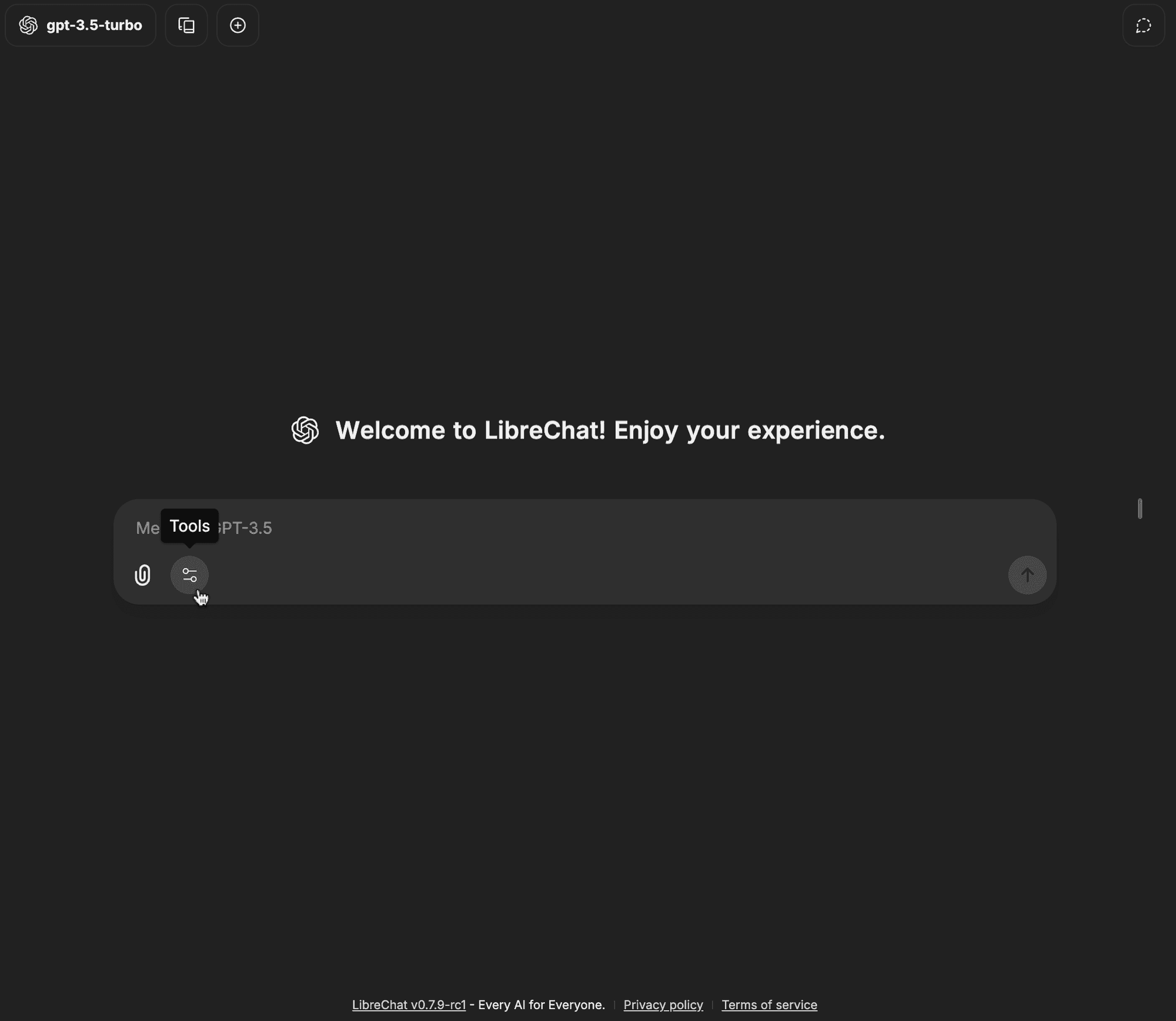
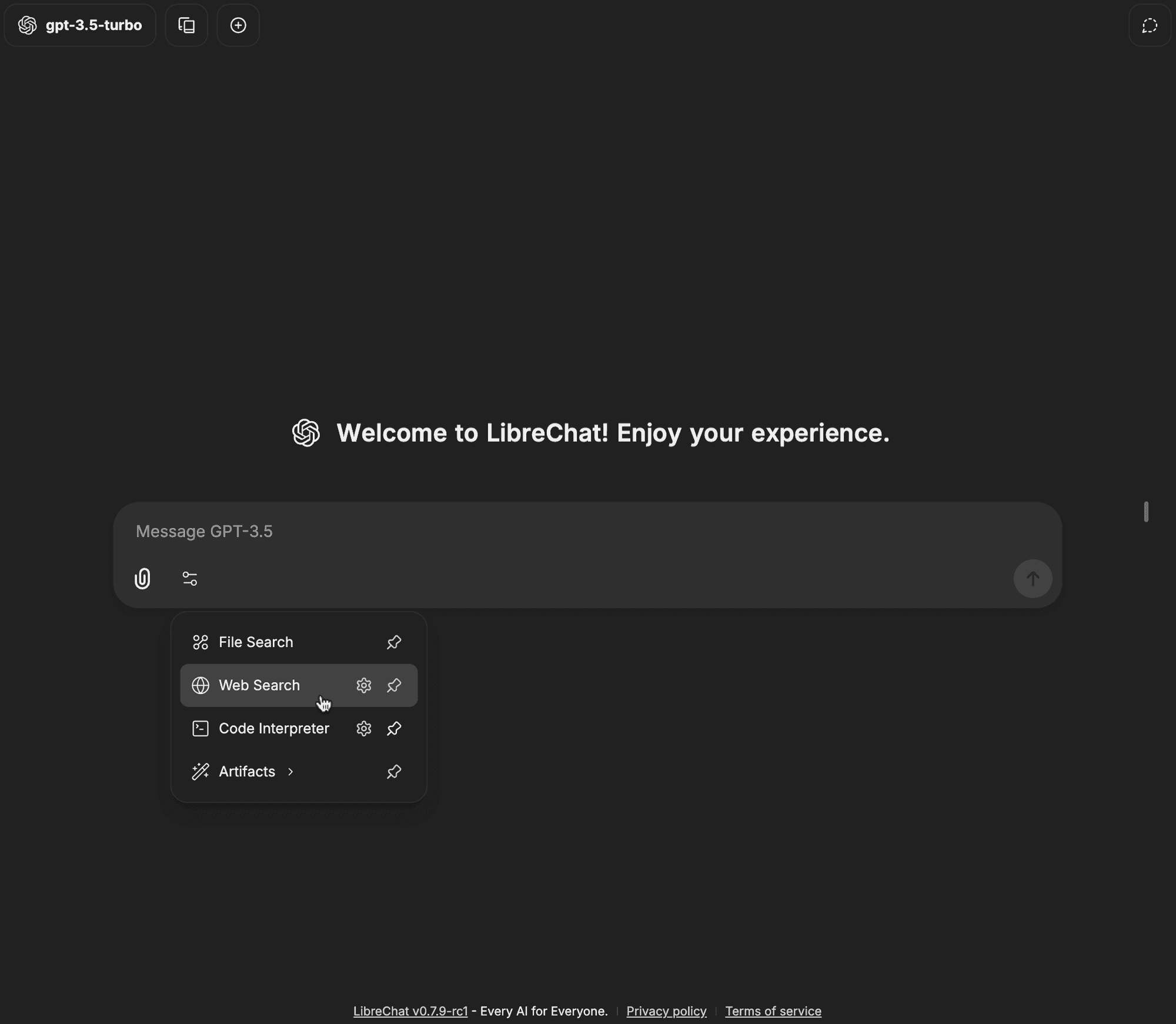
打开聊天输入栏中的工具下拉菜单
-
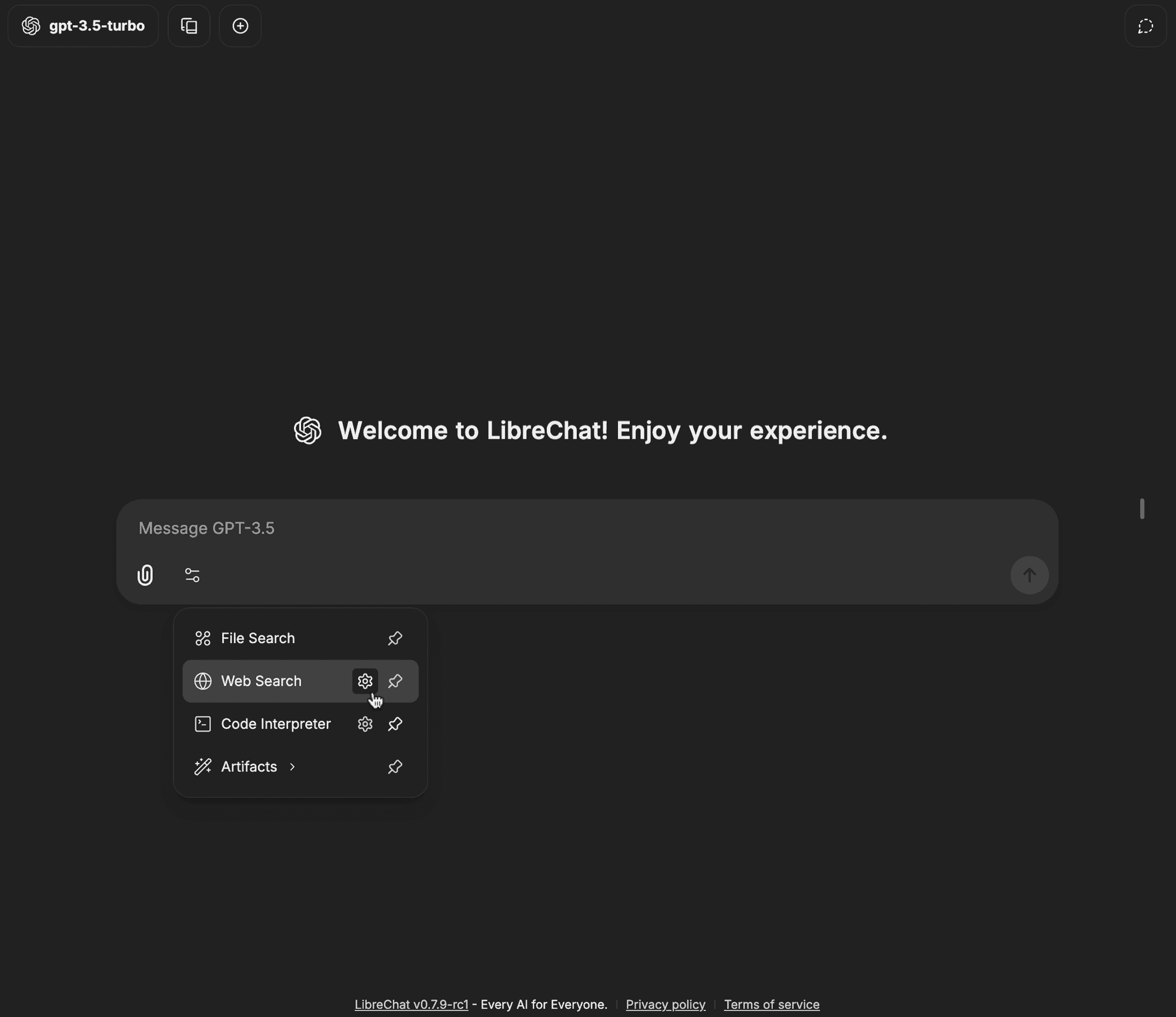
点击 Web Search 旁边的齿轮图标
-
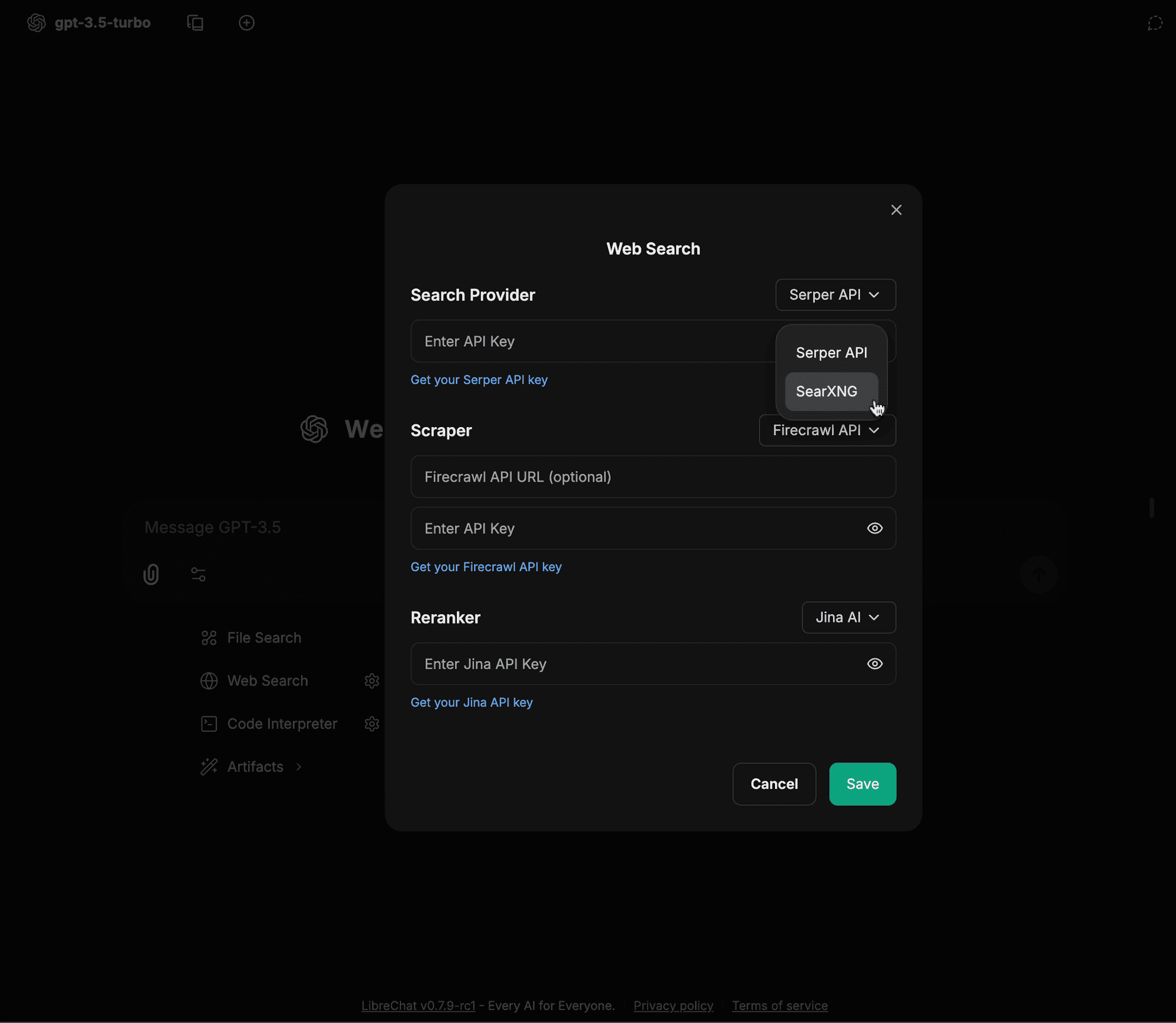
从搜索提供商 (Search Provider) 下拉菜单中选择 SearXNG
-
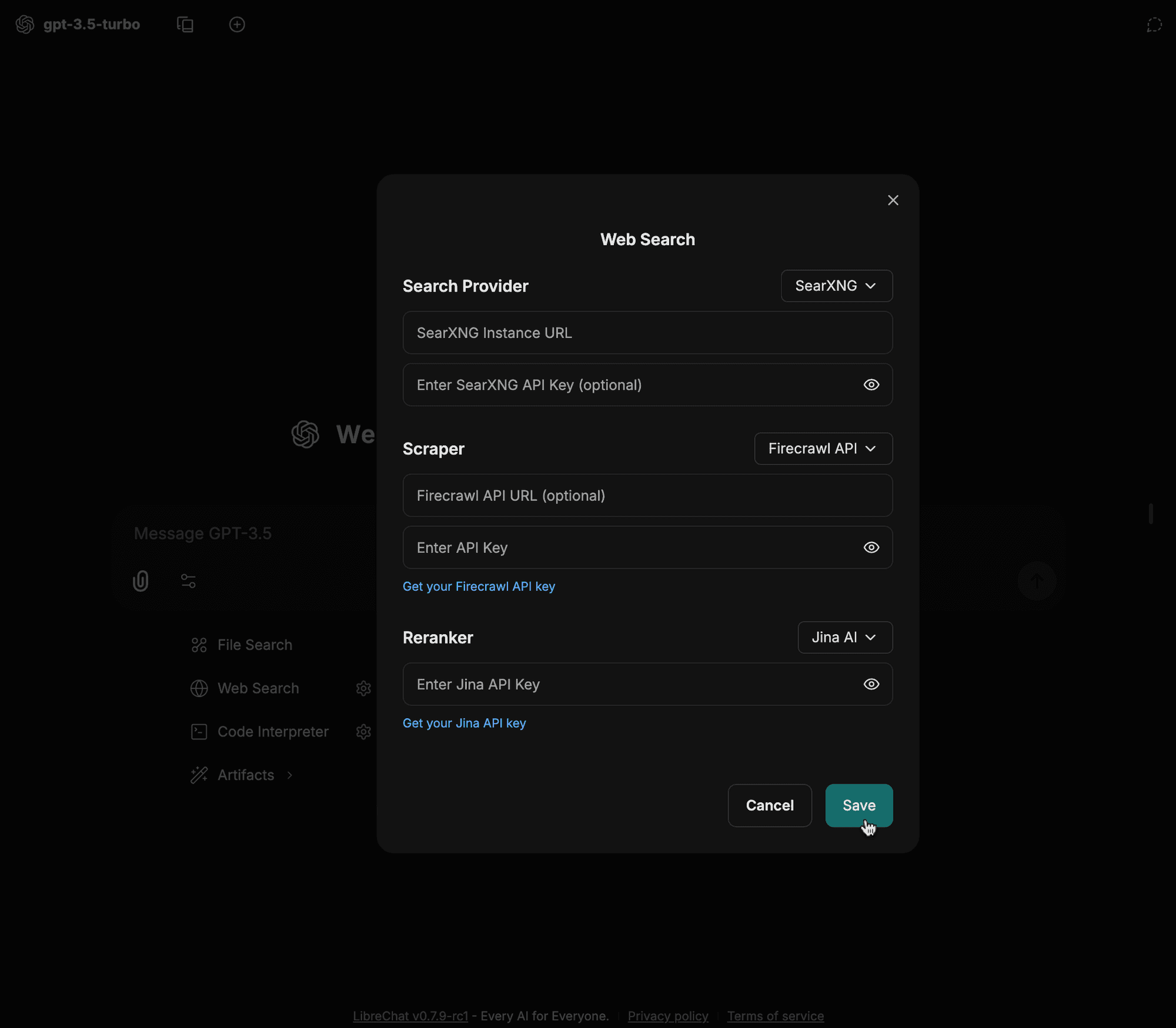
输入您的配置详情(例如实例 URL、抓取工具类型等)并点击保存
-
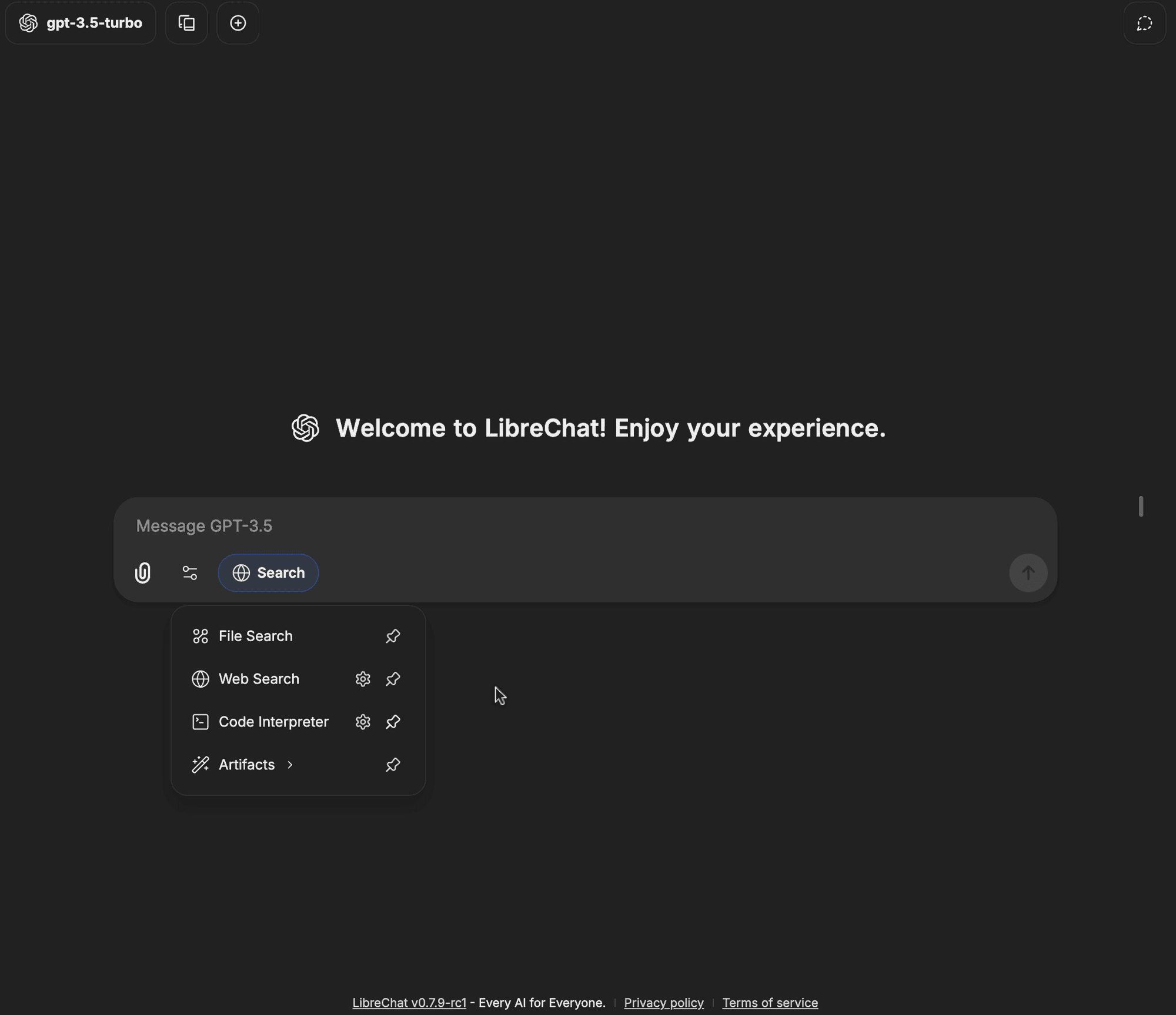
点击工具下拉菜单中的 Web Search 选项
-
Web Search 徽章现在应该已启用,这意味着您的查询现在可以使用网页搜索功能
这篇指南怎么样?