 LibreChat
Langfuse Tracing
This document explains how to integrate Langfuse tracing with LibreChat to get full observability into your AI conversations.
Langfuse is an open-source LLM observability platform that helps you trace, monitor, and debug your LLM applications. By integrating Langfuse with LibreChat, you get full visibility into your AI conversations.
Prerequisites
Before you begin, ensure you have:
- A running LibreChat instance (see Quick Start)
- A Langfuse account (sign up for free)
- Langfuse API keys from your project settings
Setup
Choose either an in-app connection or environment-managed credentials for a single-tenant deployment. Complete environment credentials take precedence.
In-App Connection
An authorized administrator can open Settings → Langfuse, choose an approved destination, enter the project's public and secret keys, and select Save & enable. LibreChat verifies both keys before saving, records the verified project ID, encrypts the secret key at rest, and returns only a masked preview on later reads. A saved connection can be enabled, disabled, retested, or replaced without exposing its secret.
The setting requires both access:admin and manage:configs:langfuse (or the corresponding broad/admin permissions). It is available when tracing is enabled and:
- A single-tenant deployment does not have both
LANGFUSE_PUBLIC_KEYandLANGFUSE_SECRET_KEY. - A fanout deployment has an enabled collector and tenant export is not disabled by the emergency switch.
Do not place a plaintext langfuse.secretKey directly in librechat.yaml; the runtime accepts the encrypted value produced by an authorized config write. Use the Settings page for the normal connection workflow.
The saved connection belongs to the base configuration. Role, group, and user configuration overrides cannot replace or remove the langfuse section.
Environment-Managed Connection
Add the following values to your .env file when deployment operators should own the central connection:
| Key | Type | Description | Example |
|---|---|---|---|
| LANGFUSE_PUBLIC_KEY | string | Your Langfuse public key. | LANGFUSE_PUBLIC_KEY=pk-lf-*** |
| LANGFUSE_SECRET_KEY | string | Your Langfuse secret key. | LANGFUSE_SECRET_KEY=sk-lf-*** |
| LANGFUSE_BASE_URL | string | The Langfuse API base URL. | LANGFUSE_BASE_URL=https://cloud.langfuse.com |
| LANGFUSE_PROJECT_ID | string | Optional stable project ID. When omitted, LibreChat discovers and caches it in the background for feedback routing. | LANGFUSE_PROJECT_ID= |
| LANGFUSE_TRACING_ENABLED | boolean | Set to false to disable Langfuse traces and feedback scores. Default: true. | LANGFUSE_TRACING_ENABLED=true |
| LANGFUSE_SAMPLE_RATE | number | Deterministic trace-level sample rate from 0 to 1. Default: 1. | LANGFUSE_SAMPLE_RATE=1 |
Example Configuration
# Langfuse Configuration
LANGFUSE_PUBLIC_KEY=pk-lf-***
LANGFUSE_SECRET_KEY=sk-lf-***
# LANGFUSE_PROJECT_ID=project-id
# LANGFUSE_SAMPLE_RATE=1

# 🇪🇺 EU Data Region
LANGFUSE_BASE_URL=https://cloud.langfuse.com

# 🇺🇸 US Data Region
# LANGFUSE_BASE_URL=https://us.cloud.langfuse.com
Self-Hosted Langfuse
For self-hosted Langfuse instances, set LANGFUSE_BASE_URL to your custom URL (e.g.,
http://localhost:3000 for local development).
When both environment keys are present, LibreChat uses them for the central project and hides Settings → Langfuse. LANGFUSE_TRACING_ENABLED=false or LANGFUSE_SAMPLE_RATE=0 disables both traces and feedback scores. Fractional sampling makes one deterministic decision per trace; sampled-out traces do not receive later feedback scores.
LANGFUSE_BASE_URL is the canonical base-URL setting. The older LANGFUSE_HOST and LANGFUSE_BASEURL names remain compatibility aliases, with LANGFUSE_BASE_URL taking precedence when more than one is set.
Authenticated Proxies and Gateways
For a self-hosted Langfuse instance behind Cloudflare Access, oauth2-proxy, or another authenticating gateway, define deployment-level custom request headers in librechat.yaml:
langfuse:
  headers:
    CF-Access-Client-Id: '${CF_ACCESS_CLIENT_ID}'
    CF-Access-Client-Secret: '${CF_ACCESS_CLIENT_SECRET}'
LibreChat applies the resolved headers to every direct Langfuse surface: trace and media export, feedback-score creation and deletion, project-identity lookup, and admin credential verification. Langfuse's own Authorization credential remains authoritative on REST requests. Values support ${ENV_VAR} interpolation; unresolved variables, protected infrastructure-secret references, blank values, and invalid header names are dropped with a warning. Header values are masked in startup logs and admin configuration reads, but environment references are still recommended over literal credentials.
These headers are operator-owned and YAML-only. They cannot be written through the Admin Panel or configuration API, stored in MongoDB, or populated with per-user {{...}} placeholders. LibreChat sends them only when configuration resolves exactly one Langfuse origin. With multiple central, tenant, or collector origins, it logs a warning and sends no custom headers because the map cannot safely select a recipient.
Fanout limitation
The fanout collector currently forwards only Authorization to tenant Langfuse destinations.
Custom langfuse.headers can authenticate LibreChat's direct request to a single collector or
Langfuse origin, but they do not authenticate the collector's upstream request to a tenant
destination behind another proxy.
Trace User Identity and Metadata
By default, Agent traces use LibreChat's internal user ID as the Langfuse userId and export no additional user or request metadata. Deployment operators can choose another user field and explicitly allowlist metadata under langfuse.trace:
langfuse:
  trace:
    userIdField: email
    userMetadataFields: [email, username, role, provider]
    conversationMetadataFields: [conversationId, endpoint, model, modelLabel, spec]
userIdField accepts id, email, username, name, openidId, samlId, ldapId, googleId, githubId, discordId, appleId, or facebookId. If the selected field is missing for a user, the internal ID remains the trace userId.
userMetadataFields accepts those identity fields plus role and provider. Values are exported under librechat.user.<field>. conversationMetadataFields accepts conversationId, endpoint, endpointType, provider, model, modelLabel, and spec, which map to the librechat.conversation.id, librechat.endpoint, librechat.endpoint.type, librechat.provider, librechat.model, librechat.model.label, and librechat.spec trace attributes.
All three fields are optional and no metadata field is exported merely because it exists on a user or request. Treat email, usernames, provider identities, conversation IDs, and model selections as potentially sensitive telemetry; allowlist only fields your Langfuse retention and access policies permit.
Tenant Fanout (Optional)
Langfuse fanout lets a multi-tenant LibreChat deployment export each eligible trace and its media to both a central Langfuse project and a tenant-specific project. The feature is opt-in and adds a gateway plus an internal OpenTelemetry collector; normal single-project tracing above is unchanged when fanout is not deployed.
Fanout uses two configuration layers:
- Deployment environment variables define the central project, gateway, and allowed tenant destinations at startup.
- Settings → Langfuse supplies the tenant's enabled state, public key, encrypted secret key, verified project ID, and one allowed destination. Keys can be changed at runtime without restarting the gateway.
The included Compose override supports the eu, us, and jp Langfuse Cloud destinations:
LANGFUSE_BASE_URL=https://cloud.langfuse.com
LANGFUSE_FANOUT_CENTRAL_BASE_URL=https://cloud.langfuse.com
LANGFUSE_FANOUT_CENTRAL_AUTH_HEADER="Basic <base64-public-key-colon-secret-key>"
LANGFUSE_FANOUT_CENTRAL_MEDIA_UPLOAD_DISABLED=false
LANGFUSE_FANOUT_TENANT_DESTINATIONS="eu=https://cloud.langfuse.com,us=https://us.cloud.langfuse.com,jp=https://jp.cloud.langfuse.com"
LANGFUSE_FANOUT_TRACE_DESTINATION_KEYS=eu,us,jp
LANGFUSE_FANOUT_TENANT_EXPORT_DISABLED=false
Start the regular Compose stack with the fanout override:
docker compose -f docker-compose.yml -f docker-compose.langfuse-fanout.yml up -dThe override enables LANGFUSE_FANOUT_ENABLED, points LibreChat at the gateway, and starts the collector and private Redis services. For the deployed stack, combine deploy-compose.yml with deploy-compose.langfuse-fanout.yml instead.
The gateway listens on :4318 by default. Custom deployments can override its bind address with LANGFUSE_FANOUT_LISTEN_ADDR; the included Compose and Helm configurations already route the standard gateway port.
Helm Deployment
The Compose overrides build the gateway locally, but Kubernetes needs an image available from a registry. From the LibreChat repository root, build and push the gateway before installing the chart:
docker build \
  -f otel/langfuse-fanout/Dockerfile \
  -t registry.example.com/librechat-langfuse-fanout:<tag> .
docker push registry.example.com/librechat-langfuse-fanout:<tag>
Create a Kubernetes Secret containing the full central Langfuse Basic auth header. Its value is Basic followed by base64-encoded <public-key>:<secret-key> credentials:
kubectl create secret generic langfuse-central \
  --from-literal=LANGFUSE_FANOUT_CENTRAL_AUTH_HEADER='Basic <base64-public-key-colon-secret-key>'
Enable the fanout deployment in Helm values. This example uses the bundled Redis chart; set langfuseFanout.redis.uri instead when using an external Redis service.
redis:
  enabled: true

langfuseFanout:
  enabled: true
  image:
    repository: registry.example.com/librechat-langfuse-fanout
    tag: '<tag>'
    pullPolicy: IfNotPresent
  central:
    baseUrl: https://cloud.langfuse.com
    authHeaderSecret:
      name: langfuse-central
      key: LANGFUSE_FANOUT_CENTRAL_AUTH_HEADER
  metrics:
    secret:
      name: librechat-metrics
      key: METRICS_SECRET
  tenant:
    destinations:
      eu:
        baseUrl: https://cloud.langfuse.com
      us:
        baseUrl: https://us.cloud.langfuse.com
      jp:
        baseUrl: https://jp.cloud.langfuse.com
  upstreamTimeout: 30s
  publicUrl: ''
  otelCollector:
    receiverEndpoint: 127.0.0.1:4319
  redis:
    uri: ''
    username: ''
    passwordSecret:
      name: ''
      key: REDIS_PASSWORD
    keyPrefix: langfuse-fanout
  memoryLimitMiB: 256
  memorySpikeLimitMiB: 64
  batchTimeout: 1s
  batchSendSize: 128
  metadataCardinalityLimit: 1000
The metrics Secret is optional, but /metrics returns 401 unless langfuseFanout.metrics.secret supplies a bearer token. Create it separately when metrics scraping is required:
kubectl create secret generic librechat-metrics \
  --from-literal=METRICS_SECRET='<metrics-bearer-token>'
The chart renders one Deployment with a gateway container on port 4318 and an internal OpenTelemetry Collector sidecar on port 4319; only the gateway is exposed by the Service. It also injects LANGFUSE_FANOUT_ENABLED and the internal LANGFUSE_FANOUT_COLLECTOR_URL into LibreChat unless those keys are already set in librechat.configEnv.
Redis stores short-lived, one-time media upload plans so create and upload requests can reach different gateway replicas. For an external authenticated Redis service, set langfuseFanout.redis.uri, optional username, and passwordSecret; keep credentials out of the URI because the URI is rendered directly into the Deployment environment. With the bundled Redis chart and authentication enabled, provide a compatible password Secret or an explicitly authenticated external URI.
Scale fanout manually with langfuseFanout.replicaCount; the chart does not create a fanout HPA. Liveness and readiness probes use /healthz and can be customized under langfuseFanout.livenessProbe and langfuseFanout.readinessProbe.
Additional deployment overrides include langfuseFanout.service for the Service type, port, and annotations; resources, podAnnotations, and podLabels for the gateway Pod; and otelCollector.image and otelCollector.resources for the sidecar. If you change langfuseFanout.traceCollectorUrl or otelCollector.receiverEndpoint, keep both values pointed at the same internal collector listener.
The stored top-level langfuse object contains enabled, publicKey, encrypted secretKey, verified projectId, server-generated secretKeyPreview, and destination. Treat it as API-managed configuration: do not submit preview fields or encrypted payloads back as secrets. The earlier displaySecretKey and nested fanout.enabled fields are no longer used.
Tenant export occurs only when fanout and the collector URL are enabled, the saved connection is enabled with valid keys, and destination matches an allowed startup destination. Other traces can still flow to the central project. Set LANGFUSE_FANOUT_TENANT_EXPORT_DISABLED=true as an emergency switch to stop tenant trace and feedback-score export while retaining central export; this also hides the in-app connection setting until tenant export is restored.
Set LANGFUSE_FANOUT_CENTRAL_MEDIA_UPLOAD_DISABLED=true to prevent the LibreChat SDK from creating media uploads for central or fallback collector traces; tenant-routed media uploads are unchanged. This app-side switch is distinct from the gateway-side LANGFUSE_FANOUT_CENTRAL_MEDIA_EXPORT_DISABLED, which blocks central media forwarding after an upload reaches the gateway.
For media forwarding, the fanout gateway accepts only absolute HTTPS upload targets returned by the configured Langfuse authority and does not follow redirects on upload PUT requests. Self-hosted object storage, including private MinIO hosts, remains supported when its returned upload URL uses HTTPS. Plain HTTP or redirect-dependent media upload targets now fail closed while trace export continues independently.
Trace and media traffic goes through the fanout gateway. Feedback scores are sent directly from LibreChat: central scores use LANGFUSE_PUBLIC_KEY, LANGFUSE_SECRET_KEY, and LANGFUSE_BASE_URL, while tenant scores use tenant app configuration.
See the Langfuse fanout deployment reference for every gateway variable, custom destination setup, metrics, scaling, and Redis behavior.
Export Diagnostics
Each traced request records low-cardinality OpenTelemetry attributes that explain its tenant export decision:
librechat.tenant.ididentifies the tenant contextlibrechat.langfuse.export_planiscentral_only,tenant_fanout, ordisabledlibrechat.langfuse.export_reasonisconfigured,collector_unconfigured,destination_unconfigured,emergency_disabled,fanout_disabled,missing_credentials, ortenant_disabled
The gateway also exposes langfuse_fanout_trace_exports_total{destination,result,tenant_id}. A batch with no tenant uses <unknown>, a mixed-tenant batch uses <multiple>, and a malformed tenant ID uses <invalid>. The gateway retains at most 1,000 distinct valid tenant labels per process and combines later IDs under <overflow>, bounding metric cardinality; unrecognized destinations are recorded as central rather than creating another label.
Successful in-app connection changes also write the structured event librechat.langfuse.connection.changed. It includes the tenant, configured and enabled state, destination, verification result, primary change, and complete changed-field list without logging either key. Use these fields to distinguish an intentional central-only or disabled plan from missing collector, destination, or credential configuration.
Restart LibreChat
After adding the environment variables, restart your LibreChat instance to apply the changes:
docker compose down
docker compose up -d
See Traces in Langfuse
Conversation Trace Viewer
Enable interface.traceViewer.enabled: true in librechat.yaml to let users inspect a sampled
Langfuse trace for their own conversation as a model-and-tool waterfall. It requires a Langfuse
release with the v2 Observations API. The viewer does not appear for another user's conversation,
unsampled traces, or traces whose user identity does not use LibreChat's internal user ID.
By default, record input, output, and metadata remain hidden. Set interface.traceViewer.showInputOutput: true only when users may view system prompts, Agent instructions, and tool definitions that can appear in those fields. maxRecords, maxContentLength, requestsPerMinute, and requestTimeoutMs bound each request; see Config v1.3.16 for their defaults and ranges.
Once LibreChat is restarted with Langfuse configured, you will see a new trace for every chat message response in the Langfuse UI:
LibreChat v0.8.8-rc2 updates Agent trace shaping to use StandardGraph, MultiAgentGraph, and AgentModelCall runtime observation names, with activity and reasoning-label calls nested under the work they describe. Trace-level input and output are also represented on root observations. Review saved Langfuse filters, dashboards, and evaluations that depend on the earlier observation names or trace-level input/output fields.
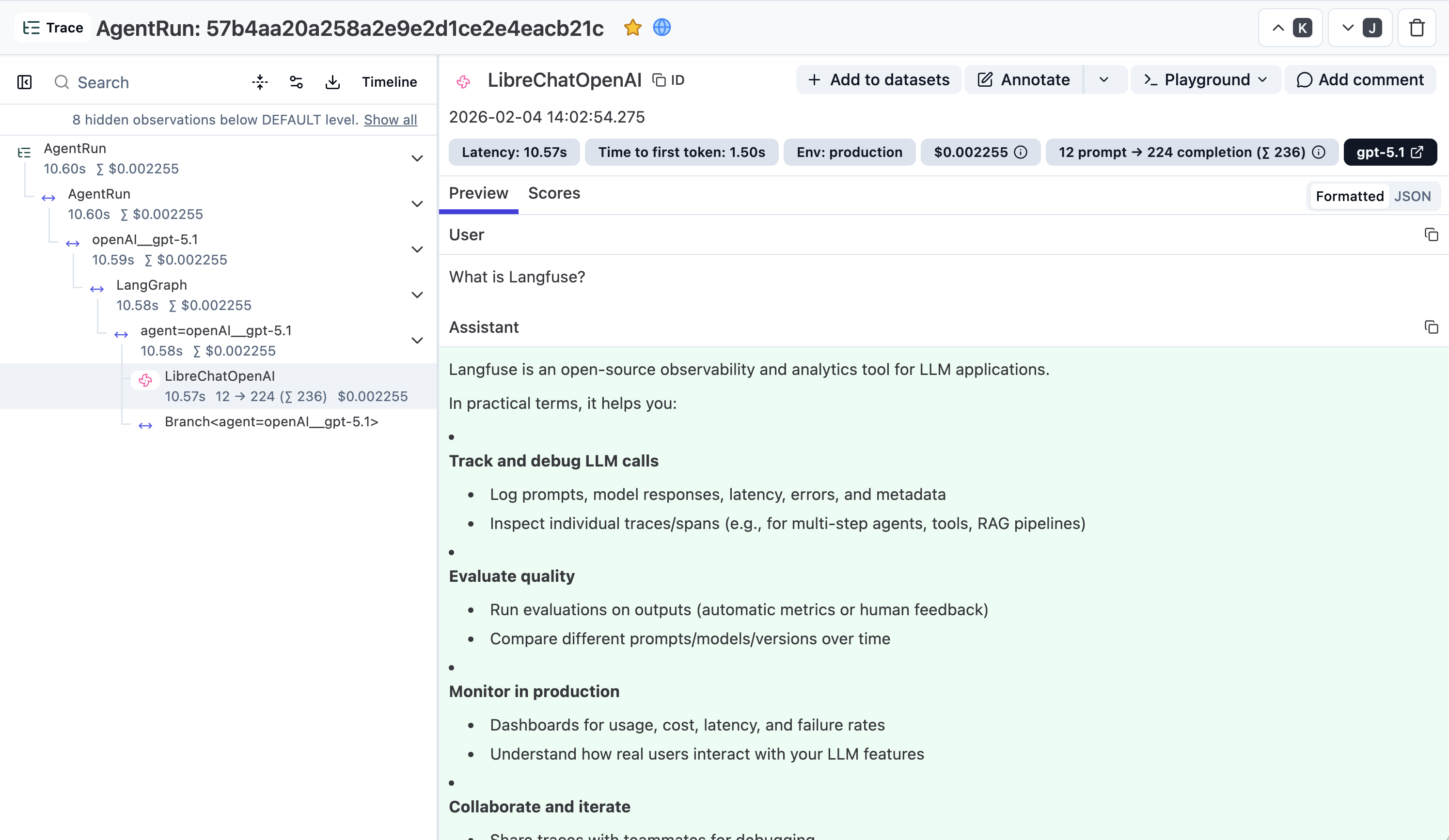
Link to trace in the Langfuse UI
Administrators with access:admin and manage:configs:langfuse can open the conversation's Context Usage breakdown and select View session in Langfuse. The same action can appear in a shared conversation for an authenticated, same-tenant administrator with Langfuse configuration access. Public and ordinary shared-link viewers never see it.
The link appears only after generation finishes and when the conversation contains at least one sampled trace sent to the active in-app Langfuse connection. It points to that connection's verified destination and project; it is not shown for environment-managed credentials, disabled connections, sampled-out conversations, cross-tenant viewers, or users without the required access.
Message Feedback Scores
When Langfuse tracing is configured, LibreChat also sends message feedback to Langfuse as a user-feedback BOOLEAN score on the matching trace. A thumbs-up rating is sent as 1, a thumbs-down rating is sent as 0, and any selected feedback tag or comment is included on the score. Clearing feedback deletes the score.
Feedback scores include message context metadata when available, including the message ID, parent message ID, conversation/session ID, user ID, endpoint, sender, isCreatedByUser, token count, rating, and feedback tag. Empty metadata values are omitted before the score is sent.
Feedback scores are only produced when the feedback buttons are available. Setting interface.feedback to false hides the buttons and rejects feedback writes, so no scores reach Langfuse.
Feedback scores use the same Langfuse credentials and base URL as tracing. They also respect LANGFUSE_TRACING_ENABLED=false, LANGFUSE_SAMPLE_RATE=0, and LANGFUSE_TRACING_ENVIRONMENT. Score delivery is best-effort, so the feedback UI does not block if Langfuse is temporarily unavailable.
How is this guide?
Automated Moderation
Configuration of the Automated Moderation System. This uses a scoring mechanism to track user violations. As users commit actions like excessive logins, registrations, or messaging, they accumulate violation scores. Upon reaching a set threshold, the user and their IP are temporarily banned. This system ensures platform security by monitoring and penalizing rapid or suspicious activities.
Logging System
This doc explains how to use the logging feature of LibreChat, which saves error and debug logs in the `/api/logs` folder. You can use these logs to troubleshoot issues, monitor your server, and report bugs. You can also disable debug logs if you want to save space.