Chaque clé sous `mcpServers` représente une configuration de serveur MCP individuelle, identifiée par un nom unique. Ce nom est utilisé pour référencer la configuration du serveur au sein de l'application.
(Optionnel) Nom d'affichage personnalisé pour le serveur MCP dans l'interface utilisateur. S'il n'est pas spécifié, le nom de la clé du serveur est utilisé.
title: "My Custom Server"
description
String
(Facultatif) Description du serveur MCP, affichée dans l'interface utilisateur pour aider les utilisateurs à comprendre son objectif.
description: "Provides file system access"
type
String
Spécifie le type de connexion au serveur MCP. Les options valides sont `"stdio"`, `"websocket"`, `"streamable-http"` ou `"sse"`. S'il est omis, il est défini par défaut en fonction de la présence et du format de `url` ou `command`.
type: "stdio"
command
String
(Pour le type `stdio`) La commande ou l'exécutable à exécuter pour démarrer le serveur MCP.
command: "npx"
args
Array of Strings
(Pour le type `stdio`) Arguments de ligne de commande à transmettre à la `command`.
(Pour les types `websocket`, `streamable-http` ou `sse`) L'URL pour se connecter au serveur MCP.
url: "http://localhost:3001/sse"
proxy
String
(Optionnel, pour les types `sse` et `streamable-http`) URL du proxy sortant pour ce serveur MCP distant. Prend en charge les URL `http://`, `https://`, `socks://` et `socks5://`.
proxy: "${MCP_PROXY_URL}"
headers
Object
(Optionnel, pour les types `sse` et `streamable-http`) En-têtes personnalisés à envoyer avec la requête. Prend en charge la substitution dynamique des champs utilisateur avec les espaces réservés `{{LIBRECHAT_USER_*}}` et les variables d'environnement avec `${ENV_VAR}`.
(Optionnel, pour les types `sse` et `streamable-http`) Configuration de l'authentification par clé API pour le serveur MCP.
See apiKey section below
iconPath
String
(Optionnel) Définit l'icône d'affichage de l'outil présentée dans la boîte de dialogue de sélection d'outils.
iconPath: "/path/to/icon.svg"
chatMenu
Boolean
(Optionnel) Lorsqu'il est défini sur `false`, exclut le serveur MCP du menu déroulant de la zone de chat (MCPSelect) pour un accès rapide et facile. La valeur par défaut est `true`.
chatMenu: false
serverInstructions
Boolean or String
(Facultatif) Contrôle la manière dont les instructions du serveur MCP sont injectées dans le contexte de l'agent. Les instructions du serveur fournissent des conseils d'utilisation de haut niveau pour l'ensemble du serveur MCP, complétant les descriptions des outils individuels.
serverInstructions: true
# or
serverInstructions: "Custom instructions"
timeout
Integer
(Optionnel) Délai d'expiration en millisecondes pour les requêtes du serveur MCP. Doit être un entier non négatif.
timeout: 30000
initTimeout
Integer
(Facultatif) Délai d'expiration en millisecondes pour l'initialisation du serveur MCP. Doit être un entier non négatif.
initTimeout: 10000
env
Object
(Optionnel, type `stdio` uniquement) Variables d'environnement à utiliser lors du lancement du processus.
env:
NODE_ENV: "production"
requiresOAuth
Boolean
(Optionnel, transports distants : `sse`, `streamable-http`, `websocket`) Indique si ce serveur nécessite une authentification OAuth. Si non spécifié, sera détecté automatiquement au démarrage du serveur. Bien qu'optionnel, il est préférable de définir explicitement cette valeur si vous savez si le serveur nécessite OAuth ou non. Définir `requiresOAuth: false` est utile pour les serveurs protégés par un en-tête `Authorization` statique, afin d'ignorer la détection automatique qui les classerait autrement à tort comme protégés par OAuth.
requiresOAuth: false
stderr
String or Integer
(Optionnel, type `stdio` uniquement) Comment gérer `stderr` du processus enfant. Options : `"pipe"`, `"ignore"`, `"inherit"`, ou un entier non négatif (descripteur de fichier). La valeur par défaut est `"inherit"`.
stderr: "inherit"
customUserVars
Object
(Facultatif) Définit des variables personnalisées que les utilisateurs peuvent configurer pour ce serveur MCP, permettant des identifiants ou des configurations par utilisateur (par exemple, des clés API). Ces variables peuvent ensuite être référencées dans les champs `headers` ou `env`.
customUserVars:
API_KEY:
title: "API Key"
description: "Your personal API key."
oauth
Object
(Facultatif) Configuration OAuth2 pour l'authentification avec le serveur MCP. Lorsqu'elle est configurée, les utilisateurs seront invités à s'authentifier via un flux OAuth.
(Facultatif) Mappage des noms et valeurs d'en-tête utilisés uniquement pour les requêtes de flux OAuth, telles que l'enregistrement dynamique de client ou l'échange de jetons.
(Optionnel, pour les types `sse` et `streamable-http`) Configuration de l'échange de jeton On-Behalf-Of. Échange le jeton d'accès OpenID de l'utilisateur actuel contre un jeton délégué en aval et le transmet en tant que jeton Bearer.
Description : Nom d'affichage personnalisé pour le serveur MCP dans l'interface utilisateur. S'il n'est pas spécifié, le nom de la clé du serveur est utilisé.
Exemple :
my-server:
  title: 'File System Access'
  command: npx
  args: ['-y', '@modelcontextprotocol/server-filesystem']
Description : Description du serveur MCP, affichée dans l'interface utilisateur pour aider les utilisateurs à comprendre son objectif et ses fonctionnalités.
Exemple :
my-server:
  title: 'File System Access'
  description: 'Provides read/write access to local files and directories'
  command: npx
  args: ['-y', '@modelcontextprotocol/server-filesystem']
Description : (Pour les types websocket, streamable-http ou sse) L'URL pour se connecter au serveur MCP. Prend en charge les espaces réservés dynamiques pour les champs utilisateur ({{LIBRECHAT_USER_*}}) et la substitution de variables d'environnement (${ENV_VAR}).
Notes :
Pour le type sse, l'URL doit commencer par http:// ou https://.
Pour le type streamable-http, l'URL doit commencer par http:// ou https://.
Pour le type websocket, l'URL doit commencer par ws:// ou wss://.
Type : Chaîne (Optionnel, pour les types sse et streamable-http)
Description : URL du proxy sortant pour ce serveur MCP distant. La valeur peut faire référence à des variables d'environnement avec ${ENV_VAR}.
Protocoles pris en charge :http://, https://, socks:// et socks5://
Note de sécurité :proxy est contrôlé par l'administrateur. Il résout les variables d'environnement, mais ne résout pas les espaces réservés contrôlés par l'utilisateur tels que {{LIBRECHAT_USER_ID}} ou customUserVars.
Type : Objet (Optionnel, pour les types sse et streamable-http)
Description : En-têtes personnalisés à envoyer avec la requête. Prend en charge divers types d'espaces réservés pour la substitution dynamique de valeurs.
Prise en charge des espaces réservés :
{{LIBRECHAT_USER_ID}} : Sera remplacé par l'ID de l'utilisateur actuel, permettant la prise en charge multi-utilisateurs.
{{LIBRECHAT_USER_*}} : Espaces réservés dynamiques pour les champs utilisateur. Remplacez * par la version en MAJUSCULES de n'importe quel champ autorisé.
{{LIBRECHAT_OPENID_*}} : espaces réservés pour les jetons/sessions OpenID pour les serveurs définis dans le YAML.
{{LIBRECHAT_GRAPH_*}} : espaces réservés de jeton Microsoft Graph pour les serveurs définis dans le fichier YAML.
{{LIBRECHAT_BODY_*}} : Espaces réservés du corps de la requête pour les serveurs définis en YAML, tels que les conversationId, parentMessageId ou messageId actuels.
{{CUSTOM_VARIABLE_NAME}} : Remplacé par la valeur fournie par l'utilisateur pour une variable définie dans customUserVars (par exemple, {{MY_API_KEY}}).
${ENV_VAR} : Sera remplacé par la valeur de la variable d'environnement {{ENV_VAR}}.
Espaces réservés disponibles pour les champs utilisateur :
Statut de vérification de l'e-mail ("true" ou "false")
{{LIBRECHAT_USER_TWOFACTORENABLED}}
twoFactorEnabled
Boolean → String
Statut de la double authentification (2FA) ("true" ou "false")
{{LIBRECHAT_USER_TERMSACCEPTED}}
termsAccepted
Boolean → String
Statut d'acceptation des conditions d'utilisation ("true" ou "false")
Remarque : Les champs manquants seront remplacés par des chaînes vides.
Les espaces réservés {{LIBRECHAT_BODY_*}} sont limités à la portée de la requête. LibreChat crée la connexion MCP pour l'exécution active, la réutilise lors des appels d'outils au cours de cette exécution, et la nettoie lorsque la requête se termine. Les serveurs limités à la portée de la requête sont exclus du cache d'outils persistant afin que les en-têtes et les URLs spécifiques à la requête ne soient pas réutilisés en dehors de l'exécution active. Les espaces réservés {{LIBRECHAT_USER_*}}, {{LIBRECHAT_OPENID_*}} et {{LIBRECHAT_GRAPH_*}} rendent toujours le serveur limité à la portée de l'utilisateur, mais les transports HTTP actualisent les en-têtes résolus avant chaque appel d'outil sans forcer eux-mêmes une reconnexion.
Type : Objet (Optionnel, pour les types sse et streamable-http)
Description : Configuration de l'authentification par clé API pour le serveur MCP. Fournit un moyen structuré de configurer l'authentification basée sur une clé API.
Type : Booléen ou Chaîne de caractères (Optionnel)
Description : Contrôle la manière dont les instructions du serveur MCP sont injectées dans le contexte de l'agent. Les instructions du serveur fournissent des conseils d'utilisation de haut niveau pour l'ensemble du serveur MCP, complétant ainsi les descriptions des outils individuels.
Options :
undefined (par défaut) : Aucune instruction n'est incluse
true : Utiliser les instructions fournies par le serveur (si disponibles) - idéal pour les serveurs bien documentés avec des conseils complets
false : Désactive explicitement les instructions - utile pour économiser des jetons de contexte ou lorsque les outils sont explicites.
string : Utilisez des instructions personnalisées (remplacent celles fournies par le serveur) - idéal pour les flux de travail spécifiques à une application ou lorsque les instructions du serveur sont insuffisantes
Valeur par défaut :undefined (aucune instruction incluse)
Notes :
Les instructions sont automatiquement injectées lorsque serverInstructions est configuré et que les outils du serveur sont disponibles pour l'agent.
Plusieurs serveurs peuvent chacun contribuer des instructions au contexte de l'agent
Exemple :
# Use server-provided instructionsserverInstructions: true# Use custom instructionsserverInstructions: | When using this filesystem server: 1. Always use absolute paths for file operations 2. Check file permissions before attempting write operations# Explicitly disable instructionsserverInstructions: false
Description : Variables d'environnement à utiliser lors du lancement du processus.
Prise en charge des espaces réservés :
{{LIBRECHAT_USER_ID}} : Remplacé par l'ID de l'utilisateur actuel.
{{LIBRECHAT_USER_*}} : Espaces réservés dynamiques pour les champs utilisateur (par ex. {{LIBRECHAT_USER_EMAIL}}).
{{CUSTOM_VARIABLE_NAME}} : Remplacé par la valeur fournie par l'utilisateur pour une variable définie dans customUserVars (par exemple, {{MY_API_KEY}}).
${ENV_VAR} : Remplacé par la valeur de la variable d'environnement côté serveur {{ENV_VAR}}.
Description : Indique si ce serveur nécessite une authentification OAuth. Si elle n'est pas spécifiée, elle sera détectée automatiquement lors du démarrage du serveur. Bien qu'elle soit facultative, il est préférable de définir explicitement cette valeur si vous savez si le serveur nécessite ou non OAuth.
Valeur par défaut : Détectée automatiquement si non spécifiée
Notes :
Applicable aux transports distants (basés sur une URL) : sse, streamable-http et websocket. Cela n'a aucun effet sur les serveurs stdio, qui n'ont pas d'URL pour l'authentification.
La détection automatique se produit lors du démarrage du serveur, ce qui peut augmenter le temps d'initialisation.
La configuration explicite améliore les performances de démarrage en ignorant la détection.
Définissez requiresOAuth: false pour les serveurs protégés uniquement par un en-tête Authorization statique (par exemple, une clé API Bearer). La détection automatique sonde le serveur sans vos en-têtes configurés, de sorte qu'un serveur répondant par un 401 avec un défi WWW-Authenticate: Bearer peut être classé à tort comme protégé par OAuth ; cet indicateur contourne cette sonde et permet à votre en-tête statique d'authentifier la connexion normalement.
Fonctionne avec les variables d'environnement MCP OAuth (MCP_OAUTH_ON_AUTH_ERROR, MCP_OAUTH_DETECTION_TIMEOUT, MCP_OAUTH_HANDLING_TIMEOUT, MCP_OAUTH_FLOW_TTL) pour une gestion améliorée des connexions
Type : Chaîne ou Entier (Optionnel, type stdio uniquement)
Description : Comment gérer stderr du processus enfant. Cela correspond à la sémantique de child_process.spawn de Node. Les valeurs de chaîne valides sont : "pipe", "ignore", "inherit". Alternativement, un entier non négatif peut être utilisé comme descripteur de fichier.
Valeur par défaut :"inherit" (les messages envoyés à stderr seront imprimés dans le stderr du processus parent).
Description : Définit des variables personnalisées que les utilisateurs peuvent configurer pour ce serveur MCP. Cela permet aux administrateurs de spécifier des variables (par exemple, des clés API, des URLs) que chaque utilisateur doit configurer individuellement. Ces valeurs fournies par l'utilisateur peuvent ensuite être utilisées dans les configurations headers ou env. Les serveurs avec customUserVars sont automatiquement exclus des connexions au niveau de l'application, garantissant que les identifiants par utilisateur sont toujours résolus au moment de l'exécution.
Structure :
L'objet customUserVars contient des clés, où chaque clé représente un nom de variable (par exemple, MY_API_KEY). Ce nom sera utilisé dans des espaces réservés comme {{MY_API_KEY}}.
Chaque nom de variable est un objet avec les sous-clés suivantes :
title: String (Requis) - Un titre convivial pour la variable, affiché dans l'interface utilisateur de configuration.
description: String (Optional) - A description or instructions for the variable, also displayed in the UI to guide the user. HTML can be used in this field (e.g., to create a link: <a href="https://example.com" target="_blank">More info</a>).
sensitive: Booléen (Optionnel) - Contrôle si la valeur est traitée comme un secret et masquée dans l'interface utilisateur. Le comportement par défaut est masqué/secret si omis ; définissez sur false pour les champs non secrets tels que les IDs de projet ou les URLs de base.
Utilisation dans headers et env :
Une fois définies sous customUserVars, ces variables peuvent être référencées dans les sections headers (pour les types sse et streamable-http) ou env (pour le type stdio) en utilisant la syntaxe {{VARIABLE_NAME}}.
Les utilisateurs fournissent ces valeurs via l'interface utilisateur. Ces paramètres sont accessibles de deux manières :
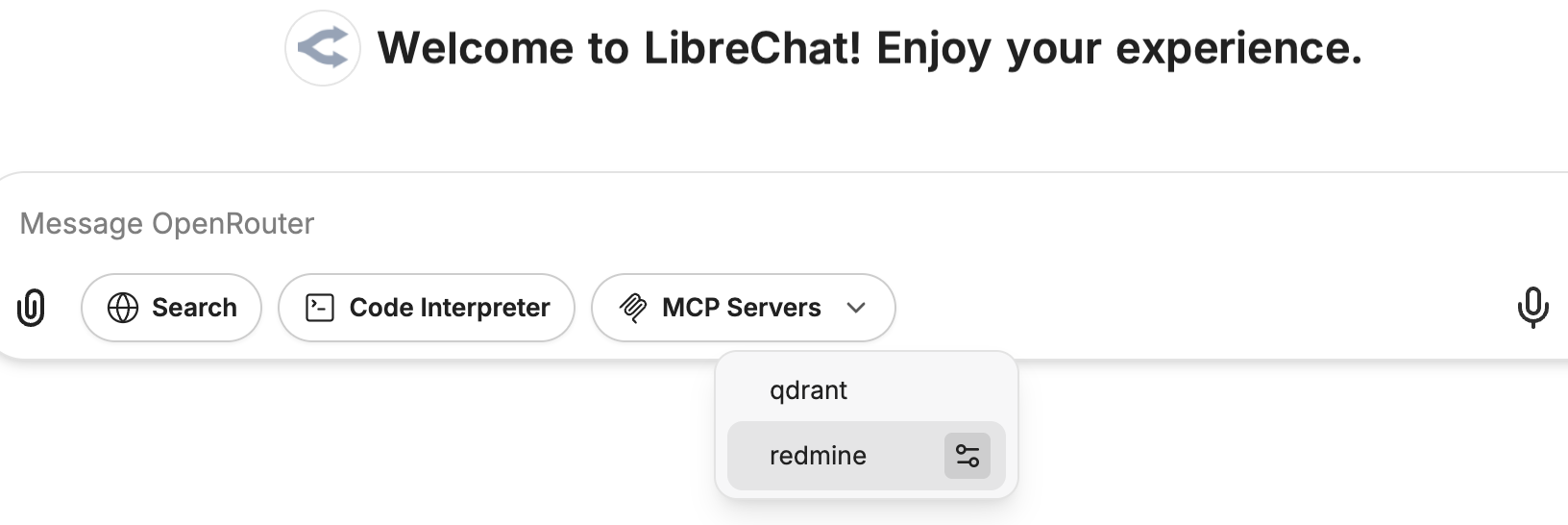
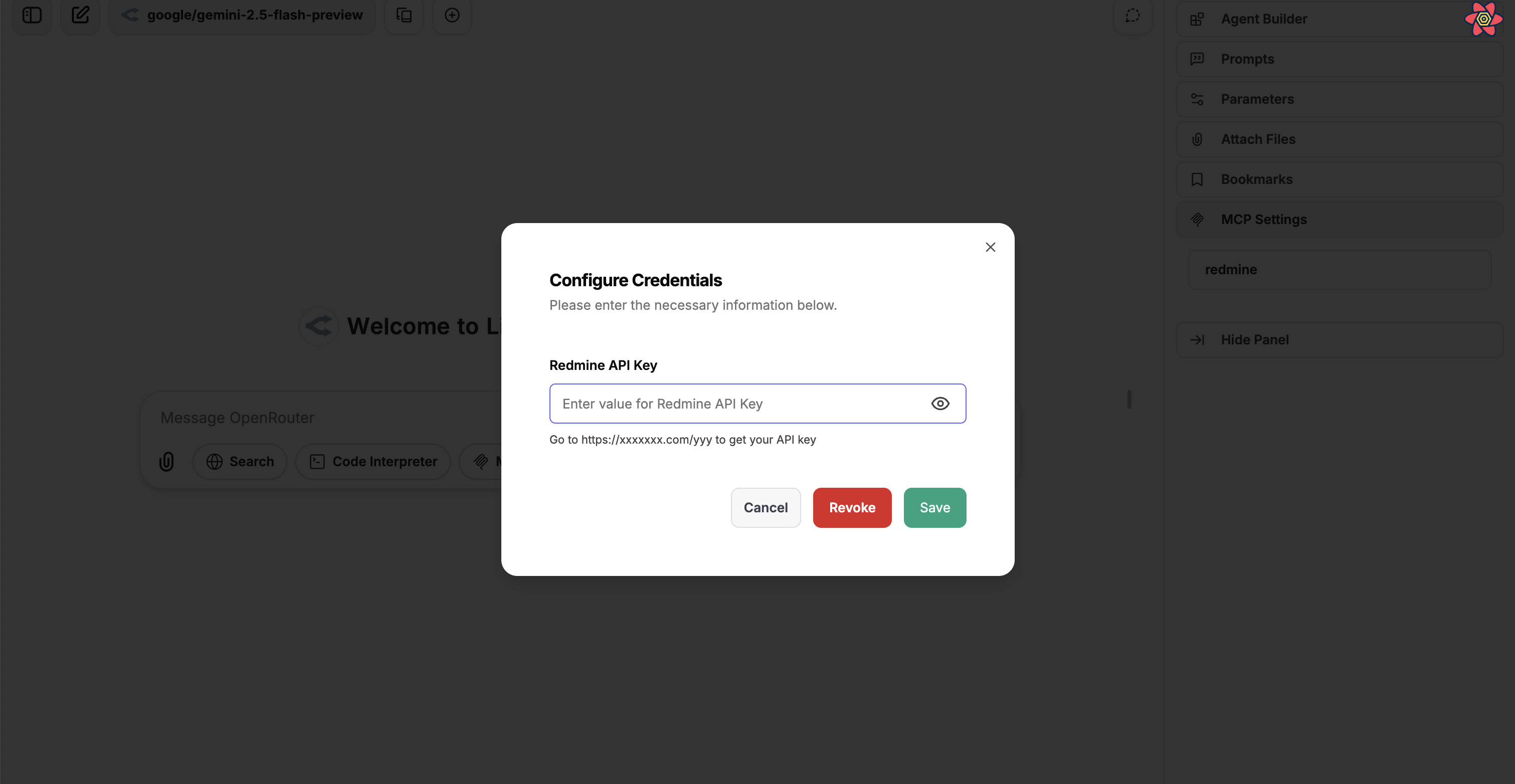
Depuis l'entrée de chat de l'assistant : Lors de la sélection d'outils MCP pour un assistant, une icône de paramètres apparaîtra à côté des serveurs MCP configurables dans le menu déroulant de sélection des outils. Cliquer sur cette icône ouvre une boîte de dialogue permettant de gérer les identifiants pour ce serveur.
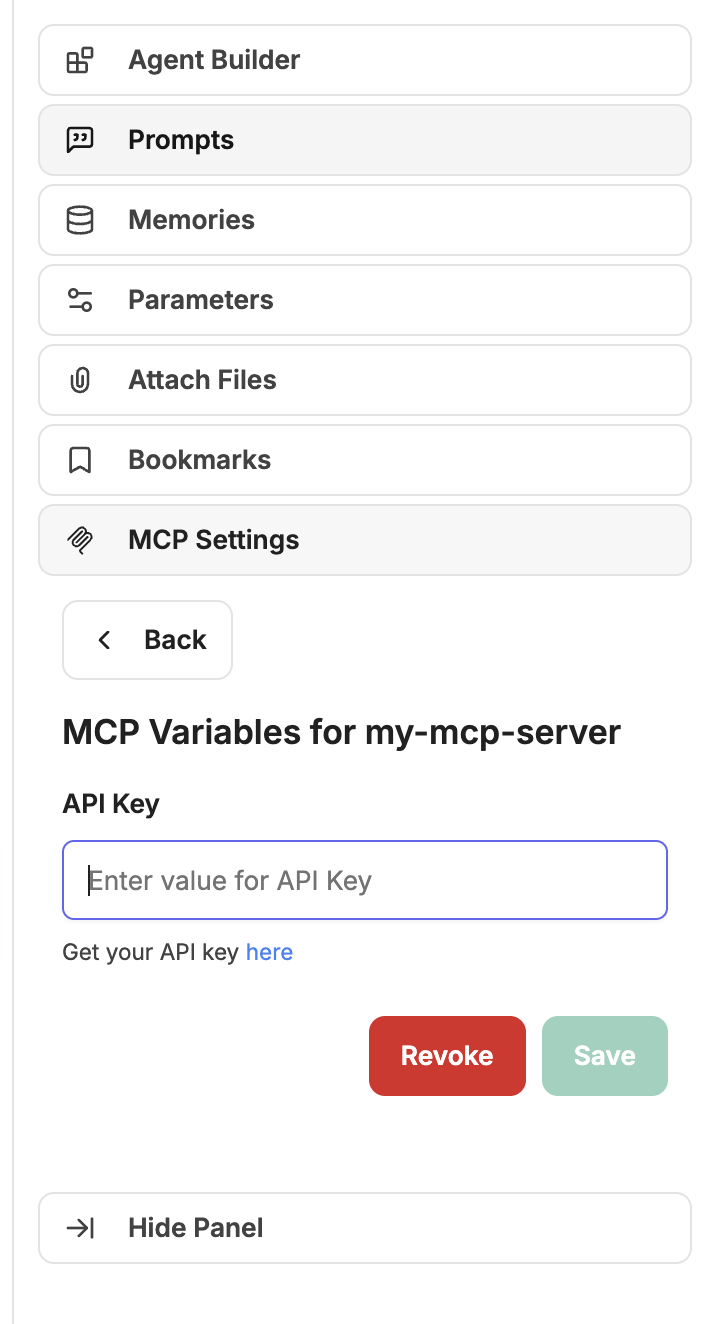
Depuis le panneau des paramètres : Une section dédiée "MCP Settings" dans le panneau de droite liste tous les serveurs MCP avec des variables personnalisées définissables. Les utilisateurs peuvent cliquer sur un serveur pour ouvrir la boîte de dialogue de configuration afin de définir ou de mettre à jour leurs identifiants pour ce serveur MCP spécifique.
Ces valeurs fournies par l'utilisateur sont stockées de manière sécurisée, associées à l'utilisateur individuel et au serveur MCP spécifique, puis substituées lors de l'exécution.
Exemple :
customUserVars:
  MY_SERVICE_API_KEY:
    title: 'My Service API Key'
    description: "Your personal API access key for My Service. Find it at <a href='https://myservice.example.com/settings/api' target='_blank'>My Service API Settings</a>."
    sensitive: true
  SOME_OTHER_VAR:
    title: 'Some Other Variable'
    description: 'The specific value for some other configuration (e.g., a specific path or identifier).'
    sensitive: false
Type : Objet (Optionnel, pour les types sse et streamable-http uniquement)
Description : Configure l'échange de jetons OAuth 2.0 On-Behalf-Of pour un serveur MCP. LibreChat échange le jeton d'accès OpenID de l'utilisateur connecté contre un jeton délégué en aval avec les portées (scopes) configurées, puis transmet ce jeton au serveur MCP sous la forme d'un en-tête Authorization: Bearer ....
Sous-clés requises :
scopes : String - Scopes non vides demandés pour l'échange de jetons en aval.
Validation :
obo est uniquement valide pour les serveurs MCP sse et streamable-http.
obo est rejeté pour les serveurs stdio et websocket.
Les utilisateurs ont besoin de l'autorisation de rôle MCP_SERVERS.CONFIGURE_OBO pour configurer ce champ. Initialisez-le avec interface.mcpServers.configureObo ou gérez-le depuis le panneau d'administration.
Prérequis :
L'authentification OpenID doit être configurée avec des jetons d'accès réutilisables.
Votre fournisseur d'identité et votre application en aval doivent autoriser la portée déléguée demandée.
Description : Configuration OAuth2 pour l'authentification avec le serveur MCP. Lorsqu'elle est configurée, les utilisateurs seront invités à s'authentifier via un flux OAuth avant que le serveur MCP puisse être utilisé. Si aucun client id ni client secret n'est fourni, l'enregistrement dynamique de client (DCR) sera utilisé.
Sous-clés requises :
authorization_url: String - L'URL du endpoint d'autorisation OAuth
token_url : String - L'URL de l'endpoint de jeton OAuth
client_id : Chaîne de caractères - Identifiant client OAuth
client_secret : Chaîne de caractères - Secret client OAuth
redirect_uri : Chaîne de caractères - URI de redirection OAuth (ex. http://localhost:3080/api/mcp/${serverName}/oauth/callback)
scope : String - Scopes OAuth (séparés par des espaces)
Sous-clés optionnelles :
grant_types_supported : Tableau de chaînes - Types d'octroi pris en charge (par défaut ["authorization_code", "refresh_token"])
token_endpoint_auth_methods_supported : Tableau de chaînes - Méthodes d'authentification du point de terminaison de jeton prises en charge (par défaut ["client_secret_basic", "client_secret_post"])
token_exchange_method : String - Méthode de requête d'échange de jeton. Utilisez default_post pour les fournisseurs qui attendent les identifiants client OAuth dans le corps de la requête POST.
response_types_supported : Tableau de chaînes - Types de réponse pris en charge (par défaut ["code"])
code_challenge_methods_supported : Tableau de chaînes - Méthodes de défi de code PKCE prises en charge (par défaut ["S256", "plain"])
skip_code_challenge_check : Booléen - Ignore la vérification de la prise en charge de PKCE par le fournisseur OAuth. Utile pour les fournisseurs comme AWS Cognito qui prennent en charge S256 mais ne l'annoncent pas dans leurs métadonnées. (par défaut : false)
Variables d'environnement : Les champs d'URL OAuth définis dans le YAML, y compris authorization_url, token_url, redirect_uri et revocation_endpoint, peuvent utiliser des références ${ENV_VAR}. LibreChat résout la valeur de l'environnement avant la validation de l'URL. Les URL de point de terminaison OAuth gérées par l'utilisateur et soumises via l'interface utilisateur doivent être des URL littérales et rejeter les espaces réservés ${ENV_VAR}.
Description : En-têtes utilisés spécifiquement pour les requêtes de flux OAuth. Ces en-têtes sont utilisés lors de l'authentification OAuth, telle que l'enregistrement dynamique de client et l'échange de jetons, et ne sont pas envoyés lors de la communication habituelle avec le serveur MCP.
Cas d'utilisation courants :
Ajout de l'authentification aux endpoints d'enregistrement dynamique de client, tels que Authorization: Bearer ${DCR_API_KEY}
Inclure des en-têtes personnalisés spécifiques au fournisseur requis pour les flux OAuth
Configuration des en-têtes requis par les points de terminaison de jeton OAuth
Principales différences par rapport à headers :
headers : Envoyés avec les requêtes régulières du serveur MCP une fois l'authentification terminée
oauth_headers : Envoyé uniquement lors des flux d'authentification OAuth
Description : Lorsqu'il est défini sur false, ce serveur MCP ne sera pas connecté au démarrage de l'application. Ceci est utile pour les serveurs qui nécessitent une saisie utilisateur ou une configuration avant la connexion, ou pour les cas où vous souhaitez contrôler le moment où le serveur est initialisé.
Si url est spécifié et commence par http:// ou https://, type est défini par défaut sur sse.
Si url est spécifié et commence par ws:// ou wss://, type prend websocket comme valeur par défaut.
Si command est spécifié, type est défini par défaut sur stdio.
Types de connexion :
stdio : Démarre un serveur MCP en tant que processus enfant et communique via l'entrée/sortie standard.
websocket : Se connecte à un serveur MCP externe via WebSocket.
sse: Se connecte à un serveur MCP externe via Server-Sent Events (SSE).
streamable-http : Se connecte à un serveur MCP externe via HTTP avec prise en charge des réponses en streaming.
Adresses internes/locales :
Important : Les serveurs MCP utilisant des adresses IP internes (par exemple, 172.24.1.165, 192.168.1.100) ou des domaines locaux (par exemple, mcp-server, host.docker.internal) doivent être explicitement autorisés. Utilisez mcpSettings.allowedAddresses pour des services hôte:port privés spécifiques lorsque vous souhaitez que les destinations publiques restent accessibles, ou mcpSettings.allowedDomains lorsque vous souhaitez une liste blanche stricte.
Voir MCP Settings pour les détails de configuration.
Lorsque vous utilisez des serveurs MCP internes/locaux et qu'aucune liste blanche de domaines stricte n'est nécessaire, configurez mcpSettings.allowedAddresses avec l'hôte et le port exacts :
# MCP Settings - Required for internal/local addressesmcpSettings: allowedAddresses: - '172.24.1.165:8000' # Internal IP and port - 'mcp-prod:8001' # Docker container and port - 'host.docker.internal:8080' # Docker host and port# MCP Servers - Individual configurationsmcpServers: prod-mcp: type: streamable-http url: http://172.24.1.165:8000/mcp timeout: 120000 test-mcp: type: streamable-http url: http://mcp-prod:8001/mcp timeout: 120000
my-mcp-server:
  type: streamable-http
  url: 'https://api.example-service.com/api/' # Example URL
  headers:
    X-Auth-Token: '{{API_KEY}}' # Uses the API_KEY defined below
  customUserVars:
    API_KEY: # This key will be used as {{API_KEY}} in headers/url
      title: 'API Key' # This is the label shown above the input field
      description: "Get your API key <a href='https://example.com/api-keys' target='_blank'>here</a>." # This description appears below the input
REMARQUE Voir MCP Server Initialization pour plus d'informations sur l'initialisation du serveur basée sur l'interface utilisateur.
# Server that uses its own provided instructionsweb-search: type: streamable-http url: https://example.com/mcp/search serverInstructions: true# Server with instructions explicitly disabledfilesystem: command: npx args: - -y - '@modelcontextprotocol/server-filesystem' - /home/user/documents/ serverInstructions: false# Server with custom instructionspuppeteer: type: stdio command: npx args: - -y - '@modelcontextprotocol/server-puppeteer' serverInstructions: | Browser automation security and best practices: 1. Be cautious with local file access and internal IP addresses 2. Take screenshots to verify successful page interactions 3. Wait for page elements to load before interacting with them 4. Use specific CSS selectors for reliable element targeting 5. Check console logs for JavaScript errors when troubleshooting
# OAuth configuration for MCP serversMCP_OAUTH_ON_AUTH_ERROR=trueMCP_OAUTH_DETECTION_TIMEOUT=10000MCP_OAUTH_HANDLING_TIMEOUT=600000MCP_OAUTH_FLOW_TTL=900000# API key for the serviceCOMPOSIO_API_KEY=your_composio_api_key_here
Importation des configurations de serveur MCP
Les configurations mcpServers permettent à LibreChat d'interagir dynamiquement avec divers serveurs MCP, lesquels peuvent effectuer des tâches spécialisées ou fournir des fonctionnalités spécifiques au sein de l'application. Cette approche modulaire facilite l'extension des capacités de l'application en ajoutant ou en modifiant simplement les configurations des serveurs.
L'initialisation se produit au démarrage, et l'application doit être redémarrée pour que les modifications prennent effet.
Si url et command sont tous deux spécifiés, le type doit être explicitement défini pour éviter toute ambiguïté.
Support multi-utilisateur :
Le MCPManager prend désormais en charge des connexions distinctes au niveau de l'utilisateur et au niveau de l'application, permettant une gestion appropriée des connexions par utilisateur.
Les connexions des utilisateurs sont suivies et gérées séparément, avec un établissement et un nettoyage appropriés.
Utilisez des espaces réservés dynamiques pour les champs utilisateur dans les en-têtes, les URLs et les variables d'environnement :
{{LIBRECHAT_USER_ID}} - Identifiant unique de l'utilisateur
{{LIBRECHAT_USER_EMAIL}} - Adresse e-mail de l'utilisateur
{{LIBRECHAT_USER_USERNAME}} - Nom d'utilisateur de l'utilisateur
{{LIBRECHAT_USER_ROLE}} - Rôle de l'utilisateur (par ex. "user", "admin")
Et bien d'autres champs (voir la section headers pour la liste complète)
Gestion de l'inactivité de l'utilisateur :
Les connexions des utilisateurs sont surveillées pour détecter toute activité et seront déconnectées après 15 minutes d'inactivité.
Variables d'environnement :
Dans env (pour le type stdio) : Utile pour configurer des environnements d'exécution spécifiques ou des configurations requises par le processus du serveur MCP.
Dans headers (pour les types sse et streamable-http) : Utilisez la syntaxe ${ENV_VAR} pour référencer des variables d'environnement dans les valeurs d'en-tête.
Champs utilisateur dynamiques :
Les espaces réservés des champs utilisateur sont remplacés lors de l'exécution par les informations de l'utilisateur authentifié.
Seuls les champs non sensibles sont disponibles (les mots de passe et autres données sensibles sont exclus)
Les champs manquants sont définis par défaut comme des chaînes vides
Les champs booléens sont convertis en représentations textuelles ("true" ou "false")
Gestion des erreurs (stderr) :
La configuration de stderr vous permet de gérer la manière dont les messages d'erreur provenant du processus du serveur MCP sont traités. La valeur par défaut "inherit" signifie que les erreurs seront imprimées dans le stderr du processus parent.
Instructions du serveur :
Les instructions sont automatiquement injectées dans le message système de l'agent lorsque les outils du serveur MCP sont utilisés.
Les instructions personnalisées (valeurs de type string) prévalent sur les instructions fournies par le serveur
Plusieurs serveurs MCP peuvent chacun contribuer leurs propres instructions au contexte de l'agent
Les instructions ne sont incluses que lorsque les outils du serveur MCP correspondant sont réellement disponibles pour l'agent.
Authentification OAuth :
Le flux OAuth2 est pris en charge pour une authentification sécurisée avec les serveurs MCP.
Les utilisateurs seront invités à s'authentifier via OAuth avant que le serveur MCP puisse être utilisé
En configurant correctement les mcpServers dans votre librechat.yaml, vous pouvez améliorer les fonctionnalités de LibreChat et intégrer des outils et services personnalisés de manière transparente.
 LibreChat