 LibreChat
Code Interpreter API
LibreChat의 Code Interpreter API로 코드를 안전하게 실행하고 파일을 원활하게 관리하세요
소개
LibreChat의 Code Interpreter API는 간단한 API 인터페이스를 통해 코드를 실행하고 파일을 관리할 수 있는 안전하고 간편한 방법을 제공합니다. LibreChat의 Agents를 통해 사용하든 애플리케이션에 직접 통합하든, 이 API는 여러 프로그래밍 언어로 코드를 실행할 수 있는 강력한 샌드박스 환경을 제공합니다.
오픈 소스
LibreChat의 Code Interpreter는 오픈 소스(Apache 2.0) 샌드박스 코드 실행 서비스인 ClickHouse/code-interpreter로 구동됩니다. 이를 직접 호스팅하고 LibreChat이 해당 인스턴스를 가리키도록 설정하세요.
시작하기
- code-interpreter 서비스를 배포하세요(Docker Compose 또는 Helm 사용, 저장소의 README 참조)
LIBRECHAT_CODE_BASEURL및LIBRECHAT_CODE_API_KEY환경 변수를 사용하여 LibreChat이 해당 위치를 가리키도록 설정하세요.- LibreChat의 에이전트 또는 "Run Code" 버튼을 통해 안전하게 코드를 실행하고 파일을 생성하세요.
주요 기능
지원되는 언어
여러 프로그래밍 언어로 코드 실행:
- Python, Node.js (JS/TS), Go, C/C++, Java, PHP, Rust, Fortran, Rscript
원활한 파일 처리
- 처리를 위해 파일 업로드
- 생성된 출력물 다운로드
- 안전한 파일 관리
- 세션 기반 파일 구성
보안 및 편의성
- 안전한 샌드박스 실행 환경
- 강력한 격리 모드 (NsJail 또는 libkrun을 통한 microVM)
- 최종 사용자에게는 로컬 설정이 필요하지 않습니다
- 세션 기반의 격리된 파일 저장소
Programmatic Tool Calling
Programmatic Tool Calling을 사용하면 LibreChat 에이전트가 선택된 MCP 도구를 Code Interpreter 샌드박스를 통해 라우팅할 수 있습니다. 모델에게 각 도구를 직접 호출하도록 요청하는 대신, LibreChat은 Code Interpreter 기반의 오케스트레이션 도구를 제공합니다. 생성된 샌드박스 코드는 등록된 도구 스텁을 호출하고, 루프와 조건문을 사용하며, 중간 결과를 처리하고, 최종 답변을 반환할 수 있습니다.
샌드박스는 여전히 일반적인 네트워크 액세스를 수신하지 않습니다. 도구 호출은 Code Interpreter Tool Call Server와 LibreChat에 등록된 도구 맵을 통해 중개되므로, 에이전트가 사용할 수 있는 도구만 호출할 수 있습니다.
API 사용하기
LibreChat에서
LibreChat은 다음의 주요 방법을 통해 API를 일급 지원합니다:
-
AI Agents: 에이전트 구성에서 Code Interpreter를 활성화하여 코드를 실행하고 파일을 자동으로 처리할 수 있도록 합니다.
-
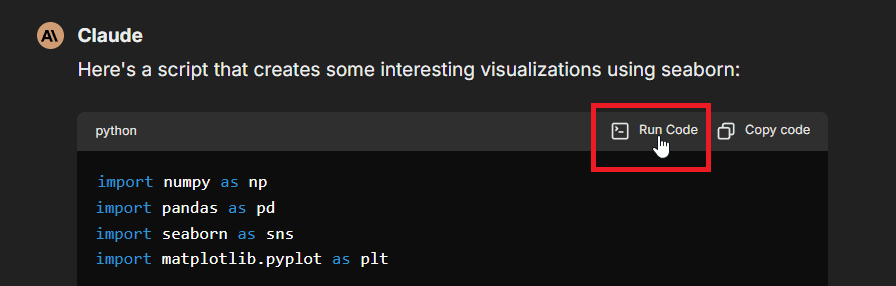
수동 실행: 아래와 같이 채팅 인터페이스 내 코드 블록에 있는 "Run Code" 버튼을 사용하세요:
-
Programmatic Tool Calling:
programmatic_tools기능을 활성화하고 선택한 MCP 도구를 Programmatic으로 표시하여 에이전트가 샌드박스 환경의 코드에서 해당 도구를 오케스트레이션할 수 있도록 합니다.
API 키 설정
- 사용자별 설정: 메시지가 표시되면 LibreChat에 API 키를 입력하세요(위의 방법 사용).
- 전역 설정: 프로젝트의 .env 파일에서
LIBRECHAT_CODE_API_KEY환경 변수를 사용하세요 (모든 사용자에게 액세스 권한을 제공합니다)
직접 API 통합
Code Interpreter API는 간단한 API 키 인증을 사용하여 모든 애플리케이션에 통합할 수 있습니다:
- 자체 code-interpreter 인스턴스를 배포하고 API 키를 생성하세요
x-api-key헤더를 사용하여 요청에 API 키를 포함하세요.
자체 호스팅 기본 URL
LIBRECHAT_CODE_BASEURL 환경 변수를 설정하여 LibreChat이 사용자가 직접 호스팅하는 code-interpreter 인스턴스를 가리키도록 하고, 해당 배포에서 생성된 API 키를 위와 동일한 방식으로 사용하세요.
핵심 기능
코드 실행
- 지원되는 언어로 코드 스니펫 실행
- stdout/stderr 출력 수신
- 실행 통계(메모리 사용량, CPU 시간) 가져오기
- 프로그램 인자 처리
- 실행 상태 및 결과에 액세스
파일 작업
- 입력 파일 업로드
- 생성된 출력물 다운로드
- LibreChat이 Office, CSV, 텍스트 및 PDF와 유사한 아티팩트를 안전하게 추출/렌더링할 수 있을 때 인라인으로 미리 보기 생성
- 사용 가능한 파일 목록
- 불필요한 파일 삭제
- 파일 세션 관리
생성된 아티팩트 미리보기는 의도적으로 크기가 제한되어 있습니다. 인라인 미리보기 추출을 위한 소스 파일 크기 제한을 변경하려면 LibreChat의 .env 파일에서 FILE_PREVIEW_MAX_EXTRACT_BYTES를 설정하세요. 더 큰 파일은 계속해서 다운로드할 수 있습니다.
제한 사항
- 코드는 네트워크에 액세스할 수 없습니다
- 실행당 최대 10개의 파일만 생성할 수 있습니다.
- 리소스 제한(실행당 RAM, 파일 업로드 크기 및 요청 할당량)은 배포를 프로비저닝하고 구성하는 방식에 따라 달라집니다.
사용 사례
- 코드 테스트: 여러 언어로 된 코드 스니펫을 테스트합니다
- File Processing: 프로그래밍 방식으로 파일 변환 및 분석
- AI Applications: AI가 생성한 코드를 안전하게 실행
- Development Tools: 대화형 코딩 환경 구축
- Objective Logic: 코드 로직과 정확성을 검증하여 AI 모델을 개선합니다.
오픈 소스 및 셀프 호스팅
Code Interpreter 서비스는 ClickHouse/code-interpreter에서 Apache 2.0 라이선스로 오픈 소스화되어 있습니다. 코드 실행을 별도의 서비스로 유지하면 핵심 LibreChat 애플리케이션을 가볍게 유지할 수 있습니다. 즉, 필요할 때만 샌드박스 인프라를 배포하면 되며, 채팅 앱과 독립적으로 확장할 수 있습니다.
이 서비스는 독립적으로 확장 가능한 구성 요소(API 게이트웨이, 샌드박스 워커, 파일 서버) 세트로 실행되며, 신뢰할 수 없는 코드를 안전하게 실행할 수 있도록 강력한 격리 모드(NsJail 또는 libkrun을 통한 microVM)를 지원합니다. Docker Compose 및 Helm 배포 지침은 저장소의 README를 참조하세요.
결론
Code Interpreter API는 격리된 샌드박스 환경에서 코드를 실행하고 파일을 관리할 수 있는 안전하고 편리한 방법을 제공합니다. LibreChat의 Agents를 통해 사용하든 애플리케이션에 직접 통합하든, 코드 실행 요구 사항을 위한 강력한 솔루션을 제공합니다.
상세한 기술 사양, 배포 가이드 및 API 참조는 code-interpreter repository를 참조하세요.
#LibreChat #CodeExecution #API #Development
이 가이드는 어떤가요?