 LibreChat
Code Interpreter API
Execute code securely and manage files seamlessly with LibreChat's Code Interpreter API
Introduction
LibreChat's Code Interpreter API provides a secure and hassle-free way to execute code and manage files through a simple API interface. Whether you're using it through LibreChat's Agents or integrating it directly into your applications, the API offers a powerful sandbox environment for running code in multiple programming languages.
Open source
LibreChat's Code Interpreter is powered by ClickHouse/code-interpreter, an open-source (Apache 2.0) sandboxed code-execution service. Self-host it and point LibreChat at your own instance.
Getting Started
- Deploy the code-interpreter service (Docker Compose or Helm, see the repository's README)
- Point LibreChat at it with
LIBRECHAT_CODE_BASEURL - Configure LibreChat JWT authentication for the current open-source service, or set
LIBRECHAT_CODE_API_KEYfor an API-key-compatible deployment - To experiment with stateful Agent sessions, deploy a separate
stateful-profile Code Interpreter route and configureLIBRECHAT_CODE_BASEURL_STATEFULor namedstatefulCodeSessions.environments - Start executing code and generating files securely through LibreChat's Agents or the "Run Code" button
Key Features
Supported Languages
Execute code in multiple programming languages:
- Python, Node.js (JS/TS), Go, C/C++, Java, PHP, Rust, Fortran, Rscript
Seamless File Handling
- Upload files for processing
- Download generated outputs
- Secure file management
- Session-based file organization
LibreChat restores referenced conversation files into managed Code Interpreter environments before an Agent run. If every required Code Interpreter file fails recovery, the run stops before model invocation and asks the user to reattach the files rather than continuing with stale references. In a selected attached workspace, chat uploads are not copied into the user's workspace, and workspace file and Bash tools cannot open them there. If the worker advertises Programmatic Bash with file relay, that tool instead sees staged uploads under $LIBRECHAT_CODE_DATA_DIR for the duration of its run.
Code API uploads recover from 429 rate limits by honoring Retry-After, reopening the source stream for each attempt, and sharing a bounded wait budget. Administrators can tune per-user, per-route recovery with codeApiUploadConcurrency and codeApiMaxRetryWaitMs.
When conversation inputs would mount at the same sandbox destination, LibreChat resolves the collision before execution. Shared conversation files are assigned before Agent-private files; within each scope, the newest content write keeps the original destination. Conflicting paths are flattened when needed or receive an identity-derived suffix, and the resolved /mnt/data/... paths are included in the Agent's file context. This also covers an upload and a generated output that share a filename, so one collision does not reject every later Code Interpreter run in the conversation. Duplicate seed references that still resolve to an already-claimed destination are skipped instead of failing the complete request.
Sandbox images are transferred in bounded windows. Set LIBRECHAT_CODE_SANDBOX_OUTPUT_MAX_SIZE to match the worker's SANDBOX_OUTPUT_MAX_SIZE; LibreChat derives the largest safe image window from that budget and can learn a smaller per-service limit after one failed read. Use LIBRECHAT_CODE_IMAGE_CHUNK_BYTES only when an exact window override is required. Previously downloaded generated artifacts are reused within the request when possible, avoiding another sandbox read.
In a multi-Agent graph, give files private to different Agents distinct filenames. Each Agent resolves its private file paths before the graph combines their inputs, so genuinely different private files that independently claim the same destination cannot yet be renamed consistently at merge time; the first seeded destination wins.
Security & Convenience
- Secure sandboxed execution environment
- Strong isolation modes (NsJail or microVM via libkrun)
- No local setup required for end users
- Session-based, isolated file storage
Programmatic Tool Calling
Programmatic Tool Calling lets LibreChat Agents route selected MCP tools through the Code Interpreter sandbox. Instead of asking the model to call each tool directly, LibreChat provides a Code Interpreter-backed orchestration tool; generated sandbox code can call registered tool stubs, use loops and conditionals, process intermediate results, and return a final answer.
The sandbox still does not receive general network access. Tool calls are brokered through the Code Interpreter Tool Call Server. LibreChat intersects the live caller-capability projection with its trusted registry, so only active programmatic tools already registered for the Agent can be called and a request cannot expand its own access.
Programmatic tools require Code Interpreter on the Agent. Their toggles stay disabled until Code Interpreter is selected, and removing Code Interpreter clears existing Programmatic selections. LibreChat also strips stale programmatic caller options from Agent create, update, duplicate, and version-restore operations when execute_code or the Code Interpreter tool is unavailable.
During a programmatic execution, expand the Code Interpreter card to see a live terminal-style trace of inner tool calls with bounded argument previews, statuses, durations, and failures. This trace helps inspect the program while it runs, but it is not persisted across a page reload.
Background Code Execution
Background execution lets an Agent dispatch long-running code or shell work and continue the conversation. For saved Agents, supported content-only completions are delivered automatically in a follow-up continuation by default. check_background_task remains available for explicit status, control, live artifacts, and recovery. In LibreChat chat, when the work finishes, stdout and generated files appear on the original code call and are persisted for subsequent turns. Background completions and explicit checks render task cards with status, delivery state, and readable results; the exact original result remains available to copy. The chat header groups running and recent tasks and offers individual or stop-all controls when permitted by the deployment's cancellation policy.
This feature is opt-in at the deployment level. Add run_in_background alongside execute_code in the Agents endpoint capabilities, then enable Code Interpreter on the agent. Code execution and shell calls become background-eligible automatically; turn off Background execution in the Code Interpreter tool settings when an agent should opt out. The model still decides per call whether to dispatch eligible work in the background.
Ordinary background execution remains process-local and does not survive the loss of its app worker. Once a content-only terminal result is persisted, its automatic delivery is durable and may continue on another replica; tasks with a live artifact still require polling on the owning run. Set endpoints.agents.backgroundTasks.completionWakeups: false to require polling for every result. Background dispatch does not extend the Code Interpreter service's execution limit; the deployment's normal server-side timeout still applies.
With ordinaryToolCancellation: true, owners can request cooperative cancellation of ordinary background Code tools, including attached Bash. The task remains active and consumes capacity until the invocation settles; a tool that ignores cancellation may still complete.
Stateful Code Sessions
Stateful code sessions let a LibreChat Agent reuse one Code Interpreter sandbox workspace across executions. Files, installed packages, and working state usually carry over, making iterative analysis and multi-step file generation more efficient. Each agent selects one workspace scope:
- User workspace (recommended): one workspace for the signed-in user across stateful-enabled agents
- Agent + user workspace: one workspace for each user and agent combination
- Conversation workspace: one workspace for each user and conversation
For newly created Agents, the initial scope comes from Settings > Data Controls > Code execution > Default stateful workspace. The personal setting defaults to User workspace; changing it does not modify existing Agents or enable stateful sessions. Deployment administrators can restrict selectable scopes with statefulCodeSessions.allowedEnvironments. If a saved personal default becomes unavailable, new Agents use the first allowed scope; an existing enabled Agent with a now-disallowed scope must be reconfigured before it can run.
The workspace scope is separate from its execution backend. When administrators configure named statefulCodeSessions.environments, the Agent Builder adds an Execution environment selector:
- Managed: a stateful Code API operated by the deployment
- Attached: a compatible Code API remote bridge that leases work to an outbound
@librechat/codeworker, such as an operator-managed VM - Personal: an owner-bound
@librechat/codeworker paired by an authorized user through LibreChat settings - Deployment default: the one configured environment marked as the default
Highly experimental
Stateful Code Sessions are in an early experimentation phase. Their behavior, configuration, persistence characteristics, and underlying integration may change substantially. Do not treat the current implementation as a stable production contract.
This feature is opt-in. Enable execute_code and stateful_code_sessions in the Agents endpoint capabilities, configure a dedicated stateful route with LIBRECHAT_CODE_BASEURL_STATEFUL or named environments, enable Code Interpreter on the agent, then turn on Stateful code sessions and choose its execution backend and workspace scope under Advanced settings.
Stateful requests fail closed when the selected environment is missing, inaccessible, or incompatible; LibreChat does not send them to LIBRECHAT_CODE_BASEURL or silently choose another named backend. When no named environments are configured, LIBRECHAT_CODE_BASEURL_STATEFUL remains the stateful route. Stateless agents continue using the normal endpoint. LibreChat also sends X-CodeAPI-Expected-Profile: stateful, so the dedicated service must advertise the stateful profile.
Stateful and stateless sessions do not share a live workspace. The stateful workspace may reset at any time, regardless of its selected scope. In managed Code Interpreter environments, save important outputs under /mnt/data, and do not otherwise rely on session state as durable storage. An attached workspace is a separate worker-owned directory; uploads are not placed there by default.
Files authored by stateful create_file and edit_file calls appear on the assistant message under an expandable Workspace changes row. It lists each unique changed path for that response and provides an authenticated download action. Downloads use LibreChat's persisted file flow when available and a secure Code Interpreter fallback otherwise. The row is a record of authored outputs, not a durable workspace snapshot; stateless outputs continue to appear as regular inline attachments.
Attached environments and pairing
Attached environments require a matching experimental Code Interpreter remote-bridge build. The bridge remains LibreChat's authenticated policy, queue, and result boundary, while the @librechat/code worker connects outbound from the attached machine; the machine does not need an inbound public worker port. LibreChat does not prewarm attached environments.
An operator can pin a deployment-owned attached environment to one worker with workerId, and can add pairing.workerId when LibreChat should issue an administrator pairing code for that same route. pairing.tokenEnv names the environment variable containing the bridge administrator token; the secret itself never belongs in YAML. Paired control planes require HTTPS outside loopback development.
For self-service workers, configure a deployment-owned attached control plane with pairing.allowPrincipalWorkers: true and pairing.tokenEnv. It may omit both worker IDs and exist only as an enrollment control plane; such an entry is not selectable for execution and cannot be the deployment default.
Users with Code Environment management permission can then open Settings > Code environments, name an environment, choose an approved control plane, and select Connect VM. LibreChat shows a short-lived, one-time librechat-code pair ... command. Run it on the user's VM, then start @librechat/code with LIBRECHAT_CODE_SANDBOX_ENDPOINT pointing to that machine's sandbox service. The UI lists the user's environments and can revoke and remove them later; sandbox files remain on the VM.
Administrators can bound enrollment with statefulCodeSessions.principalWorkers. Enrollment defaults to enabled with at most five registered environments per user when this block is omitted. The count includes offline workers across every control plane. Deployment configuration is the ceiling: principal-specific configuration may lower or disable it, but cannot raise it. Tightening the policy does not revoke machines that are already registered.
Personal environments are bound to the authenticated user and tenant, protected by Code Environment ACLs, and assigned only server-validated IDs and approved base URLs. LibreChat does not expose the bridge administrator token or arbitrary operator URLs to the client. Removing an environment revokes its worker credential before deleting the registry entry, and user deletion schedules the same revocation and cleanup with background reconciliation for interrupted attempts. The selected worker route applies consistently to Code Interpreter, shell, generated-file access, and Programmatic Tool Calling.
Agents using an attached workspace can list its directory tree, read files, search file contents, create or edit files, and run Bash on the selected worker. File citations use workspace-relative paths, authored files appear in the response's Workspace changes row, and tool failures preserve the worker's bounded HTTP diagnostics. An Agent can also store a per-Agent Git name and email for commits created in that workspace; these values configure authorship only and do not provide repository credentials.
In the chat, a failed attached-workspace Bash command shows its exit code, terminating signal, or timeout, and its stderr is styled separately from stdout. See Activity Groups for how Bash output is displayed.
An attached worker advertises the workspace roots it makes available. The composer lets the user select one workspace for each attached environment reachable through the Agent or its Subagents; a single unambiguous workspace is selected automatically for a new conversation. LibreChat stores these selections on the conversation, revalidates them against the live worker before execution, and keeps them fixed through approval pauses and resumed runs. Sending is blocked when a required selection is missing or unavailable, and LibreChat never silently substitutes another workspace. At the start of a run, LibreChat can load repository instructions from the selected workspace so the Agent follows that repository's guidance; administrators can bound discovery with repositoryInstructions.timeoutMs. Native file and Bash workspace tools can use an advertised root even when the worker does not support reusable runtime sessions. Workspace-aware Programmatic Bash is available on compatible Code API and worker builds when the Agent's programmatic-tool configuration permits it, the authorized attached worker is ready and advertises programmaticLanguages: ['bash'], and both the selected workspace and worker allow execute_command. LibreChat passes the server-validated workspace ID and conversation workspace-instance ID, when present, to the programmatic tool; model arguments cannot replace that selection. Without these capabilities, Programmatic Bash is disabled; use direct Bash for workspace-aware commands. When the worker supports file relay, chat uploads are staged separately under $LIBRECHAT_CODE_DATA_DIR for the programmatic run, not copied into the selected workspace. Stop cancels a signal-aware in-flight BYOM command without invalidating the workspace for later commands; detached work retains its separate cancellation lifecycle.
For an attached execution environment, the Agent Builder can set a Workspace default to one currently advertised root. It is validated against that attached environment and used to initialize new conversations for that Agent. Choose Last used to use the signed-in user's browser-local preference for that Agent and environment; it is only a convenience hint, never an authorization grant or conversation binding. Changing the execution environment clears an explicit default, and a saved root that is no longer advertised remains visible but cannot be selected until it is reconfigured.
Saved-chat workspace changes
By default a saved conversation's attached workspace decision is sealed. With statefulCodeSessions.conversationMoves.enabled enabled, the owner can explicitly move to another authorized workspace or recover a missing workspace. Recovery preserves chat history, not the lost workspace's files. Setting allowAttachDetach: true additionally lets the owner attach a workspace to a saved non-coding chat or leave an attached workspace to continue normal chat; enabling moves alone does not enable attach/detach. These transitions cannot take place while a generation is running and are revalidated on the server. Upgrade all API replicas and enable CODE_ENVIRONMENT_DECISION_VERSION=1 before opting in. Without the switches, existing move-only and sealed-conversation behavior is unchanged.
Attached Bash uses a 30-second timeout by default. An environment can expose a larger model-requestable budget with configSchema.limits.maxCommandTimeoutMs, up to the five-minute protocol ceiling. The requested timeout never exceeds the deployment limit. Administrators can separately bound capacity retries with configSchema.limits.maxQueueWaitMs; this queue wait does not cancel an admitted or running command. To allow longer individual admission attempts, use configSchema.limits.maxRequestTimeoutMs only after the Code API honors the per-request queue allowance and the shortest proxy timeout on the live route is verified. The optional configSchema.limits.minCommandAdmissionMs reserves 10 seconds by default (valid 1–300 seconds) for admission before a command. The advertised Bash timeout is fitted to the request budget after this reserve and another 10 seconds for settlement and delivery. This budget does not replace maxQueueWaitMs.
Linked-worktree lanes
Attached environments can opt into per-worktree request scheduling with configSchema.workspaces.linkedWorktrees: true. First upgrade LibreChat, then deploy a compatible Code API bridge and start the worker with --linked-worktree-lanes; enable the YAML setting only after that worker advertises git_linked_worktree. Requests that structurally target .worktrees/<name>/ use that worktree's lane without changing the checkout-relative paths shown to the Agent. For Bash, pass the worktree directory in the tool's cwd argument; running cd .worktrees/<name> inside the command stays in the root lane. Checkout-root operations, environment actions, and conversation workspace instances also stay root-scoped. Without the opt-in, all requests keep their existing checkout-wide scheduling.
Workspace edit matching and conflicts
edit_file accepts a top-level replace_all for a single old_text/new_text replacement, or a per-entry flag when an edits batch is supplied. Without it, each old_text must resolve to one location. A supplied batch must be non-empty and valid; LibreChat rejects an empty or malformed edits value instead of falling back to top-level replacement fields. Valid JSON-stringified batches and boolean replacement flags are normalized before native tool approval, so the preview and execution use the same canonical edits, including reviewed hook rewrites. Skill-file and managed-sandbox edits support replacement of all matches within LibreChat's size and match-count limits; attached workspaces require a worker advertising replace_all and reject unsupported requests before dispatch.
On attached workers advertising tolerant_match, edits and protected previews try exact matching first, then whitespace-tolerant strategies for trailing whitespace, CRLF, indentation shifts, or normalized whitespace. Administrators can require exact matches with configSchema.edits.tolerantMatching: false. Success messages identify non-exact matching or multiple replacements. Failed batches are atomic: nothing is written, and LibreChat reports bounded per-edit reasons, counts, candidate line numbers, or a file-changed warning without forwarding arbitrary worker text or file excerpts.
These attached-worker features require compatible Code API and worker builds implementing Code Interpreter #271. LibreChat only sends the new fields after capability negotiation. With older builds, the request format and matching behavior stay unchanged; upgrading LibreChat alone does not enable tolerant attached edits or replace_all.
Attached-environment tool permissions
Attached and personal environments use an ask-by-default approval policy for file writes and command or code execution. Read-only and search operations continue under the deployment's regular tool policy. If the administrator exposes either category through configSchema.permissions, users with Code Environment management permission can choose among the allowed Allow, Ask, or Deny values under Settings > Code environments. Missing, stale, or disallowed settings fall back safely to Ask.
The composer shows a conversation-level Code approval mode whenever the selected attached environment supports it:
- Ask before changes asks before file edits or commands.
- Accept edits allows file edits but continues asking before commands.
- Full access allows both categories without routine prompts.
The selected mode travels with that conversation and is intersected with the deployment's allowed values and the environment policy. Full access appears only when both fileWrite and commandExecution permit allow; it does not bypass sandbox isolation, role grants, explicit endpoint ask or deny rules, Skill-file confirmation, or approval hooks.
A conversation import cannot select a Code approval mode for its recipient. New imported or bulk-copied conversations use the recipient's preference/default under current policy; bulk updates preserve any locally stored choice. Existing conversations are not retroactively reset, and explicitly selecting a mode in LibreChat still persists it.
These controls cover file-authoring tools, shell and code execution, compile checks, and Programmatic Tool Calling. Writes to persistent Skill files still require confirmation when Skill authoring is available, even when ordinary file writes are allowed. The settings do not change VM isolation, networking, mounts, privileged execution, ingress, egress, or secret access.
The deployment's explicit toolApproval.enabled: false setting is an emergency override that disables this baseline. Without that override, a caller that cannot present and resume approval requests fails closed instead of silently executing an attached-environment tool.
Pairing authenticates the remote worker transport; it is not a sandbox boundary. Keep the worker's local execution endpoint on loopback or a private network and use an appropriate isolation mode for untrusted code.
While an execution is active, expanded code and shell detail panes follow streamed arguments to the bottom. Scrolling upward pauses the follow behavior so you can inspect earlier output without the pane pulling the viewport away.
Using the API
In LibreChat
The API has first-class support in LibreChat through these main methods:
-
AI Agents: Enable Code Interpreter in your agent's configuration to allow it to execute code and process files automatically.
-
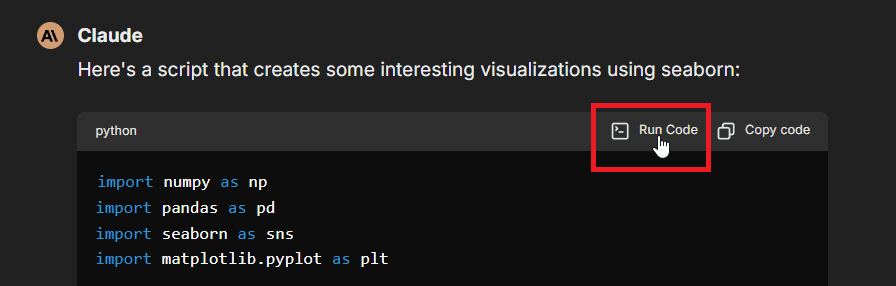
Manual Execution: Use the "Run Code" button in code blocks within the chat interface, as shown here:
-
Programmatic Tool Calling: Enable the
programmatic_toolscapability and mark selected MCP tools as Programmatic so agents can orchestrate those tools from sandboxed code. -
Background Tool Calls: Let an agent dispatch eligible code in the background and continue while it runs.
-
Stateful Code Sessions: Experimentally reuse a user-, agent-and-user-, or conversation-scoped workspace across an agent's code executions.
Set up API key
- Per-user setup: Input your API key in LibreChat when prompted.
- Global setup: Set
LIBRECHAT_CODE_API_KEYin LibreChat's.envto provide one key for all users.
The current ClickHouse/code-interpreter service uses LibreChat JWT authentication outside local mode. API keys remain available for compatible Code Interpreter deployments.
Self-hosted JWT authentication
With JWT authentication, LibreChat signs a short-lived bearer token for the authenticated user on each Code Interpreter request. The Code Interpreter service verifies the matching public key and uses the signed user and tenant context to isolate files and sessions. The private signing key stays in LibreChat; Code Interpreter receives only its public verifier.
Configure LibreChat with:
CODEAPI_AUTH_PROVIDER=librechat-jwt
CODEAPI_JWT_PRIVATE_KEY="-----BEGIN PRIVATE KEY-----\n...\n-----END PRIVATE KEY-----"
CODEAPI_JWT_ALGORITHM=EdDSA
CODEAPI_JWT_KID=lc-codeapi-2026-05
CODEAPI_JWT_ISSUER=librechat
CODEAPI_JWT_AUDIENCE=codeapi
CODEAPI_JWT_TTL_SECONDS=300
CODEAPI_JWT_MINT_CACHE_SECONDS=30
CODEAPI_JWT_SINGLE_TENANT_ID=legacy
CODEAPI_JWT_PRIVATE_KEY_BASE64 can hold a base64-encoded PEM instead, and CODEAPI_JWT_PRIVATE_JWK_JSON accepts a private JWK. LibreChat supports Ed25519 (EdDSA, the default) and RSA (RS256) signing. See the environment-variable reference for every LibreChat-side setting.
Configure Code Interpreter with the corresponding verifier:
LOCAL_MODE=false
CODEAPI_AUTH_PROVIDER=librechat-jwt
CODEAPI_JWT_ISSUER=librechat
CODEAPI_JWT_AUDIENCE=codeapi
CODEAPI_JWT_ALLOWED_ALGS=EdDSA
CODEAPI_JWT_JWKS_JSON={"keys":[{"kty":"OKP","crv":"Ed25519","x":"...","kid":"lc-codeapi-2026-05","alg":"EdDSA"}]}
CODEAPI_JWT_SINGLE_TENANT_ID=legacy
The issuer, audience, key ID, algorithm, and public key must match LibreChat's signer. Code Interpreter can also load verifier keys from CODEAPI_JWT_PUBLIC_KEY plus CODEAPI_JWT_KID, or from CODEAPI_JWT_PUBLIC_KEYS_DIR; an inline JWKS is convenient for rotation. Keep the token TTL at or below the Code Interpreter service's CODEAPI_JWT_MAX_TTL_SECONDS, which defaults to and is capped at 300 seconds.
For a local checkout, the Code Interpreter repository includes a helper that generates matching Ed25519 signing and execution-manifest keys and updates both .env files:
node scripts/setup-local-auth-env.js --librechat /path/to/LibreChatSingle-tenant deployments can leave CODEAPI_JWT_SINGLE_TENANT_ID=legacy, but the value must match on both services. Multi-tenant deployments should provide an authenticated tenant context and enable TENANT_ISOLATION_STRICT=true in LibreChat plus CODEAPI_TENANT_ISOLATION_STRICT=true in Code Interpreter. Strict mode rejects requests without tenant context instead of using the single-tenant fallback.
Direct API Integration
The current self-hosted service expects a bearer token that satisfies its LibreChat JWT claim contract. A direct integration must mint compatible short-lived tokens and send them in the Authorization: Bearer <token> header. API-key-compatible deployments instead accept their configured key in the x-api-key header. Never use Code Interpreter's authentication-free local mode on a public or production endpoint.
Self-hosted base URL
Set LIBRECHAT_CODE_BASEURL to point LibreChat at your self-hosted code-interpreter instance, then configure JWT authentication. For an API-key-compatible service, set LIBRECHAT_CODE_API_KEY instead. Highly experimental stateful Agent sessions require a separate stateful-profile route configured through LIBRECHAT_CODE_BASEURL_STATEFUL or named statefulCodeSessions.environments.
Core Functionality
Code Execution
- Run code snippets in supported languages
- Receive stdout/stderr output
- Get execution statistics (memory usage, CPU time)
- Handle program arguments
- Access execution status and results
File Operations
- Upload input files
- Download generated outputs
- Preview generated Office files, including PowerPoint
.pptxpresentations and.potxtemplates, plus CSV, text, and PDF-like artifacts inline when LibreChat can safely extract/render them - Display PNG, JPEG, GIF, and WebP images returned by an Agent's
read_filetool as viewable artifacts - List available files
- Delete unnecessary files
- Manage file sessions
Generated artifact previews are intentionally size-bounded. Set FILE_PREVIEW_MAX_EXTRACT_BYTES in LibreChat's .env to change the source-file size limit for inline preview extraction; larger files remain available for download.
Sandbox images returned through read_file have a 1 MiB inline limit. Larger images remain in the sandbox for processing with bash_tool. LIBRECHAT_CODE_IMAGE_CHUNK_BYTES controls only the transport chunk size used while reading eligible images; it does not raise the inline limit.
Upgrade check for legacy code outputs
Deployments that regenerated the same Code Interpreter filename before the unique output-file index was added may have duplicate MongoDB records that prevent the index from building. Preview the repair with npm run migrate:code-file-duplicates:dry-run, then apply it with npm run migrate:code-file-duplicates. The migration keeps the newest canonical filename, renames older records with numeric suffixes, and builds the unique index after a successful run.
Limitations
- Code cannot access the network
- Only 10 files can be generated per run
- Resource limits (RAM per execution, file upload size, and request quotas) depend on how you provision and configure your deployment
Use Cases
- Code Testing: Test code snippets in multiple languages
- File Processing: Transform and analyze files programmatically
- AI Applications: Execute AI-generated code securely
- Development Tools: Build interactive coding environments
- Objective Logic: Verify code logic and correctness, improving AI models
Open Source & Self-Hosting
The Code Interpreter service is open source under the Apache 2.0 license at ClickHouse/code-interpreter. Keeping code execution as a separate service keeps the core LibreChat application lightweight: you only deploy the sandbox infrastructure when you need it, and you can scale it independently of the chat app.
The service runs as a set of independently scalable components (an API gateway, sandboxed workers, and a file server) and supports strong isolation modes (NsJail or a microVM via libkrun) so you can run untrusted code safely. See the repository's README for Docker Compose and Helm deployment instructions.
Conclusion
The Code Interpreter API provides a secure, convenient way to execute code and manage files in an isolated sandbox. Whether you're using it through LibreChat's Agents or integrating it directly into your applications, it offers a robust solution for code execution needs.
For detailed technical specifications, deployment guides, and the API reference, see the code-interpreter repository.
How is this guide?