 LibreChat
API de Interpretador de Código
Execute código de forma segura e gerencie arquivos perfeitamente com a Code Interpreter API do LibreChat
Introdução
A API de Code Interpreter do LibreChat oferece uma maneira segura e descomplicada de executar código e gerenciar arquivos por meio de uma interface de API simples. Esteja você usando-a através dos Agents do LibreChat ou integrando-a diretamente em suas aplicações, a API oferece um ambiente de sandbox poderoso para executar código em várias linguagens de programação.
Código aberto
O Code Interpreter do LibreChat é alimentado pelo ClickHouse/code-interpreter, um serviço de execução de código em sandbox de código aberto (Apache 2.0). Hospede-o você mesmo e aponte o LibreChat para a sua própria instância.
Primeiros Passos
- Implante o serviço code-interpreter (Docker Compose ou Helm, consulte o README do repositório)
- Aponte o LibreChat para ele com as variáveis de ambiente
LIBRECHAT_CODE_BASEURLeLIBRECHAT_CODE_API_KEY - Comece a executar código e gerar arquivos de forma segura através dos Agents do LibreChat ou do botão "Run Code"
Principais Recursos
Idiomas Suportados
Execute código em várias linguagens de programação:
- Python, Node.js (JS/TS), Go, C/C++, Java, PHP, Rust, Fortran, Rscript
Manipulação de Arquivos Integrada
- Fazer upload de arquivos para processamento
- Baixar saídas geradas
- Gerenciamento seguro de arquivos
- Organização de arquivos baseada em sessão
Segurança e Conveniência
- Ambiente de execução seguro em sandbox
- Modos de isolamento forte (NsJail ou microVM via libkrun)
- Nenhuma configuração local necessária para usuários finais
- Armazenamento de arquivos isolado, baseado em sessão
Programmatic Tool Calling
O Programmatic Tool Calling permite que os Agents do LibreChat roteiem ferramentas MCP selecionadas através do sandbox do Code Interpreter. Em vez de solicitar que o modelo chame cada ferramenta diretamente, o LibreChat fornece uma ferramenta de orquestração baseada no Code Interpreter; o código de sandbox gerado pode chamar stubs de ferramentas registrados, usar loops e condicionais, processar resultados intermediários e retornar uma resposta final.
O sandbox ainda não recebe acesso geral à rede. As chamadas de ferramentas são intermediadas pelo Code Interpreter Tool Call Server e pelo mapa de ferramentas registrado do LibreChat, portanto, apenas as ferramentas disponíveis para o agente podem ser chamadas.
Usando a API
No LibreChat
A API possui suporte de primeira classe no LibreChat através destes métodos principais:
-
AI Agents: Habilite o Code Interpreter na configuração do seu agente para permitir que ele execute código e processe arquivos automaticamente.
-
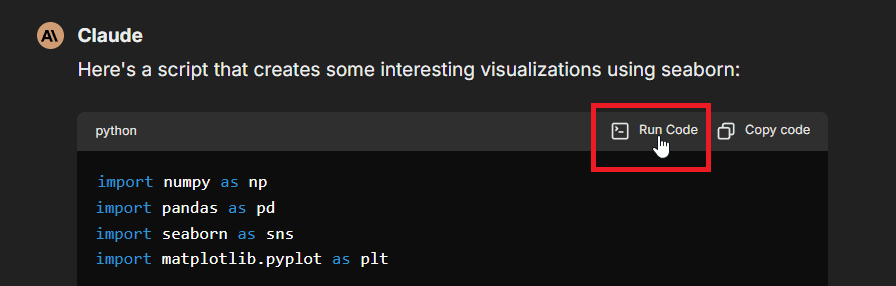
Execução Manual: Use o botão "Run Code" nos blocos de código dentro da interface de chat, como mostrado aqui:
-
Programmatic Tool Calling: Habilite a capacidade
programmatic_toolse marque ferramentas MCP selecionadas como Programmatic para que os agentes possam orquestrar essas ferramentas a partir de código em sandbox.
Configurar chave de API
- Configuração por usuário: insira sua chave de API no LibreChat quando solicitado (usando os métodos acima)
- Configuração global: use a variável de ambiente
LIBRECHAT_CODE_API_KEYno arquivo .env do seu projeto (fornece acesso a todos os usuários)
Integração Direta de API
A API do Code Interpreter pode ser integrada a qualquer aplicação usando uma autenticação simples por chave de API:
- Implante sua própria instância do code-interpreter e crie uma chave de API
- Inclua a chave de API em suas solicitações usando o cabeçalho
x-api-key
URL base auto-hospedada
Defina a variável de ambiente LIBRECHAT_CODE_BASEURL para apontar o LibreChat para sua instância auto-hospedada do code-interpreter, juntamente com uma chave de API gerada nessa implantação, usada da mesma forma que acima.
Funcionalidades Principais
Execução de Código
- Execute trechos de código em linguagens suportadas
- Receber saída stdout/stderr
- Obter estatísticas de execução (uso de memória, tempo de CPU)
- Manipular argumentos do programa
- Acesse o status de execução e os resultados
Operações de Arquivo
- Fazer upload de arquivos de entrada
- Baixar saídas geradas
- Visualize artefatos de Office, CSV, texto e similares a PDF gerados inline quando o LibreChat puder extraí-los/renderizá-los com segurança
- Listar arquivos disponíveis
- Excluir arquivos desnecessários
- Gerenciar sessões de arquivos
As visualizações de artefatos gerados são intencionalmente limitadas em tamanho. Defina FILE_PREVIEW_MAX_EXTRACT_BYTES no .env do LibreChat para alterar o limite de tamanho do arquivo de origem para extração de visualização em linha; arquivos maiores permanecem disponíveis para download.
Limitações
- O código não pode acessar a rede
- Apenas 10 arquivos podem ser gerados por execução
- Os limites de recursos (RAM por execução, tamanho de upload de arquivo e cotas de solicitação) dependem de como você provisiona e configura sua implantação.
Casos de uso
- Teste de Código: Teste trechos de código em vários idiomas
- Processamento de Arquivos: Transforme e analise arquivos programaticamente
- Aplicações de IA: Execute código gerado por IA de forma segura
- Ferramentas de Desenvolvimento: Crie ambientes de programação interativos
- Lógica de Objetivo: Verificar a lógica e a correção do código, aprimorando modelos de IA
Open Source & Self-Hosting
O serviço de Code Interpreter é de código aberto sob a licença Apache 2.0 em ClickHouse/code-interpreter. Manter a execução de código como um serviço separado mantém a aplicação principal do LibreChat leve: você só implanta a infraestrutura de sandbox quando precisa dela, e pode escalá-la independentemente do aplicativo de chat.
O serviço é executado como um conjunto de componentes escaláveis de forma independente (um gateway de API, workers em sandbox e um servidor de arquivos) e oferece suporte a modos de isolamento robustos (NsJail ou uma microVM via libkrun) para que você possa executar código não confiável com segurança. Consulte o README do repositório para obter instruções de implantação com Docker Compose e Helm.
Conclusão
A API do Code Interpreter oferece uma maneira segura e conveniente de executar código e gerenciar arquivos em um sandbox isolado. Esteja você usando-a através dos Agents do LibreChat ou integrando-a diretamente em suas aplicações, ela oferece uma solução robusta para necessidades de execução de código.
Para especificações técnicas detalhadas, guias de implantação e a referência da API, consulte o code-interpreter repository.
#LibreChat #CodeExecution #API #Development
Como está este guia?