 LibreChat
Konfiguration der Websuche
Die webSearch-Konfiguration ermöglicht es Ihnen, die Websuchfunktion innerhalb von LibreChat anzupassen, einschließlich Suchanbietern, Content-Scrapern und Ergebnis-Rerankern.
Übersicht
Die Websuchfunktion besteht aus drei Hauptkomponenten:
- Suchanbieter: Dienste, die die anfängliche Websuche durchführen
- Scrapers: Dienste, die Inhalte von Webseiten extrahieren
- Rerankers: Dienste, die Suchergebnisse für eine bessere Relevanz neu sortieren
Beispiel
webSearch:
  # Search Provider Configuration
  serperApiKey: "${SERPER_API_KEY}"
  searxngInstanceUrl: "${SEARXNG_INSTANCE_URL}"
  searxngApiKey: "${SEARXNG_API_KEY}"
  searchProvider: "serper" # Options: "serper", "searxng", "tavily"

  # Tavily Configuration (search and/or scraper)
  tavilyApiKey: "${TAVILY_API_KEY}"
  # Optional: custom Tavily-compatible endpoints
  tavilySearchUrl: "${TAVILY_SEARCH_URL}"
  tavilyExtractUrl: "${TAVILY_EXTRACT_URL}"

  # Scraper Configuration
  firecrawlApiKey: "${FIRECRAWL_API_KEY}"
  firecrawlApiUrl: "${FIRECRAWL_API_URL}"
  firecrawlVersion: "${FIRECRAWL_VERSION}"
  scraperProvider: "firecrawl" # Options: "firecrawl", "serper", "tavily"

  # Reranker Configuration
  jinaApiKey: "${JINA_API_KEY}"
  jinaApiUrl: "${JINA_API_URL}"
  cohereApiKey: "${COHERE_API_KEY}"
  rerankerType: "jina" # Options: "jina", "cohere", "none"

  # General Settings
  scraperTimeout: 7500 # Timeout in milliseconds for scraper requests (default: 7500)
  safeSearch: 1 # Options: 0 (OFF), 1 (MODERATE - default), 2 (STRICT)
Suchanbieter
searchProvider
| Key | Type | Description | Example |
|---|---|---|---|
| searchProvider | String | Gibt an, welcher Suchanbieter verwendet werden soll. | Options: "serper", "searxng", "tavily" |
serperApiKey
| Key | Type | Description | Example |
|---|---|---|---|
| serperApiKey | String | Umgebungsvariablenname für den Serper API-Schlüssel. Falls dieser nicht in der .env gesetzt ist, werden Benutzer aufgefordert, ihn über die UI einzugeben. | ${SERPER_API_KEY} |
Hinweis: Holen Sie sich Ihren API-Schlüssel von Serper.dev
searxngInstanceUrl
| Key | Type | Description | Example |
|---|---|---|---|
| searxngInstanceUrl | String | Umgebungsvariablenname für die SearXNG-Instanz-URL. Wenn dieser nicht in der .env gesetzt ist, werden Benutzer aufgefordert, ihn über die UI anzugeben. | ${SEARXNG_INSTANCE_URL} |
searxngApiKey
| Key | Type | Description | Example |
|---|---|---|---|
| searxngApiKey | String | Umgebungsvariablenname für den SearXNG API-Schlüssel. Falls nicht in der .env gesetzt, werden Benutzer aufgefordert, diesen über die UI einzugeben. | ${SEARXNG_API_KEY} |
Hinweis: Dies ist optional und nur erforderlich, wenn Ihre SearXNG-Instanz eine Authentifizierung erfordert.
tavilyApiKey
| Key | Type | Description | Example |
|---|---|---|---|
| tavilyApiKey | String | Umgebungsvariablenname für den Tavily API-Schlüssel. Wird sowohl für die Suche als auch für den Scraper verwendet. Falls nicht in der .env gesetzt, werden Benutzer aufgefordert, diesen über die UI einzugeben. | ${TAVILY_API_KEY} |
Hinweis: Holen Sie sich Ihren API-Schlüssel von Tavily
tavilySearchUrl
| Key | Type | Description | Example |
|---|---|---|---|
| tavilySearchUrl | String | Umgebungsvariablenname für eine benutzerdefinierte Tavily Search API-URL. Optional; standardmäßig wird die von Tavily gehostete Suche verwendet, wenn keine Angabe erfolgt. | ${TAVILY_SEARCH_URL} |
tavilyExtractUrl
| Key | Type | Description | Example |
|---|---|---|---|
| tavilyExtractUrl | String | Umgebungsvariablenname für eine benutzerdefinierte Tavily Extract API-URL. Optional; standardmäßig wird das von Tavily gehostete Extract verwendet, wenn keine Angabe erfolgt. | ${TAVILY_EXTRACT_URL} |
tavilySearchOptions
| Key | Type | Description | Example |
|---|---|---|---|
| tavilySearchOptions | Object | Konfigurationsoptionen für die Tavily-Suche. |
Untergeordnete Schlüssel:
| Key | Type | Description | Example |
|---|---|---|---|
| searchDepth | String | Steuert das Verhältnis zwischen Relevanz und Latenz. "basic" gibt eine NLP-Zusammenfassung pro URL zurück. "advanced" gibt mehrere semantisch relevante Snippets pro URL zurück (2 API-Credits). "fast" gleicht Geschwindigkeit und Relevanz mit Snippets aus. "ultra-fast" minimiert die Latenz mit einer NLP-Zusammenfassung. | Options: "basic", "advanced", "fast", "ultra-fast". Default: "basic" |
| maxResults | Number | Die maximale Anzahl der zurückzugebenden Suchergebnisse. | Range: 1-20. Default: 5 |
| topic | String | Die Kategorie der Suche. "news" ist nützlich für Echtzeit-Updates. "finance" für Finanzdaten. | Options: "general", "news", "finance". Default: "general" |
| includeImages | Boolean | Bilder in die Antwort einbeziehen. Gibt sowohl Bilder der obersten Abfrage als auch Bilder pro Ergebnis zurück. | Default: false |
| includeAnswer | Boolean or String | Füge eine LLM-generierte Antwort hinzu. "basic" oder true für eine schnelle Antwort, "advanced" für eine detaillierte Antwort. | Default: false |
| includeRawContent | Boolean or String | Inklusive bereinigtem und geparstem HTML-Inhalt. „markdown“ oder true für das Markdown-Format, „text“ für reinen Text. | Default: false |
| includeDomains | Array of Strings | Suche auf bestimmte Domains beschränken. Maximal 300 Domains. | |
| excludeDomains | Array of Strings | Bestimmte Domains von den Ergebnissen ausschließen. Maximal 150 Domains. | |
| timeRange | String | Zeitbereichsfilter basierend auf dem Veröffentlichungs- oder letzten Aktualisierungsdatum. | Options: "day", "week", "month", "year" |
| includeImageDescriptions | Boolean | Wenn includeImages auf true gesetzt ist, fügen Sie zusätzlich einen beschreibenden Text für jedes Bild hinzu. | Default: false |
| includeFavicon | Boolean | Füge die Favicon-URL für jedes Suchergebnis hinzu. | Default: false |
| chunksPerSource | Number | Maximale Anzahl relevanter Inhaltsabschnitte pro Quelle. Nur verfügbar, wenn searchDepth auf "advanced" gesetzt ist. | Range: 1-3. Default: 3 |
| safeSearch | Boolean | Optionale Tavily safe_search-Überschreibung für Tavily Search-Anfragen. Standardmäßig weggelassen; true erfordert möglicherweise Tavily Enterprise. | Default: omitted |
| timeout | Number | Clientseitiges HTTP-Anfrage-Timeout in Millisekunden. Steuert, wie lange auf eine Antwort der Tavily API gewartet wird, bevor der Vorgang abgebrochen wird. | Default: 15000 |
Scraper
firecrawlApiKey
| Key | Type | Description | Example |
|---|---|---|---|
| firecrawlApiKey | String | Umgebungsvariablenname für den Firecrawl API-Schlüssel. Wenn dieser nicht in der .env gesetzt ist, werden Benutzer aufgefordert, ihn über die UI einzugeben. | ${FIRECRAWL_API_KEY} |
Hinweis: Holen Sie sich Ihren API-Schlüssel von Firecrawl.dev
firecrawlApiUrl
| Key | Type | Description | Example |
|---|---|---|---|
| firecrawlApiUrl | String | Umgebungsvariablenname für die Firecrawl API-URL. Wenn dieser nicht in der .env gesetzt ist, werden Benutzer aufgefordert, ihn über die UI anzugeben. | ${FIRECRAWL_API_URL} |
Hinweis: Dies ist optional und nur erforderlich, wenn Sie eine benutzerdefinierte Firecrawl-Instanz verwenden.
firecrawlVersion
| Key | Type | Description | Example |
|---|---|---|---|
| firecrawlVersion | String | Umgebungsvariablenname für die Firecrawl API-Version (v0 oder v1). | ${FIRECRAWL_VERSION} |
scraperProvider
| Key | Type | Description | Example |
|---|---|---|---|
| scraperProvider | String | Gibt an, welcher Scraper-Dienst verwendet werden soll. | Options: "firecrawl", "serper", "tavily" |
firecrawlOptions
| Key | Type | Description | Example |
|---|---|---|---|
| firecrawlOptions | Object | Erweiterte Konfigurationsoptionen für den Firecrawl-Scraper. |
Untergeordnete Schlüssel:
formats
| Key | Type | Description | Example |
|---|---|---|---|
| formats | Array of Strings | Formate, die in die Ausgabe aufgenommen werden sollen. |
includeTags
| Key | Type | Description | Example |
|---|---|---|---|
| includeTags | Array of Strings | Tags, die in die Ausgabe aufgenommen werden sollen. |
excludeTags
| Key | Type | Description | Example |
|---|---|---|---|
| excludeTags | Array of Strings | Tags, die von der Ausgabe ausgeschlossen werden sollen. |
headers
| Key | Type | Description | Example |
|---|---|---|---|
| headers | Object | Header, die mit der Anfrage gesendet werden sollen. Können verwendet werden, um Cookies, User-Agent usw. zu senden. |
waitFor
| Key | Type | Description | Example |
|---|---|---|---|
| waitFor | Number | Geben Sie eine Verzögerung in Millisekunden an, bevor der Inhalt abgerufen wird, damit die Seite ausreichend Zeit zum Laden hat. |
timeout
| Key | Type | Description | Example |
|---|---|---|---|
| timeout | Integer | Timeout in Millisekunden für die Scraping-Anfrage. Muss eine nicht-negative Ganzzahl sein. | Default: 7500 |
maxAge
| Key | Type | Description | Example |
|---|---|---|---|
| maxAge | Number | Gibt eine zwischengespeicherte Version der Seite zurück, wenn diese jünger als dieser Wert in Millisekunden ist. Wenn eine zwischengespeicherte Version der Seite älter als dieser Wert ist, wird die Seite neu abgerufen. |
Hinweis: Wenn Sie keine extrem aktuellen Daten benötigen, kann die Aktivierung dieser Option Ihre Scrapes um 500 % beschleunigen.
mobile
| Key | Type | Description | Example |
|---|---|---|---|
| mobile | Boolean | Emulieren des Scrapings von einem Mobilgerät. |
skipTlsVerification
| Key | Type | Description | Example |
|---|---|---|---|
| skipTlsVerification | Boolean | Überspringen der TLS-Zertifikatsüberprüfung bei Anfragen. |
blockAds
| Key | Type | Description | Example |
|---|---|---|---|
| blockAds | Boolean | Aktiviert Werbeblocker und das Blockieren von Cookie-Popups. |
removeBase64Images
| Key | Type | Description | Example |
|---|---|---|---|
| removeBase64Images | Boolean | Entfernt alle Base64-Bilder aus der Ausgabe, die extrem lang sein können. Der Alt-Text des Bildes bleibt in der Ausgabe erhalten, aber die URL wird durch einen Platzhalter ersetzt. |
parsePDF
| Key | Type | Description | Example |
|---|---|---|---|
| parsePDF | Boolean | Steuert, wie PDF-Dateien während des Scrapings verarbeitet werden. |
storeInCache
| Key | Type | Description | Example |
|---|---|---|---|
| storeInCache | Boolean | Wenn auf true gesetzt, wird die Seite im Firecrawl-Index und Cache gespeichert. Dies auf false zu setzen ist nützlich, wenn Ihre Scraping-Aktivitäten Datenschutzbedenken aufwerfen könnten. Die Verwendung einiger Parameter, die mit sensiblem Scraping verbunden sind (Header), erzwingt, dass dieser Parameter auf false gesetzt wird. |
zeroDataRetention
| Key | Type | Description | Example |
|---|---|---|---|
| zeroDataRetention | Boolean | Wenn auf true gesetzt, wird die Null-Datenaufbewahrung für diesen Scrape aktiviert (erfordert eine vorherige Einrichtung bei Firecrawl). |
location
| Key | Type | Description | Example |
|---|---|---|---|
| location | Object | Geografischer Standort und Spracheinstellungen für das Scraping. |
onlyMainContent
| Key | Type | Description | Example |
|---|---|---|---|
| onlyMainContent | Boolean | Geben Sie nur den Hauptinhalt der Seite zurück, ohne Header, Navigation, Footer usw. |
changeTrackingOptions
| Key | Type | Description | Example |
|---|---|---|---|
| changeTrackingOptions | Object | Konfiguration zur Nachverfolgung von Änderungen in gescrapten Inhalten. |
Beispiel:
webSearch:
  firecrawlApiKey: "${FIRECRAWL_API_KEY}"
  firecrawlOptions:
    formats: ["markdown", "rawHtml"]
    includeTags: ["main", "article", ".content"]
    excludeTags: ["nav", "footer", ".ads"]
    waitFor: 2000
    timeout: 10000
    mobile: false
    blockAds: true
    onlyMainContent: true
    location:
      country: "US"
      languages: ["en"]
Hinweis: Detaillierte Informationen zu den Optionen und Standardeinstellungen des Firecrawl-Scrapers finden Sie in der Firecrawl API Documentation.
tavilyScraperOptions
| Key | Type | Description | Example |
|---|---|---|---|
| tavilyScraperOptions | Object | Konfigurationsoptionen für Tavily Extract (Scraper). |
Untergeordnete Schlüssel:
| Key | Type | Description | Example |
|---|---|---|---|
| extractDepth | String | Die Tiefe des Extraktionsprozesses. "advanced" ruft mehr Daten ab, einschließlich Tabellen und eingebetteter Inhalte mit höherer Erfolgsquote, kann jedoch die Latenz erhöhen. "basic" kostet 1 Credit pro 5 erfolgreiche URLs, "advanced" kostet 2 Credits pro 5 erfolgreiche URLs. | Options: "basic", "advanced". Default: "basic" |
| includeImages | Boolean | Fügen Sie eine Liste der aus den URLs extrahierten Bilder in die Antwort ein. | Default: false |
| includeFavicon | Boolean | Füge die Favicon-URL für jedes extrahierte Ergebnis hinzu. | Default: false |
| format | String | Das Format des extrahierten Webseiteninhalts. "markdown" gibt den Inhalt im Markdown-Format zurück. "text" gibt reinen Text zurück und kann die Latenz erhöhen. | Options: "markdown", "text". Default: "markdown" |
| timeout | Number | Timeout in Millisekunden. Steuert das clientseitige HTTP-Timeout. Wenn festgelegt, wird zudem ein serverseitiges Extraktions-Timeout an Tavily gesendet, das in Sekunden umgerechnet und auf einen Bereich von 1-60s begrenzt wird. | Default: 15000 for basic, 30000 for advanced |
Beispiel:
webSearch:
  searchProvider: tavily
  scraperProvider: tavily
  tavilyApiKey: "${TAVILY_API_KEY}"
  # Optional: custom Tavily-compatible endpoints
  # tavilySearchUrl: "${TAVILY_SEARCH_URL}"
  # tavilyExtractUrl: "${TAVILY_EXTRACT_URL}"
  tavilySearchOptions:
    searchDepth: basic
    maxResults: 5
    topic: general
  tavilyScraperOptions:
    extractDepth: basic
Hinweis: Detaillierte Informationen zu den Optionen der Tavily API finden Sie in der Tavily API Documentation.
Rerankers
jinaApiKey
| Key | Type | Description | Example |
|---|---|---|---|
| jinaApiKey | String | Umgebungsvariablenname für den Jina API-Schlüssel. Falls dieser nicht in der .env gesetzt ist, werden Benutzer aufgefordert, ihn über die UI einzugeben. | ${JINA_API_KEY} |
Hinweis: Holen Sie sich Ihren API-Schlüssel von Jina.ai
jinaApiUrl
| Key | Type | Description | Example |
|---|---|---|---|
| jinaApiUrl | String | Umgebungsvariablenname für die Jina API-URL. Falls nicht in der .env gesetzt, werden Benutzer aufgefordert, diese über die UI anzugeben. | ${JINA_API_URL} |
Hinweis: Dies ist optional und nur erforderlich, wenn Sie eine benutzerdefinierte Jina-Instanz verwenden.
cohereApiKey
| Key | Type | Description | Example |
|---|---|---|---|
| cohereApiKey | String | Umgebungsvariablenname für den Cohere API-Schlüssel. Wenn dieser nicht in der .env gesetzt ist, werden Benutzer aufgefordert, ihn über die UI einzugeben. | ${COHERE_API_KEY} |
Hinweis: Holen Sie sich Ihren API-Schlüssel vom Cohere Dashboard
rerankerType
| Key | Type | Description | Example |
|---|---|---|---|
| rerankerType | String | Gibt an, welcher Reranker-Dienst verwendet werden soll. Auf "none" setzen, um das Reranking zu überspringen. | Options: "jina", "cohere", "none" |
Allgemeine Einstellungen
scraperTimeout
| Key | Type | Description | Example |
|---|---|---|---|
| scraperTimeout | Integer | Timeout in Millisekunden für Scraper-Anfragen. Muss eine nicht-negative Ganzzahl sein. | Default: 7500 |
safeSearch
| Key | Type | Description | Example |
|---|---|---|---|
| safeSearch | Number | Sicherheitsfilter-Stufe für die Suche. 0 = AUS (keine Filterung), 1 = MODERAT (Standard), 2 = STRENG (maximale Filterung). | Default: 1 (MODERATE) |
Hinweis: Die Stufen der sicheren Suche (Safe Search) entsprechen den gängigen Konventionen der Such-API. Die Filterung MODERATE ist standardmäßig aktiviert, um eine angemessene Inhaltsfilterung bei gleichzeitiger Aufrechterhaltung der Sucheffektivität zu gewährleisten. Tavily übernimmt diese globale Einstellung standardmäßig nicht; verwenden Sie tavilySearchOptions.safeSearch nur, wenn Ihr Tavily-Konto safe_search unterstützt.
Hinweise
- API-Schlüssel können auf zwei Arten konfiguriert werden:
- Legen Sie die in der YAML-Konfiguration angegebenen Umgebungsvariablen fest
- Wenn Umgebungsvariablen nicht gesetzt sind, werden Benutzer dazu aufgefordert, die API-Schlüssel über die UI einzugeben.
- Die Konfiguration unterstützt mehrere Dienste für jede Komponente (Anbieter, Scraper, Reranker)
- Wenn kein spezifischer Diensttyp angegeben ist, versucht das System, alle verfügbaren Dienste in dieser Kategorie zu verwenden.
- Safe Search bietet drei Stufen der Inhaltsfilterung: OFF (0), MODERATE (1) und STRICT (2)
- Tavily übernimmt standardmäßig nicht die globale Einstellung für die sichere Suche (Safe Search); setzen Sie
tavilySearchOptions.safeSearchnur dann explizit, wenn Ihr Tavily-Kontosafe_searchunterstützt. - Geben Sie niemals echte API-Schlüssel in die YAML-Konfiguration ein – verwenden Sie nur die Namen der Umgebungsvariablen.
Einrichten von SearXNG
SearXNG ist eine datenschutzorientierte Metasuchmaschine, die Sie selbst hosten können. Weitere Informationen finden Sie in der offiziellen SearXNG-Dokumentation.
Hier sind die Schritte zur Einrichtung Ihrer eigenen SearXNG-Instanz zur Verwendung mit LibreChat:
Verwendung von Docker Desktop
-
Suche nach dem offiziellen SearXNG-Image
- Öffnen Sie Docker Desktop
- Suchen Sie nach
searxng/searxngim Tab Images - Klicken Sie auf Run beim offiziellen Image, um automatisch einen Container des Images herunterzuladen und auszuführen.
-
Ausführen des Containers
- Erweitern Sie das Dropdown-Menü Optional Settings im darauf folgenden Bereich, der erscheint, sobald der Download abgeschlossen ist.
- Legen Sie Ihre gewünschten Konfigurationsdetails fest (Portnummer, Container-Name usw.)
- Klicken Sie auf Run, um den Container zu starten
-
Konfiguration von SearXNG für LibreChat
- Navigieren Sie zum Tab
Filesin Docker Desktop - Gehe zu
/etc/searxng/settings.yaml - Öffnen Sie den Datei-Editor
- Navigieren Sie zum Abschnitt
formats - Fügen Sie
jsonals akzeptables Format hinzu, damit LibreChat mit Ihrer Instanz kommunizieren kann. - Speichere die Datei
- Navigieren Sie zum Tab
-
Starten Sie den Container neu
- Starten Sie den Container neu, damit die Änderungen wirksam werden.
Video-Anleitung:
Hier ist ein Video, das Sie in etwa einer Minute von Anfang bis Ende durch den Prozess führt:
Hinweis: In diesem Beispiel lautet die Instanz-URL http://localhost:55011 (die Portnummer befindet sich oben links unter dem Containernamen am Ende des Videos)
Konfiguration von LibreChat zur Verwendung von SearXNG
Sie können SearXNG in LibreChat innerhalb der Benutzeroberfläche oder über librechat.yaml konfigurieren.
UI-Konfiguration
-
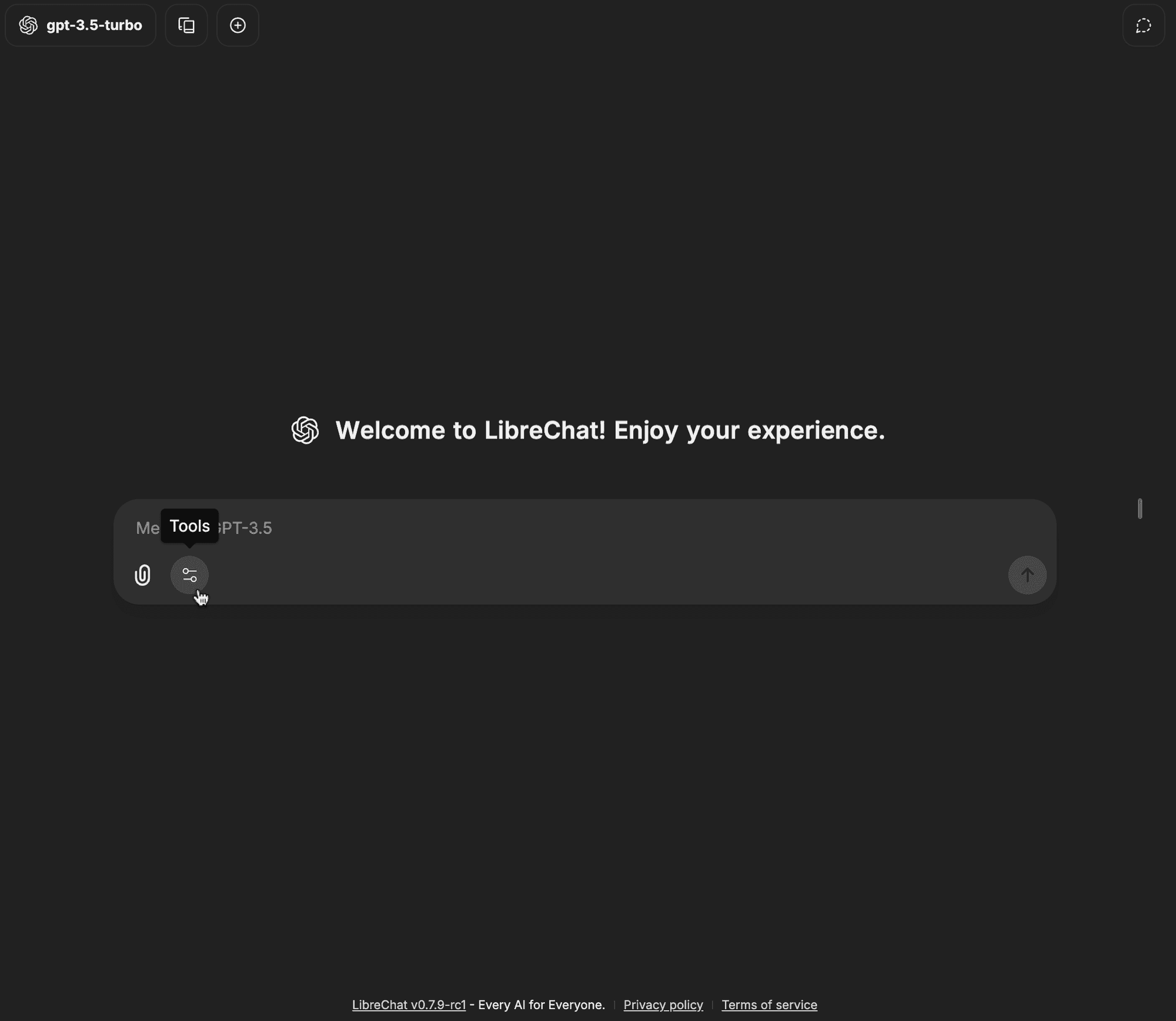
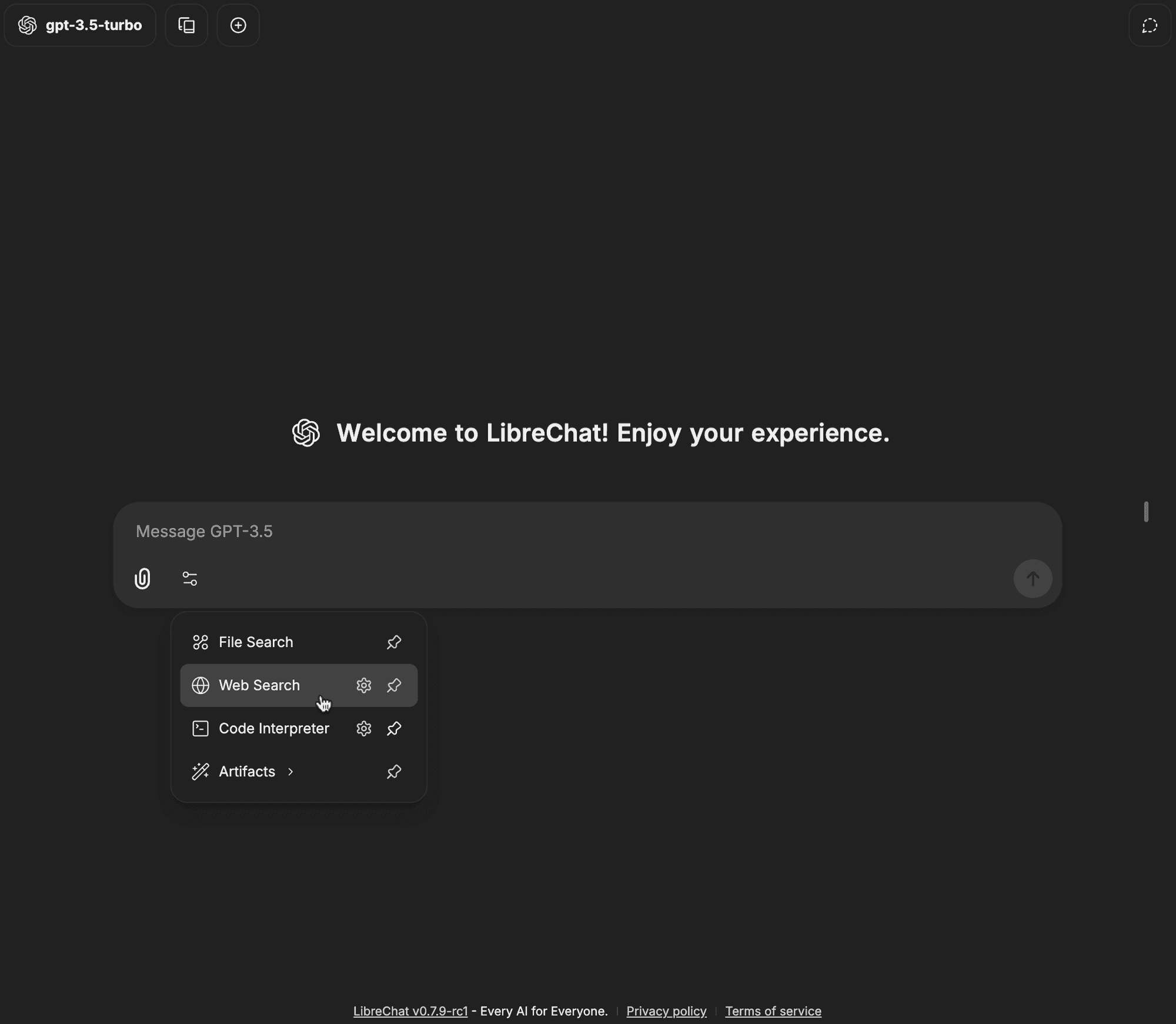
Öffnen Sie das Tools-Dropdown-Menü in der Chat-Eingabeleiste
-
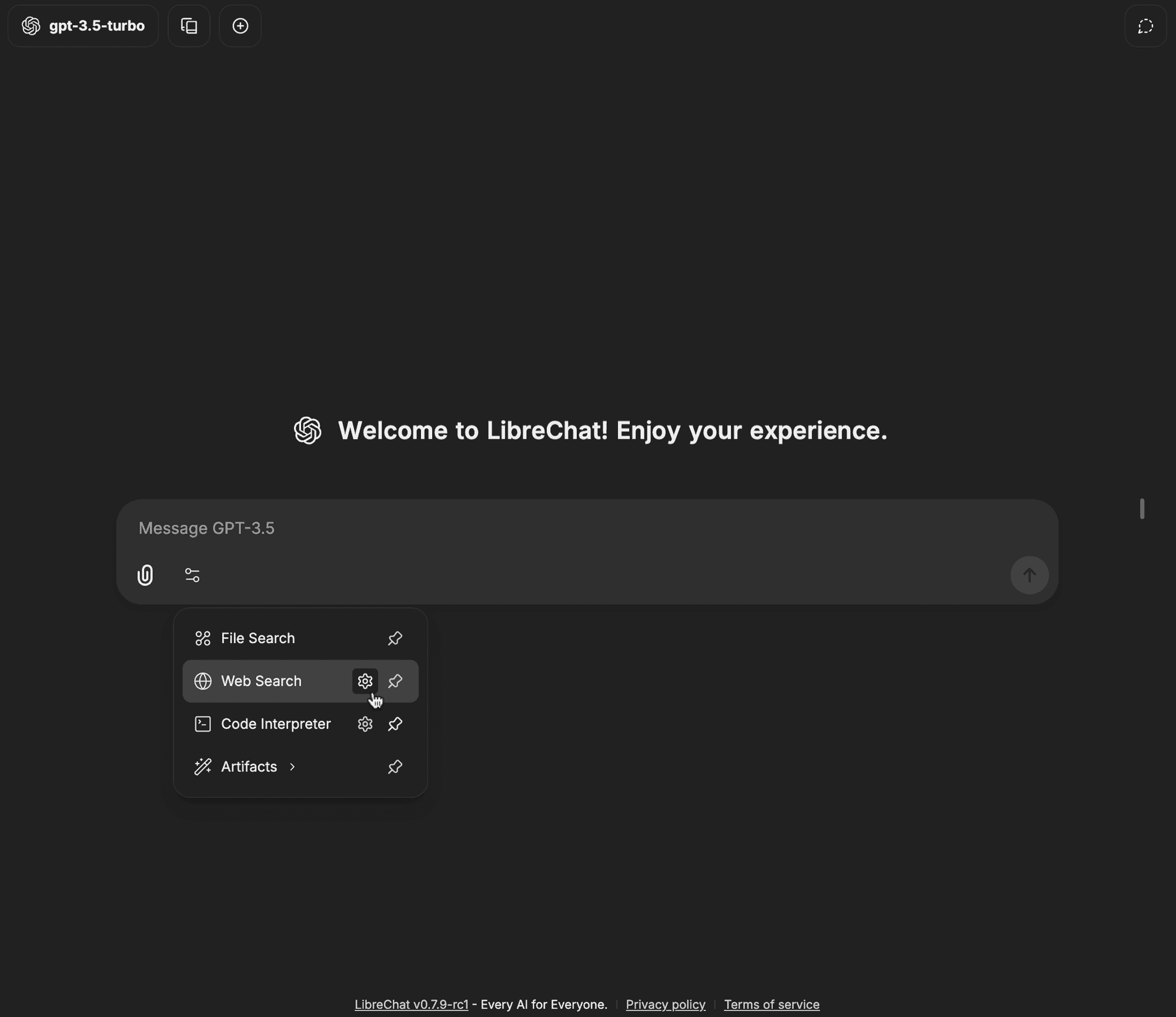
Klicken Sie auf das Zahnradsymbol neben Web Search
-
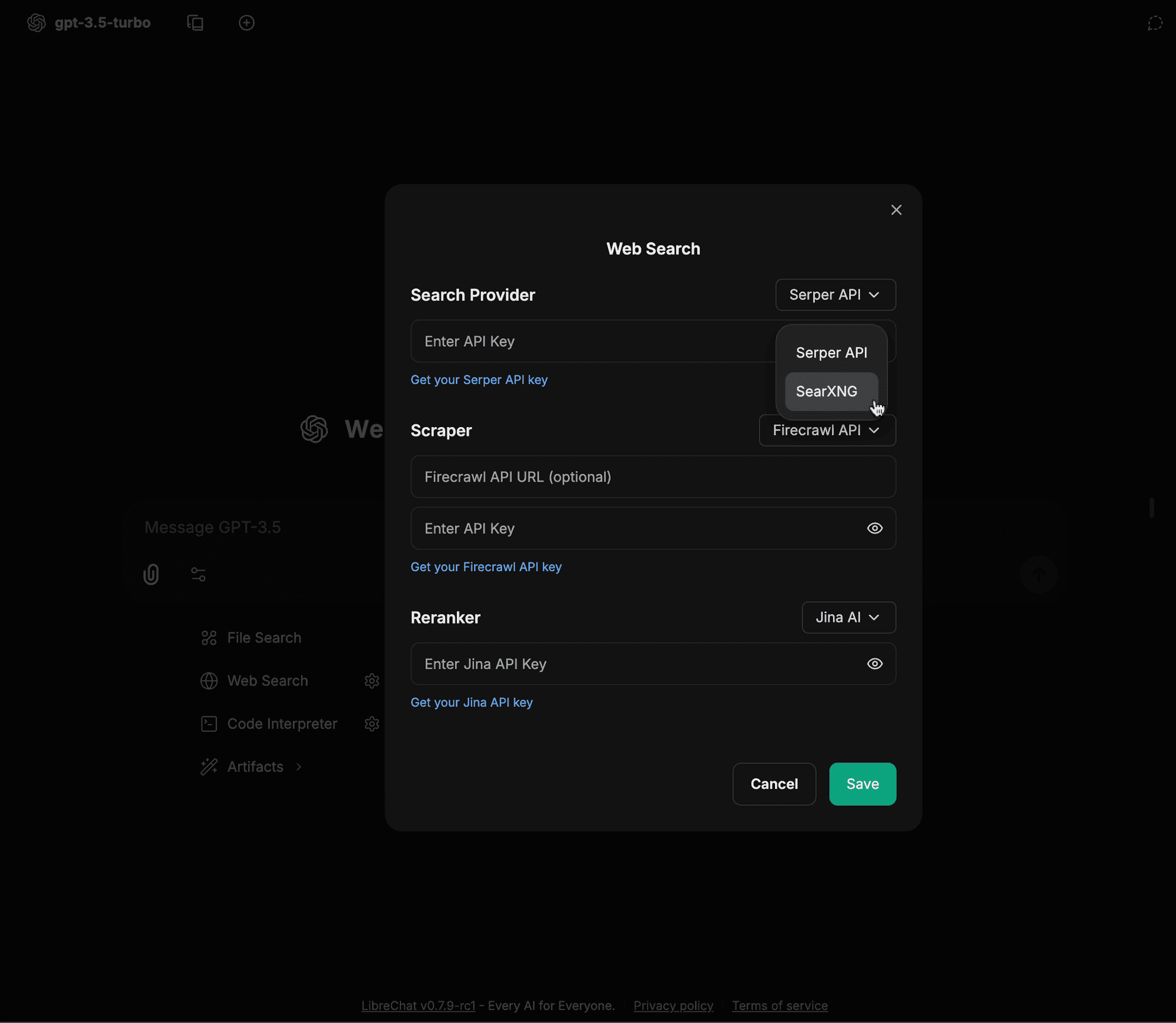
Wählen Sie SearXNG aus dem Dropdown-Menü für Suchanbieter
-
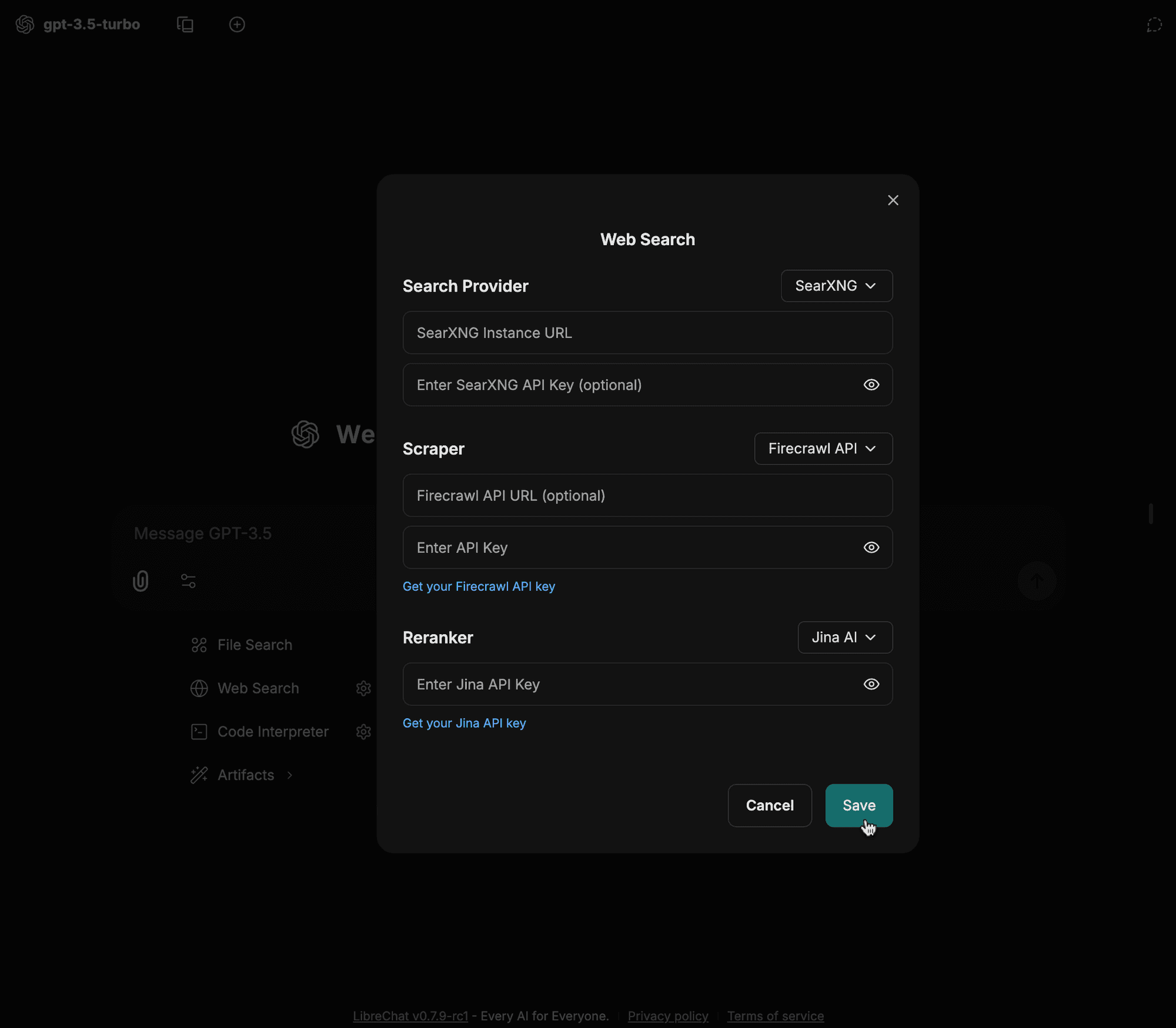
Geben Sie Ihre Konfigurationsdetails ein (z. B. Instanz-URL, Scraper-Typ usw.) und klicken Sie auf Speichern
-
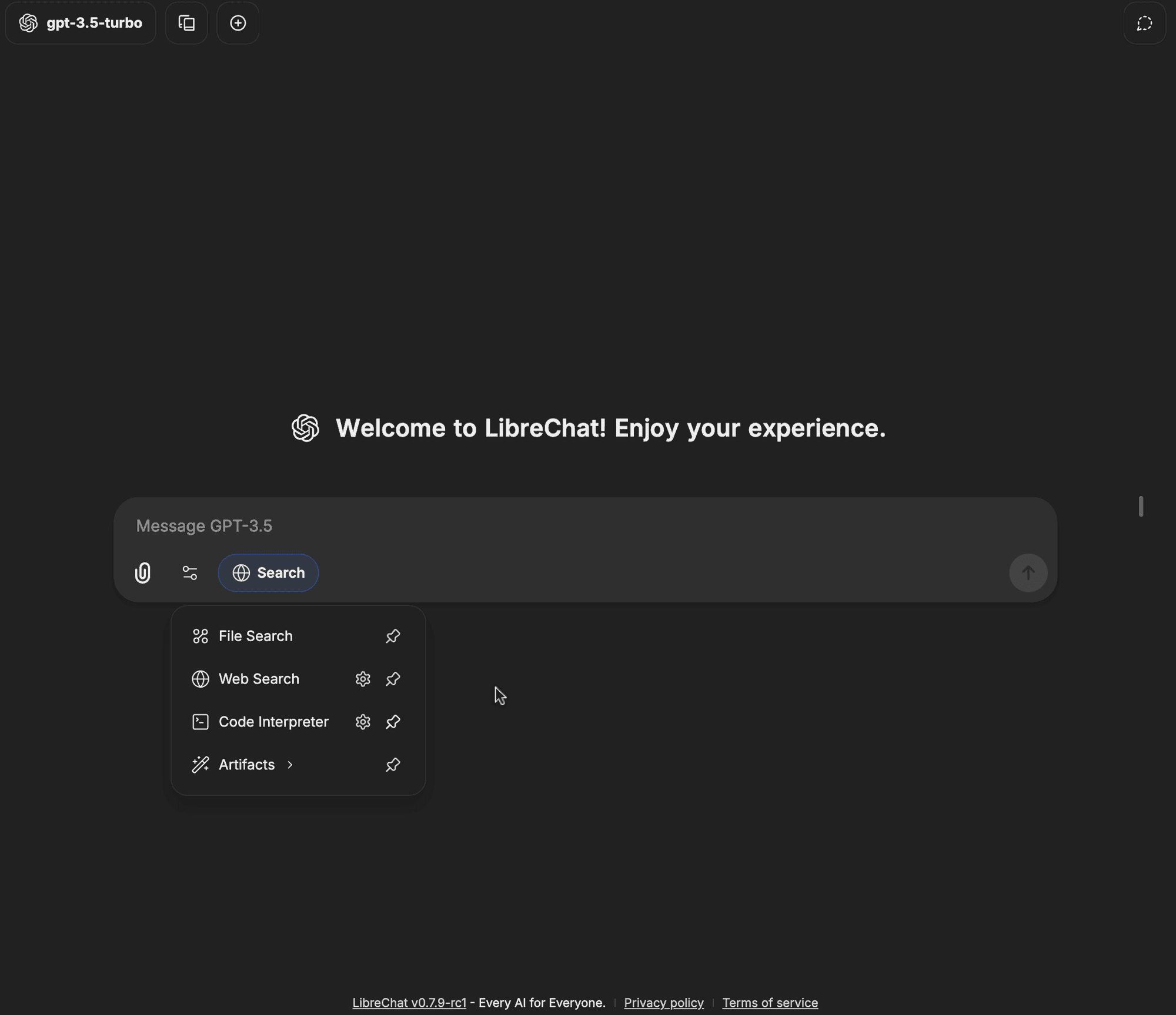
Klicken Sie auf die Option Web Search im Dropdown-Menü für Tools
-
Das Web-Search-Badge sollte nun aktiviert sein, was bedeutet, dass Ihre Anfragen jetzt die Websuchfunktion nutzen können.
Wie finden Sie diese Anleitung?